































Ask questions about Front features, getting started on Front, or how to use the community.
Recently active
Hi all!I’ve noticed that, when I reply to a new message in a Front thread, it clears any draft I currently had (i.e, if a new response comes in while I am drafting an email). Is there a way to undo when a draft is cleared or a way for this to not happen at all?Thanks!
It’s a pivotal moment for the customer service industry. Don’t miss our on-demand recordings from Frontlines, where we discuss the evolving customer support landscape and unveil game-changing new Front features. Plus, support leaders share their tips for creating a customer-first culture, company-wide. 📍 Check out the replay here AGENDAKEYNOTEBuilding a customer-first support strategy in the age of AIAI is evening the CX playing field, enabling companies of all sizes to better support their customers. However, best-in-class businesses use these tools for more than deflection—they’re gaining a deeper understanding of their customers. See how to leverage AI to grow your business faster and gain insights into what customers really want. PRODUCT SPOTLIGHTNew capabilities for exceptional service at scaleOur latest launches and upcoming releases will help your team deliver your best customer experience yet. From enhanced support workflows to practical AI for end-to-end assistance, tune in t
Deliverability means ensuring your emails reach recipients' inboxes—both internal and external—without being marked as spam or bouncing. It’s key for effective communication, making sure important messages get through. Email servers have systems to filter out spam and let legitimate emails through. Since most of Front’s customers use email as one of their communication channels, we created a course to help you improve your email delivery to make sure your messages reach your audience as planned and to maintain your email reputation so that your emails are less likely to be marked as spam by recipients. 👉 Take the course here: Optimizing email deliverability for Front
Exceptional customer service is a key differentiator in today’s market, especially in high-value-transaction industries like travel management or reputation-sensitive industries like healthcare. At Front, we're committed to transparency and excellence, consistently striving to surpass industry standards with our support team's performance. To share some of the knowledge we’ve gained along the way, we've gathered insights from top technology leaders on building world-class support organizations that drive business growth through outstanding service. This guide will help you build a world-class support function by evaluating your teams, tools, processes, and mindset. You'll learn how to:Understand and measure CSAT 🧠 Identify key areas for improvement 🔎 Enhance your team, tools, and processes for better CSAT 👨💻 Utilize AI to boost CSAT 🤖 Foster a company-wide culture focused on CSAT ✔️📌 Check out our guide here
We’re all about delivering top-tier customer service, and we’ve taken it a step further by making our core metrics public. Our support team doesn’t just meet industry standards—they exceed them in response time, reply rate, CSAT, and more. By sharing these metrics, we hope to lead with transparency and help to set a higher standard for the industry. And yes, we achieve these results thanks to Front. 📌 Check out our live Support Report page as we continue to push the boundaries of what great customer service looks like.
In case you missed it, here’s a recap of all the exciting new features from the last few months 🚢 Subscribe to product updates and announcements so you don’t miss a thing! 🇫🇷 Front Chat now supports FrenchFront Chat (including AI Answers) is now available in French 🇫🇷You can set a chat widget to be in French in your chat settings and all text will be automatically translated into French. With this update, chatbots now also support French so the full experience will be consistent. Additionally, the French version of AI Answers is now in open beta. AI Answers instantly resolves chat inquiries with responses written by AI, sourced from your knowledge base. This lets your team save time on simple issues and deliver faster resolutions to customers.Learn more about Front Chat and AI Answers. 📚 Power suggested replies with an internal knowledge baseYou can now select an internal Front knowledge base as the source for suggested replies. With suggested replies, your team can:Let AI craft
So we integrated Front chatbot to our website and we want to be able to do the following things:export conversations we received from this inbox per week identify topics that is most talked about, better to have this highlighted in a report What would be the best work around to make this happen.
I just recently started creating Macros for my team and one thing that we noticed is that when we respond to our customers using the macro function (using one of our templates) it does not use a signature. Is there any way that when replying using the macros that it defaults to the user signature? Example below: We would like to see our company signature after “Thank you for your patience”
What is the single best Front tool you use for effectively managing shared inboxes?
Our company is a long time Front user but we are now hiring a Sales Team and trying to Integrate Pipedrive. We’re trying to figure out the best way to get our contacts into Pipedrive with the least amount of manual entering. Any suggestions or tips on how to do this most effectively?
Hello,As you have put a restriction in number of rules, I tried to create set of rules to reduce the unique rules.Formatting options are available for unique rule as you can see below, but are not available for rule sets. I cannot organize properly auto comments in rule sets. Line break is not possible and all information are completely mixed.Unique rule: Rule set: How can I arrange that? Have you planned any correction?Best,Benjamin
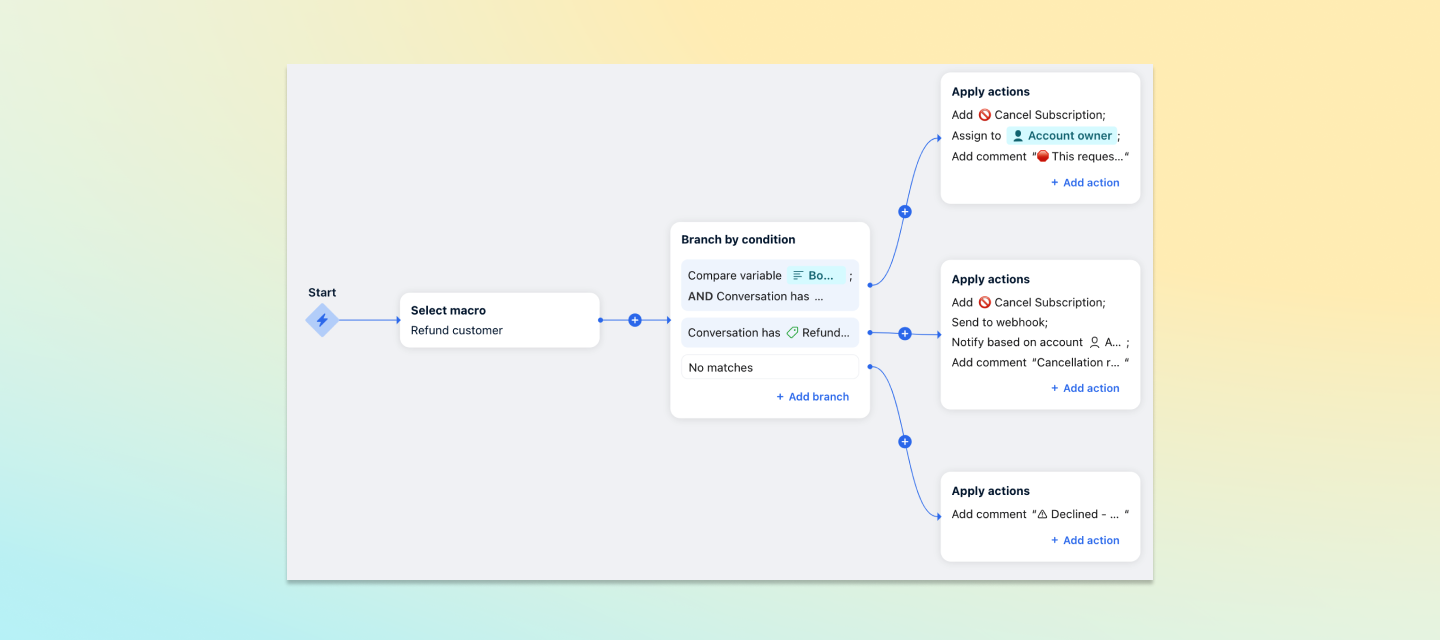
With macros, your team can perform several actions at once with the click of a button. The options for codifying your business logic are endless: macros are completely customizable to your needs. From handoffs to escalations to updating other systems (coming soon!), macros make it easy to ensure processes are followed and issues are resolved in a flash. If you want to know more, here’s your opportunity! We have our macros Product Manager, Fred Bidot, here to answer all your questions about macros and how they can accelerate your response times, speed up your workflows, and reduce onboarding and training time for agents. If you haven’t had a chance to see it yet, here’s a look at how macros work: Check out these additional guides to help you get set up: Course: Accelerate your workflows with macros Article: Use macros to accelerate your workflows Article: Macros best practicesFred will personally answer your questions on Monday, August 19 – and we’ll ensure any questions thereafter co
Hello, Some of our associates prefer having their monitor set up vertically for the monitor they have email open on. In Outlook, you can change the reading pane to be on the bottom instead of the right, making it easier to read. Is there any way to change the orientation of things in Front?
What are the benefits of using Dialpad with Front? I’m mostly looking for a feature we can enable for SMS messages, but am interested in learning other possibilities. Is there an article I can read more about this?
We’ve launched two brand-new courses designed to help your team make a smooth and successful transition from Gmail or Outlook to Front: 1️⃣ Transitioning from Gmail to Front2️⃣ Transitioning from Outlook to Front What you'll learn:Understanding cutover: Get a clear understanding of what a cutover is and how it impacts your transition. Preparation steps: Learn how to properly prepare your Gmail/Outlook accounts and associated groups to ensure a flawless move. Launch with confidence: Equip your team with the knowledge and tools to make the switch with ease.These courses are designed to set your team up for success, minimizing disruptions and ensuring a seamless transition to Front. Ready to get started? Dive into the courses now and take the first step toward a more efficient and collaborative workspace with Front! We can’t wait to see you excel with Front! 🚀
We recently launched a new feature to help you track all the conversations happening in real-time. Keep your team in sync with the new Live Dashboard, offering real-time insights into open conversation queues to ensure quick responses, improve efficiency, and provide support when needed. With the Live Dashboard, you can:Monitor key metrics instantly: Track open and unassigned conversations by inbox, helping your team manage workload effectively. Spot and resolve bottlenecks: Detect slowdowns as they happen and allocate resources where they're most needed. Assess team performance: See how conversations are distributed among team members to identify those who may need extra training or support.This feature is now accessible to all company and workspace admins on the latest Growth plan or higher. Head over to Analytics to explore it! Learn more in this article. Additionally, we’ve updated your Analytics sidebar for easier navigation. You’ll now land on the new Workload report, which conso
Hello, We are currently having a downtime and need to send the same message to everyone who has contacted us. Is there a way to send a bulk message in Front?
I’m trying to get a support team to follow the best practice of “if it’s a new query, move it to a new conversation”. However, when they do this, a reply time SLA is not triggered, which I would expect to happen as a new message has been received, and a new conversation created (manually). Is this a gap in functionality or an error? Thanks!
Hello everyone, I am a bit confused by the pricing of WhatsApp. The comparative table states that WhatsApp is available on all plans with third-party integration (I understand this refers to Twilio). However, there are no comparisons showing how to have the Front version. Only at checkout I find out I need the growth plan and additionally to buy 70 USD worth of credits. Are these credits on top of 1000 monthly free credits that WhatsApp provides ? Thank you for your time.George
Hello everyone, Is it possible to receive and send voice messages in the Front App on mobile when using the WhatsApp channel ? Thank you. George
Hello,I’ve noticed that the “compose with AI” spelling and grammar tool offered in Front is very inconsistent. It generally catches spelling errors, but the grammar and punctuation check leaves a lot to be desired. When it isn’t functioning, sometimes it will work if you highlight the content and then do the spell check. Though, sometimes even this trick doesn’t work.With Grammarly no longer supporting Front integration, is there any advice out there? My work solely relies on the app and not web browsers for their emails. It would be awesome if Front were working to improve this.
Hi, new to Front. :) @mentioning teammates in conversations seems to be one of the best ways to communicate with other Front users in your team but how do you best communicate with teammates in your company from other departments who are not Front users?
Hi Everyone, I have just started using a chatbot and I am loving it but I am stuck on one part. I want to authorise a user based on their email address they submit. I have created an Open Ended Question “To see if you qualify for support, please enter your email address?” once they enter i cannot see how using ‘Branch by visitor data’ or ‘Branch by keywords’ how to take this input, check if the user already exists.I mistakenly tried to use ‘Collect contact details’ first but realised that this actually creates the contacts.If anyone has any ideas about this or smarter ways of doing authentication against contacts then i would love to hear your ideas.Keep up the good work, the chatbot will be a gamechanger for us and allow us to move away from email support.Chris
Make self-service your customer’s most loved form of support.Join us with customer experience experts, Maxime Manseau (Birdie), Susana de Sousa (Ex-Loom, Airbnb), Nisha Baxi (Gong), and Kenji Hayward (Front) to learn how to transform your self-service support into delightful experiences. In this webinar, you’ll learn: How to create personalized, valuable experiences that lead customers to success How to scale support through self-service channels and streamline for faster resolutions How to measure the performance of your self-serve resources
Is it possible to implement a “time to first response” SLA that only looks at the time between the first message and the subsequent reply? Use case: Implement a Time to First Response SLA which measures the time from the very first message received in a conversation, to the very first reply sent. I’ve tried implementing the rule with a “when” condition of “doesn’t have tag ‘First Reply Sent’”, which is added by another rule when the first reply is sent. However, this seems to do weird things with reporting, as the analytics can see that an SLA breach tag is added when the SLA is breached, then removed when the reply is sent, but seems to think that the SLA no longer applies because the First Reply Sent tag has been added, so it doesn’t show the conversation in the “SLA breaches” stats. Note that it does show the conversation in the “SLA breach time (avg)” stat, which is a little confusing If there’s another way to implement this, please let me know!
Already have an account? Login
No account yet? Create an account
Enter your E-mail address. We'll send you an e-mail with instructions to reset your password.