




























Ask questions about Front features, getting started on Front, or how to use the community.
Recently active
What are some of the best tips’ and tricks for users moving from traditional outlook?
Hi there, so I have enabled the Intercom channel to manage Intercom chats on Front.Independently, we have an API from our data source to Front and have created all of our contacts and accounts, however, when a chat is created, the contact is not linked to the existing contacts. Do I need to set up some kind of rule?I would have expected Front to authenticate the contact with what is already existing… Can I get some guidance on how to make it happen?Thank you
Hello! I’ve been having issues using the code block feature when creating an article in the knowledge base. Is there a specific formatting type that I need to use? I have a standard iframe code.
Hi there, I wonder if there is any way to bulk upload tags from a csv? I havent been able to find anything related to it in the help centerThanks for letting me know, Alex
We’re excited to announce a powerful and highly-requested new enhancement to Front’s Knowledge Base: login controls. Now, you can require customers or partners to log in to access your content, giving you greater control over who sees your resources.Key benefits of this feature:🔒 Enhanced security: Restrict access to your knowledge base with login requirements. 🔗 Seamless authentication: Use an external identity provider via OpenID Connect for easy and secure access. ⚙️ Customizable access: Manage visibility settings with admin permissions tailored to your needs.Take control of your knowledge base today and share the right content with the right people.💡 Learn more about this update and how to enable it here.
Customer support roles are evolving, and your top performers deserve a framework that recognizes their contributions beyond the queue. That’s why we’ve created Developing Support Talent: A Rubric for Career Development Beyond the Queue. This resource helps managers empower their teams and align unique talents with meaningful opportunities.Here’s what you’ll get:A practical rubric to track growth: Balance metrics for queue performance and strategic projects, ensuring all contributions are recognized. Retention-boosting strategies: Help your team thrive with clear pathways for growth, including leadership, mentorship, and cross-functional projects. Tips for fostering autonomy: Empower team members to take charge of their development while aligning with company goals. A focus on impact: Go beyond tasks to measure the real outcomes of off-queue initiatives like mentorship and OKR ownership. Customizable framework: Adapt our six building blocks for a senior support rubric to fit your team’s
When customers receive my emails a text is displayed under my signature “Sent from Front”. Is there an option to remove it?
Every so often, we like to host an AMA (Ask Me Anything) session in Front Community, which brings in one of our Product Managers or leaders to answer all your questions about a certain feature. In case you missed the AMA post last wek, we’re talking about one of our newest and most powerful features: macros. They allow you to kick off multi-step automations so that all your processes stay consistent and streamlined, reducing room for error and increasing your productivity. Head on over to our macros AMA to see a video and ask your questions! 📍 Macros AMA: Create shortcuts to automate multi-step processes
We have discovered an issue with creating/using auto replies as Front will not run rules or auto replies if in the header there is code saying auto reply. We did not pick up on this problem till the current holidays occurred and then as we dug into it discovered this occurs whenever we are out of office as per our settings. Some emails do come in and they receive the auto reply as intended but it turns out many have buried code in the header that disables the auto reply. How if possible are others dealing with this issue and is there a solution or work around?The "x-auto-response-suppress": "DR, OOF, AutoReply" is placed in the email header by the sending mail server specifically to prevent auto replies from being sent in reply to their messages.
Hi All,we have integrated our business whatsapp (not through) Twilo and I was wondering how can I initiate an our going conversation? Thanks, Ido
We've just released a comprehensive guide to help you break down silos and boost collaboration across departments to deliver the best support for your customers. Here are some key takeaways: Engineering collaboration: Learn how integrating support teams with engineering can lead to proactive problem-solving and a more cohesive product development process. Marketing synergy: Discover strategies for aligning support and marketing efforts to ensure consistent messaging and a unified customer experience. Product development partnership: Understand the importance of involving support teams in product development to provide valuable customer insights and enhance product usability. Operational efficiency: Find out how cross-functional partnerships can streamline operations, leading to increased efficiency and business growth. 👉 Dive deeper into these strategies and more in our full blog post: From silo to powerhouse: how nurturing cross-functional partnerships can amplify support’s imp
2024 was a year of incredible innovation and impact for Front customers, who collectively accomplished:📬 394M messages sent🤖 3B AI & automation actions completed⏳ 14M hours saved for teams Our customers proved that exceptional service isn’t about AI replacing agents—it’s about AI empowering them. 💪Here’s what we delivered to make it happen:100+ new features, including Ticketing, AI Answers, and Suggested Replies. Faster resolutions, smarter workflows, and tools to delight your customers. Time saved with AI and automation, helping teams scale support with ease. Looking ahead to 2025:📊 AI going beyond routine tasks to provide deeper insights.⏱️ Even faster, more personalized customer service.🤝 AI as your team’s partner, not a replacement.💡 Ready to see the full recap of how we’re building for AI-powered, customer-first support? Plus, a sneak peek of what’s next in 2025? Check out Front Rewind 2024 here. What was your biggest win this year? Let us know! 🚀
Hi, Is there a way to show accounts pinned on your sidebar without making a tag?
How can I find out how many e-mails have been processed by my team? Note that an e-mail can contain several replies, so how can I find out how many e-mails have been processed by each member of team?
I just had to change my password on my gmail account. When I have done this on other gmail accounts, Front has presented me an option to reconnect. I don’t know if this is because it is my primary account email, or due the issues Front is currently having with gmail, or just a change to the UI, but I cannot find a way to reconnect. When I try to add my calendar, it tells me it is already connected but unable to show events. Anyone quickly know the way to reconnect with a new password? I also tried logging out and logging back in, restarting my computer, checked for updates, quit front and opened it again.
At our annual signature event, Frontlines, we hosted an industry panel of CX leaders about how they built customer-first organizations. Front’s own Head of Support, @Kenji Hayward, moderated the conversation. Kenji and I started at Front around the same time (he was my manager for many years, actually) — so I know firsthand the wealth of experience and knowledge he has. And so, as an extension of his panel that he hosted, I wanted to ensure we get him in front of our community to talk in-depth about how he built the strong company-wide support culture here at Front, including:The early days of the support team at Front Mistakes made when trying to involve more of the company in providing customer support How a support program was successfully formalized and embedded into the company Listen to our interview below: Shoutout to @PhoebeatFront @Cori @evano @jason @Luke @jessye @haley @sadie_mcdaniel @MaggieL for making appearances in the stories we shared and laughed about 😄 If you enjoye
Does Front Academy have a sandbox in which I can try the activities from the courses? I don’t have admin access yet for my organization but am working towards my certification in preparation for that, so a test environment would be very helpful.
Hi. I’m trying the new company rule but create rule button doesn’t work. Otherwise I can create for the Share rule page and making the enable the rule. Just doesn’work the company rule. I thinked my licence not enough the new company rule. Thanks for returns :)
Hey guys.I tried to set up AI sentiment tags for my workspace today but ran into a problem: Each tag required "10 approved messages." I have not been able to find out how to approve said messages, and I was curious to know if anyone could help.
Throughout the learning path I have seen a few ways to oversee my employees in their work, but I am looking for the most hands-free way to just have a quick oversight without looking at the statistics. I have thought of automating tags for if there were to be an SLA breach or a churn risk etc. that would be visible in my views tab, but I am wondering if there is an easier way to do this?
Hey there!My team is currently creating a knowledge base in trainual.com. I was wondering if anyone could share some insight on how I could import this knowledge base into Front.com without just doing it manually.
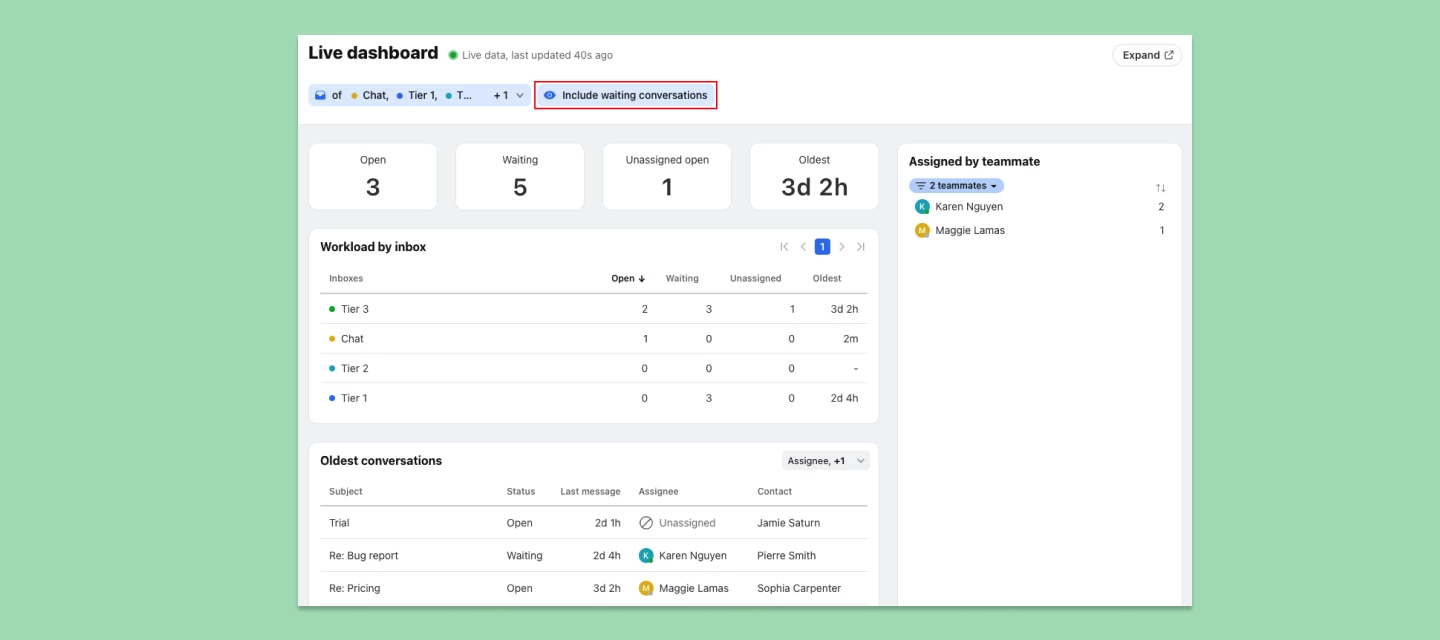
🎟️ Access ticket resolution metrics in the workflow reportYour favorite performance metrics, such as resolution time and replies to resolution, now work with ticketing statuses. These metrics were previously only available if you had a conversation stage rule, but now both types of resolutions (stage and ticketing) are accounted for. Learn more about each resolution metric at the links below: Resolved conversations Unresolved conversations Resolution time Replies to resolution Resolved on first replyNote: Conversation stages will be gradually replaced by ticketing statuses—learn more here. ⏰ See waiting and snoozed conversations in the Live dashboardThe Live Dashboard now includes “waiting” and “snoozed” conversations in addition to “open” ones, giving support managers a full view of all conversations by status. Learn more. 🔗 New integration: SyndicoSyndico is a co-pilot for your property management business, enabling you to receive, analyze, and respond to requests, all while conn
Whether you’re seeking to optimize your team's workflow or master your own daily operations in Front, our live office hours are here to guide you to success, accessible on Front Community’s Events page! You’ll find the upcoming schedule of all our office hours there, so come hang out as often as you’d like. 🤓 What are office hours?Our Weekly Live Office Hours are interactive sessions where Front experts are available to provide real-time assistance, share best practices, and answer any questions you might have. This is an excellent opportunity for users of all levels to enhance their skills and leverage Front's capabilities to the fullest! 💬 Who should join?These sessions are open to all Front users. Whether you’re an admin configuring advanced settings and integrations, or an end user looking to streamline your tasks, we’ll answer any Front questions you have. 📆 When and where?We host both US and EMEA sessions every week, so see our Events page for the schedule. 🚀 What can you e
Exciting news, Front Community! Front Academy has just launched two new courses to help you make the most of your upgraded plan. Whether you're exploring possibilities of these plans or diving into recently unlocked features, these courses are here to guide you every step of the way:✨ How to activate your Growth plan featuresLearn how to take full advantage of the standout features of Front’s Growth plan, such as enhanced analytics, AI-powered tools, advanced rules, and premium integrations. Unlock the potential to drive productivity and streamline workflows like never before.✨ How to activate your Scale plan featuresDiscover the top features unlocked with Front’s Scale plan, including advanced team controls, workspaces, and smart rules. This course will show you how to use these tools to optimize efficiency and seamlessly scale your operations.Ready to get started? Enroll in the above courses now and unlock the full potential of your Growth or Scale plan!
This may be a long complicated question but we are hoping for a simple answer. We have emails coming in that need to be escalated to a higher tier. We have a macro that performs the flow of tagging, moving and assigning which works correctly. We want to capture the analytics from the higher tier which the macro allows but we also want the source to retain access to only the original inbound email. The original email comes in to our team and they determine if it needs escalation and activate the macro. We would like the original email to be retained by the team should they need to reference it. At the higher tier there may be confidential material we do not want the team to access but so far all our efforts show the emails are connected and data is shared across them. So how do we allow one team to retain a source email only and not have access to the escalated email while using a macro?
Already have an account? Login
No account yet? Create an account
Enter your E-mail address. We'll send you an e-mail with instructions to reset your password.