
































Ask questions about Front features, getting started on Front, or how to use the community.
Recently active
Hi All,I was wondering if any of you are using the beta for the streamlined inbox experience and how you are finding it.My first thoughts on it was that it was a cleaner look, however after using it some more I can see that it may marginally increase the time worked on in emails.I have found the new look involves more mouse clicks to navigate to simple tasks such as tagging and searching. The ability to quick view linked Jira tasks now also involves clicking into objects.I know I can utilise keyboard shortcuts for a number of these workarounds, but I was wondering what you thoughts on the new look is and how you are navigating this.Regards
Looking for inspiration on we can utilise all the features within Front!
I was curious which analytics you all find most useful on Front and most intuitive?
Hello, I thought today was the day for the new In Box update and revamp of Front? Did I miss something? Harry
Hi All, I am wondering if it is at all possible to apply a rule template to an already created rule by modifying it. I have a large number of rules created from scratch and seeking to know if I can apply a specific rule template to it. I can see the conditions of the rule template but those options are not available to me in the rules that have been created by scratch.I know the simple solution would be to create a new rule but this is not available to us due to the amount of rules already generated, also deleting an existing rule and recreating is not available to us. Regards
My team and I are trying to find ways to use our AI answers exports to inform the needed updates to our knowledge base to then in turn improve our AI resolution rate and reduce the amount of emails coming into our team. I’m curious if any has found an effective way of doing this, whether it’s using Front’s offerings or supplementing with outside tools?Any thoughts or suggestions are appreciated!
Hi Everyone!I’m fairly new to Front currently exploring how to streamline our support team’s inbox during peak hours. We get flooded with customer queries and sometimes high-priority issues get buried.I’m planning to create a few rules that tag message based on keywords like “urgent”, “outage” or “payment failure” and then route those to a priority inbox.Has anyone implemented a similar triage system using Front rules and tags? I’d love to hear how you’ve approached escalation logic or how you’ve used custom SLA rules for this type of workflowThanks in advance for sharing your experience😇
Front has been helpful in keeping track of all work and is user-friendly.
Hi!Our team is thinking about using Front more intentionally for onboarding new hires.Has anyone set up Front-based workflows or resources (rules, tags, knowledge base, etc.) to help with onboarding or training? What worked well?
The Command + Shift + Number shortcuts to switch between different Front apps (Inbox, Calendar, Contacts, etc) clashes with the default Firefox shortcuts to switch between containers. Would it be possible to customise or remove these Front shortcuts, or to change them to another modifier by selecting one of the alternative Front shortcut sets?
In part one of this series, we showed that customers’ familiarity with AI impacts their beliefs and expectations of AI-powered customer service. Our study uncovered three customer personas:Adopters use AI daily Dabblers use AI weekly or monthly Traditionalists use AI less than monthly or never But here’s where it gets interesting: how do these personas play out in the real world across different industries? To find out, we surveyed 4,500 desk workers and segmented them by the types of tools or services they use the most often for work. The top four industries were software-as-a-service (SaaS), logistics, professional services, and financial services. We saw that the number of Adopters, Dabblers, and Traditionalists isn’t evenly distributed — each industry has its own mix, leading to wildly different expectations and support preferences. See the data broken down by industry and how that should inform your CX strategy: https://front.com/blog/ai-in-cx-industry-breakdown
In reviewing the team performance analytics, I noticed that the average Reply Time and First Reply Time are not displaying for a particular team. I'm unsure why this is happening. It could be related to how the team is handling responses (possibly archiving messages before replying), but I’m not certain. I’d appreciate any insight into what might be causing this.
We use the “Create Jira Issue” and “Create Jira Comment” automation actions to sync Front with Jira. Unfortunately, neither of these actions support rich text formatting. The issue description / comment body is sent to Jira as plain text, which means that hyperlinks are not automatically converted to clickable links.It would be helpful if both of these options supported some form of rich text formatting, such as Wiki Markup, Markdown, or HTML.As an example, this description in the automation action: Produces this result in Jira: Note that the links are not clickable, and none of the formatting is applied.
We'd like to save the files contained in an email to a folder on our company server or to a folder on my desktop. Unfortunately, the only option we've found is drag and drop.Is there a button to ‘Save as’ and choose the location where the file is downloaded ?Thank you for your help.
Temporary downgrade to Chromium 132 and Electron 34 while issues with Chromium 134 are being resolved.
Your customers aren’t a monolith, nor should your customer experience be. Our recent study of 4,500 desk workers revealed that your customers’ relationship with AI affects what they expect from your AI-powered customer service. We uncovered three personas, and they all want different things from AI: Daily AI users (Adopters): Recognize AI’s benefits, so expect more6X more likely than Traditionalists to agree that businesses using AI care more about their customer experiences Weekly/monthly users (Dabblers): On the fence and easy to lose70% wish AI could help without needing a human Rare/never users (Traditionalists): Skeptical yet still demand excellence3X more likely to avoid using AI-powered service (find out what channels they prefer instead) We break down exactly what each group wants and how to design experiences that work for all three. Check out the data: https://front.com/blog/state-of-service-expectations-ai-comfort-gap
We have created a rule which automatically assigns an email from a customer to a member of staff.However, this rule does not take into account back-ups in the event of an agent's absence. Is it possible to include a rule that modifies automatic assignments in the event of absence ?Thanks for your help !
My department works on Front but not the rest of my colleagues. We used to use ‘tags’ (like “@Name”) in Outlook to highlight emails to the colleagues concerned. Is it possible to tag in a Front Front and have it visible in Outlook for another user or client ?
We have a sales@ email address that comes to a shared inbox. When individual members of the team respond to the emails that come to that inbox, we want the “From” field to show ONLY sales@, not the individual’s name or email address as an ‘on the behalf of’. How do I set that up?
Hello,We have been experiencing issues in the past 15 hours company wide where email from Gmail accounts are not syncing for our users. Steps we have taken to try and fix this:Restarted the app Updated the app Reauthenticated with GmailWe are able to send from Front with no issues, so this appears to be a possible imap issue? We have made no changes to our configuration, so we are unsure how to fix this problem. I am not sure if others are experiencing this as well, or if this just limited to our accounts. The status page shows all things operational for Gmail and all other services.
Is there a way top duplicate rules and macros? It’s frustrating to create rules all over again and they are pretty similar.
Need Front to do even more? Front's Professional Service team can partner with you to scope, design, and build custom integrations, develop tailored applications, and implement novel functionality to unlock more value for your organization.Contact proserve@front.com to schedule a complementary consultation with our team.
AI headlines are loud, but what’s actually working inside top support teams? Smart operations. At companies like Airbnb and Shopify, AI isn’t replacing humans, it’s clearing the path for them. And the teams seeing real success aren’t the biggest. They’re the most scalable. At Front, we’ve doubled down on support operations: investing in knowledge management, automation, and roles like Support Ops Analyst and Developer. These aren’t back-office roles: they’re the force multipliers. As Kenji Hayward shares, scaling support today means building systems, not just adding headcount. 🔗 Read why smart support leaders are investing in leverage: https://www.linkedin.com/pulse/why-future-support-scale-size-kenji-hayward-z5qlc/
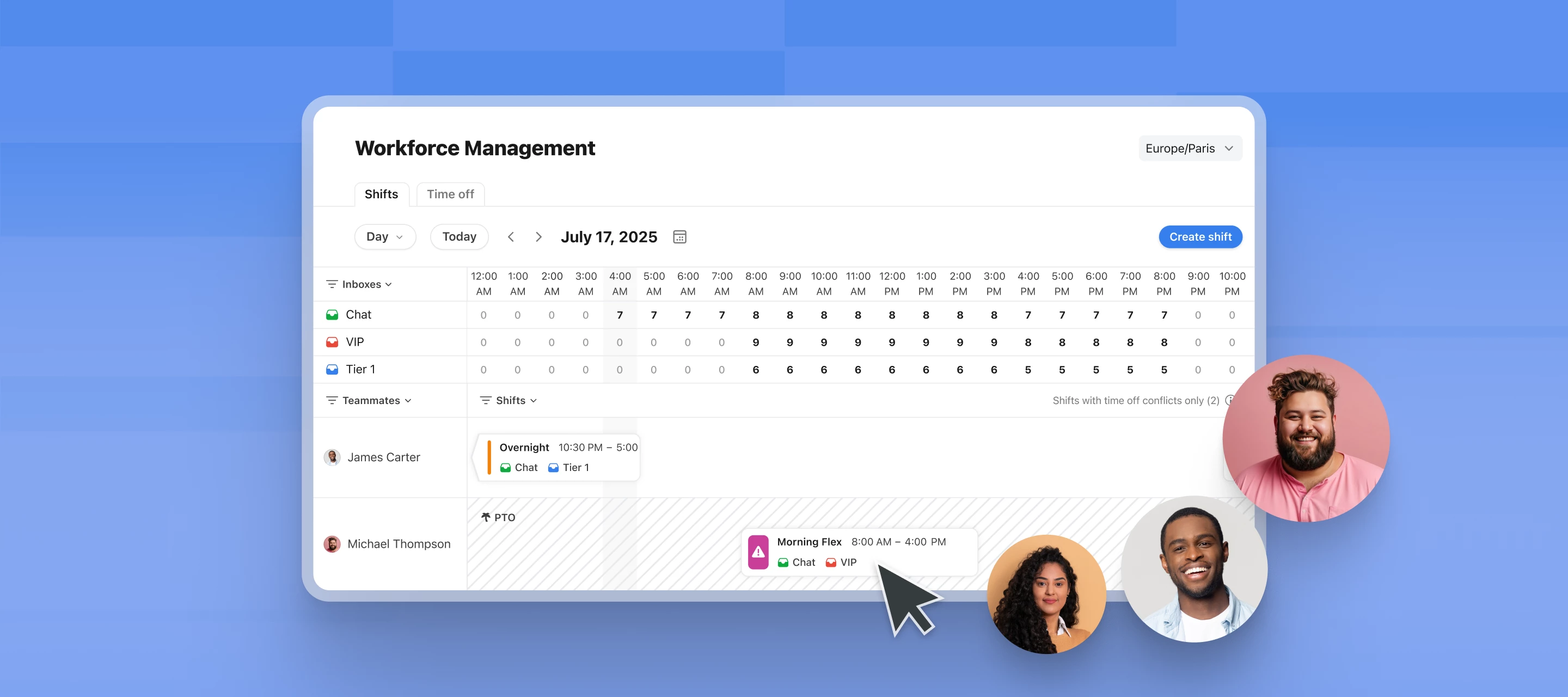
Today we’re introducing our latest features including a self-serve Help Center, new admin tools, and previewing Workforce Management to help support leaders scale support sacrificing service quality. Here’s what's new: An exclusive first look at Workforce Management: Customize shift plans, sync your Google Calendar events, and set minimum staffing requirements. With real-time staffing visibility and conversation auto-assignment, your team stays covered and ready to deliver great service, every time. Streamline self-serve support in the new Help Center hub: Enable your customer portal, Knowledge Base, Support Report, and chat widget in one flexible, easy-to-enable experience. Admin tools for managing at scale: From flexible ticket statuses per inbox to detailed audit logs, these updates give support leaders the control they need to scale without the chaos. 📍Sign up here to get on the beta waitlist for Workforce Management, and get more details on how each feature works on our blog.
Our team uses a knowledge base to answer common questions, but we still spend lots of time manually sharing links, especially in live chats during peak hours. For example: When customers ask about ‘international roaming,’ we paste the same guide repeatedly Questions about ‘data limits’ require digging through articles We’re exploring ways to automatically suggest relevant help articles when certain topics come up in chats or emails. Questions we have: How do you balance automated suggestions with personalized replies? Can we trigger articles based on factors like a customer’s plan type? What metrics best show if this actually reduces reply time?
Already have an account? Login
No account yet? Create an account
Enter your E-mail address. We'll send you an e-mail with instructions to reset your password.