

ngallis
Conversationalist
June 11, 2025
Solved

Auto-assign by Account (Back-up)

  • June 11, 2025
  • 1 reply
  • 202 views

We have created a rule which automatically assigns an email from a customer to a member of staff.

However, this rule does not take into account back-ups in the event of an agent's absence. Is it possible to include a rule that modifies automatic assignments in the event of absence ?

Thanks for your help ! 
    Best answer by cat_apac

    Hi there! Cat here from the Front support team 🌻

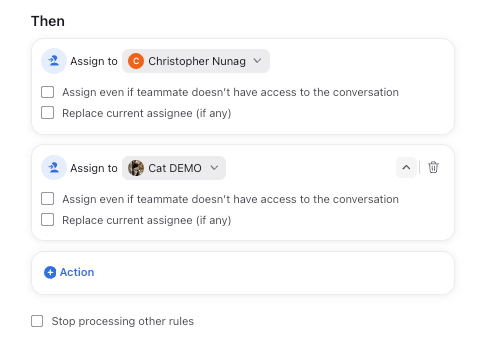
    Yes! You can have multiple assignment actions in a single rule, like this:

    In this example, the conversation would be assigned to Chris as long as he is available. If he is not available, the conversation would then assign to Cat. Teammates can set their availability status in-app or it can be set via a team Shift.

    [Note: The exception here would be if the secondary assignment had “Replace current assignee” checked - if this is checked, the assignment to Cat would override any other active assignment. I don’t think this would be the case for you, but wanted to note it!]

    Cheers,
    Cat

    1 reply

    cat_apac
    cat_apacAnswer
    Fronteer
    June 12, 2025

    Hi there! Cat here from the Front support team 🌻

    Yes! You can have multiple assignment actions in a single rule, like this:

    In this example, the conversation would be assigned to Chris as long as he is available. If he is not available, the conversation would then assign to Cat. Teammates can set their availability status in-app or it can be set via a team Shift.

    [Note: The exception here would be if the secondary assignment had “Replace current assignee” checked - if this is checked, the assignment to Cat would override any other active assignment. I don’t think this would be the case for you, but wanted to note it!]

    Cheers,
    Cat