































Ask questions about Front features, getting started on Front, or how to use the community.
Recently active
Hello, I’m looking for advice on how to make the new UI more readable, whether there will be accessibility options like high-contrast (or color-blindness) themes in the near future, or if it is necessary to raise this as a feature request.In both the light and dark themes, I can no longer distinguish the sidebar or see separation between conversations and messages. Subject lines blur into senders and previews, making it hard to read. I'm not color blind but I can't perceive the subtle shade differences with the new UI that others seem to. I typically leverage high-contrast themes in Windows and increased monitor brightness/contrast to reduce eye strain and increase clarity, but even with adjustments the light theme remains hard to use. The dark theme offers better contrast but still lacks boundaries between text.Like many other posters I will use the old inbox experience for as long as possible because it was better. But I see that the Front team is responsive and I hope you will offer
Hi Guys,We’re currently trying to set up WhatsApp on Front but running into the error below. Has anyone else come across this before?
Hey everyone,In my role combining business analysis and support responsibilities, I’ve been exploring the Front Administration Certificate. One area I find especially useful is the Knowledge Base.From the materials, I understand you can: Organize articles with tags by customer type or topic. Insert articles directly from the composer when responding to customers. Track article usage to see what’s most helpful and update content regularly. I’m looking for ways to reduce repetitive questions while maintaining SLA targets. I’d love to hear how other analysts or support teams structure their Knowledge Base workflows to improve efficiency and insights from analytics.
Front rules are a game-changer for managing incoming messages efficiently🙂 Automatically tag conversations by priority or customer type. Route messages to the right teammate or inbox. Trigger notifications for SLA breaches. Has anyone set up rules to automatically prioritize urgent requests or high-value customers? Real-world examples would be really helpful to see these best practices in action.
I’ve noticed a couple of limitations in Front Calendar and was curious if others have found effective workarounds while these features are still in development: Cancellation Notes: Currently, when deleting a meeting, there’s no built-in option to send a cancellation message. I’ve been manually notifying attendees via email before removing the event, simple enough, but not ideal. Co-Organizer Functionality: Since Front doesn’t support assigning co-organizers, I’ve been using Teams or Outlook to set that up, which then requires managing changes through those platforms. It works, but adds a layer of complexity. If anyone has discovered a more streamlined approach or temporary solution, I’d really appreciate hearing about it. Always open to learning from how others are navigating this.
Hi everyone,I’m exploring ways to make message templates accessible across the entire organization, spanning all workspaces. Currently, Front’s “Company” workspace settings support rules, but not message templates, which limits centralized management.The two workarounds I’ve come across are:Creating a shared workspace that everyone can access, solely to house the template. Keeping the template in its original workspace and granting template-level access to all users.Both approaches work, but they’re not ideal—especially when it comes to maintaining consistency and avoiding duplication across multiple workspaces.Curious to hear how others are handling this. Have you found a more scalable or elegant solution for distributing templates organization-wide?
Curious if anyone else is experiencing this - we did contact support with no response yet.We added a new user to Front and they don’t have access to Contacts. It’s not in their app switcher menu at all. I can’t find a setting for this or anything…. anyone else have this problem?
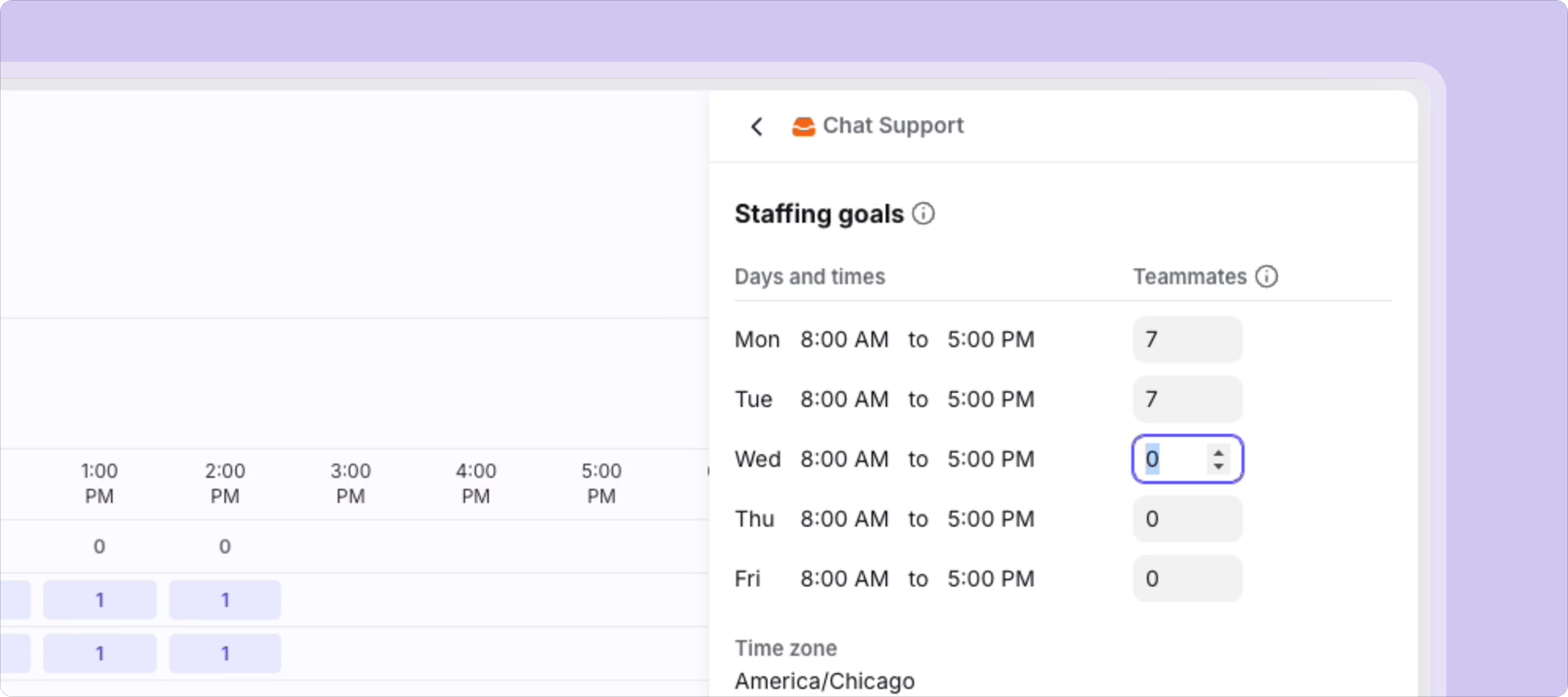
We’ve just made it easier to keep your inboxes covered with staffing goals for our native Workforce Management add-on. Staffing goals enable you to set minimum teammate coverage requirements per inbox and day, while flagging when your inboxes are under- or overstaffed. With Front’s native Workforce Management add-on, you can also: Streamline scheduling: Create custom recurring shifts with defined inboxes, teammates, and cadence. Get complete oversight into staffing with filterable timeline schedule views. Stay ahead of coverage gaps: Keep schedules up to date with native time-off management and coming soon, Google Calendar syncs. Quickly spot and fix staffing gaps with coverage gap alerts. Improve team productivity: Teammates get full visibility into their upcoming shifts with improved teammate schedule view. You automatically route conversations based on shift schedules and workloads, preventing burnout. Workforce Management is available on Growth, Scale, Professional, and Enterprise
Hi! I am wanting to looking into notification settings within different inboxes for workspace admins. I’m currently a main admin for our Front Instance and on the end-user side, I won’t be using some of the inboxes set up across the team. Is there a way I can customize my notification settings on the Mac Desktop app? Thanks!
Is it possible to search a shared inbox’s archives by user? So, like I could search to see all the emails that I specifically archived? It’s likely not possible, but I won’t know for sure unless I ask. Thanks!
Hi Front users/admins! I’m getting started in Front as I build up my capacity in my role as applicaiton specialist. I’m here to learn about new processes we can manage in Front and/or ways to improve our current workflows. Looking forward to diving into the community more!
I used the “time off” feature when I took 2 days off in order to enable the auto-responder. There were several conversations assigned to me in a shared channel for which we received an inbound message while I was out of office. When that happened, I was unassigned from the conversations. I would like the conversations to remain assigned to me, so that the inbound responses would be waiting in my inbox upon my return. As it was, I missed them at first. How can I avoid being unassigned on conversations like this? I can imagine two possibilities:A way to enable the auto-responder without marking myself “out of office” (maybe I can do this with a rule? seems like a hack) Changing some settings so that inbound messages do not auto-unassign me.
Please put the search box back on the main dashboard. I use the search button 500 times a day and now I have to click the little search button everytime. It adds hours to my day.
Front’s native knowledge base is solid, but does lack some of the features available in other knowledge management systems. Is anyone out there integrating another KB with Front, and if so, what system are you using and how well does the integration work?
Big things are coming to Front — and you're invited to see them first. Control Shift aired on July 16 at 10am PT, where we unveiled the all-new Front, built for teams that want to scale support without sacrificing quality. 🔍 What to expect:A bold take on AI from our CPXO, Paul Teyssier New CX tools unveiled by our Head of AI, Kevin Yang A live tour of the redesigned inbox by our Head of Design, Maggie Lamas Q&A with the product and engineering teams View the webinar here!
The update this morning seems to have moved the Archive folder? Where did it go?
I have found the Inbox When Ready extension for Gmail extremely valuable in preserving my focus against compulsively checking my email and getting distracted, while still enabling me to look up past emails when needed. Is there any way to recreate that functionality in Front? Viz., create a barrier to checking my Open emails (a 10-second delay for instance would be amazing) while still allowing me to compose and search?
Sometimes I receive an email with a numbered or bulleted list where the text does not wrap at the end of my screen, so I have to copy-paste it to another program in order to read it. This occurs both when viewing the email in an external email or when viewing it in the main app (see screenshots below for examples)Is there a way to force all text in received emails to be wrapped? If not, would you please consider this a bug report / feature request.
Why introduce a new UI that requires 5X more clicking?
Hello,I’m quite disappointed with the service we've received from Front recently. We transitioned our main business communications to Front from another provider following a successful trial earlier this year. One of the key factors in our decision was the availability of live chat with a real person—we tested this during the trial and consistently received responses within 30 minutes or less for multiple queries. This level of service continued for the first few weeks after onboarding.However, the live chat was subsequently removed, first replaced by a bot, and now by a message board-style system where issues are posted. The responses we receive are often brief and generic—resembling AI-generated replies—with a couple of unhelpful sentences followed by a link to an article. It’s been genuinely disappointing. We carefully evaluated several options before choosing Front, and we now feel somewhat let down.Additionally, the recent update has introduced issues with external tagging and cha
How do we setup a custom SMS connection channel to connect to AWS End User SMS or AWS SNS (instead of ex: twilio)The only guide is confusing and doesnt really help - also asked AWS side but they referred back to frontapp.
Hoping someone here has run into this before. I run a screen printing & embroidery shop and use Front for all our customer communications. I’m trying to connect my Google Calendar (Workspace account) to Front, and I’m getting some mixed signals from the app.Here’s what’s happening: I went through the normal “Sign in with Google” flow to connect the calendar. It looked like everything worked — Front said permissions were granted (see attached screenshots). But when I go to the Calendar section in Front, it still tells me to connect a calendar. If I try to reconnect, the channel setup page says the calendar is already connected by my company, so I can’t re-do it. So… it’s kind of in limbo? 😅A few things I’m wondering: Why would Front say it’s already connected, but also not actually let me use it? Could this be a conflict between company-level and user-level settings? Is there somewhere I can check if the calendar is hooked up to a different inbox or workspace? What’s th
If you aren’t going to give us the new version back, at least give usmore contrast in both the light and dark versions! search bar at the top “compose” more obvious discussions…??? because, no really, WHERE ARE THEY
It is pretty clear that no one likes the new update. Please provide options to return to the old interface.
Hello, is there a way to activate notifications in the top bar of new front like we had in the old front? This is a super important feature for us.Thank you,
Already have an account? Login
No account yet? Create an account
Enter your E-mail address. We'll send you an e-mail with instructions to reset your password.