Solved

Contacts Missing in the New UI

  • August 26, 2025
  • 1 reply
  • 15 views

lora_brasser
Forum|alt.badge.img+3

Curious if anyone else is experiencing this - we did contact support with no response yet.

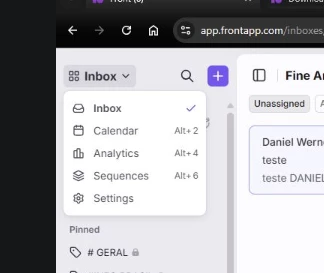
We added a new user to Front and they don’t have access to Contacts. It’s not in their app switcher menu at all. I can’t find a setting for this or anything…. anyone else have this problem? 


Best answer by PhoebeatFront

Hey Lora! 

This is most likely related to a recent bug fix that changed how auto-created contacts can be displayed.


Previously, some auto-created contacts were being incorrectly shown to teammates even when contact permissions should have restricted them. The fix corrected this, which means some teammates may now lose visibility of contacts they previously saw.


This can directly affect things like contact suggestion in the composer. The teammates who are unable to see contacts are all members of a teammate group that does not have contact permissions. You'll need to update any teammate groups that do not have permissions to access contacts, and grant that permission. 

We have an article here in our Help Center with more info on editing teammate groups: Teammate groups

1 reply

PhoebeatFront
Forum|alt.badge.img+5
  • Fronteer
  • Answer
  • August 26, 2025

Hey Lora! 

This is most likely related to a recent bug fix that changed how auto-created contacts can be displayed.


Previously, some auto-created contacts were being incorrectly shown to teammates even when contact permissions should have restricted them. The fix corrected this, which means some teammates may now lose visibility of contacts they previously saw.


This can directly affect things like contact suggestion in the composer. The teammates who are unable to see contacts are all members of a teammate group that does not have contact permissions. You'll need to update any teammate groups that do not have permissions to access contacts, and grant that permission. 

We have an article here in our Help Center with more info on editing teammate groups: Teammate groups