







Learn about the latest updates to the Front Platform
Recently active
Between Sunday 2023-11-12 0200 UTC and Sunday 2023-11-12 0300 UTC, customers in our eu-west-1 data center region may experience an interruption to loading conversations, loading conversation lists, and reopening conversations from an integration. This is due to planned maintenance work required on a core database service. What is the impact?During the window, the conversations viewing experience will be degraded or unavailable. The display of new messages, counter updates of all workspaces, and some asynchronous conversation mass-actions will be delayed. Developers trying to use the API via integrations may receive a 503 "service unavailable" error in their list conversations responses during the interruption. This should be resolved once the maintenance is complete. Why are we doing this?One of our core database clusters needs to be restarted during the maintenance window while we perform an important security upgrade. We are doing this type of work during off-hours to minimize disrup
We now offer a sample application that demonstrates how to export conversations and messages from Front! The application demonstrates: Listing all inboxes Searching for conversations Applying filters to the conversation search Handling pagination of results from the Core API Export all conversations with messages and attachments included Applying rate limit handlers Check out the application and GitHub source code on our Developer Portal.
Custom Fields in the Core APIThe Core API now exposes endpoints to list the custom fields that can be used on different resources:Use GET /accounts/custom_fields to list the custom fields available on an Account (docs). Use GET /contacts/custom_fields to list the custom fields available on a Contact (docs).Use GET /conversations/custom_fields to list the custom fields available on a Conversation (docs). Use GET /inboxes/custom_fields to list the custom fields available on an Inbox (docs). Use GET /teammates/custom_fields to list the custom fields available on a Teammate (docs). In addition, the Custom Field data model now returns all the supported values for the Custom Field of type enum. Accessing email messages in the .eml formatThe Get message (GET /messages/:message_id) endpoint now supports customizing the response's Content Type.By default, the endpoint returns the documented JSON data. However, you can now request the response to contain the message in the .eml format by setti
Between Sunday 2023-10-22 0700 UTC and Sunday 2023-10-22 0800 UTC, customers in our us-west-2 data center region may experience an interruption to loading conversations, loading conversation lists, and reopening conversations from an integration. This is due to planned maintenance work required on a core database service. What is the impact?During the window, the conversations viewing experience will be degraded or unavailable. The display of new messages, counter updates of all workspaces, and some asynchronous conversation mass-actions will be delayed. Developers trying to use the API via integrations may receive a 503 "service unavailable" error in their list conversations responses during the interruption. This should be resolved once the maintenance is complete. Why are we doing this?One of our core database clusters needs to be restarted during the maintenance window while we perform an important security upgrade. We are doing this type of work during off-hours to minimize disrup
We just launched a new sample plugin application on the Developer Portal that demonstrates how to use the Plugin SDK to load data from an external system of record and display it to the Front user. The plugin provides advanced interactivity, allowing the Front user to reply to conversations with contextual data or attach documents from the external system to the draft. In our example, we mock a Transportation Management System (TMS) that might be used by a logistics company to manage data about transactions or shipments. Check out a video overview The sample plugin can be adapted to any number of use cases and industries: customer service, finance, retail, hospitality, real estate, etc. The plugin demonstrates the following concepts:Loads the Front Plugin SDK through React context Reads data from a RESTful API and displays it in the Front sidebar Implements the Front UI Kit to save time developing UI components Detects links attached to the selected Front conversation and loads recor
Composer plugins now have access to a closeDraft function, which both closes the composer plugin and the draft composer in Front. This is useful for plugins that send messages directly within the modal window. For example, in the following screenshot, the Send Template button sends a message template through a channel, and uses the closeDraft function to close both the composer modal that contains the button AND the draft composer behind it. Note that this method is available for composer plugins but not sidebar plugins. Learn about the closeDraft function on the Developer Portal.
This announcement details a potentially breaking change to the Core API. The changes might affect you if your company uses our API in one of your integrations or tools to return a list of company, team, or individual tags. TLDR: Please update your Front integrations by November 4th, 2023 so that they handle paginated results from the Tags API endpoints. Previously, these endpoints returned all the tags in one response, but we are changing this behavior so that the endpoints return paginated results instead. This change will result in better API performance when retrieving tags from a list of potentially hundreds or thousands of tags. If your integrations have been relying on the endpoints to return all the tags in one response, you will have to update those integrations so that they paginate through the list of results instead. You can learn how to handle paginated results on our Developer Portal. We understand changes take time to implement, so we are releasing these changes in a way
Ever wondered how pagination works for the Core API? We now offer a quick guide to get you up to speed.
Have you been confused by the q search query object available on some Core API endpoints? We hear you! Now you can access a new help topic to learn how to filter the results of certain GET endpoints to retrieve exactly what you need. P.S. Remember to subscribe to our API News & Updates page to be notified of developer news!
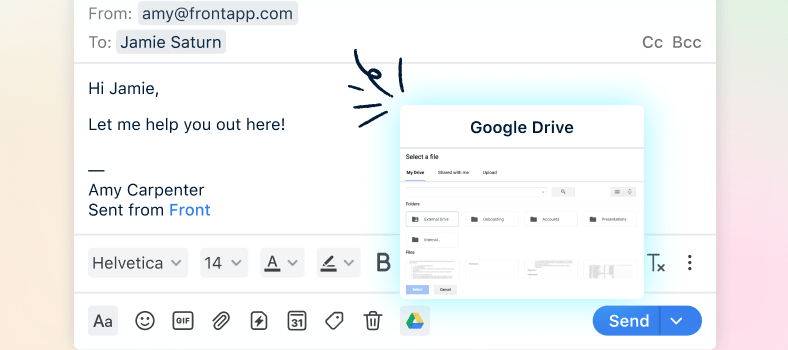
Developers can now build composer plugins! Previously, plugins could only be embedded within the right sidebar in Front, but it’s now possible for developers to build plugins that embed themselves in the composer instead, similar to how our existing integrations work with Google Drive or Dropbox. Users access composer plugins by clicking the icon for the app directly from the composer toolbar. Our developer community has long requested composer plugins as an entry point, so we’re happy to say that we heard you loud and clear. Composer plugins should provide a more intuitive user experience for certain types of plugins that didn’t work well within the sidebar and are much more natural fits for the composer, such as smart drafting, file-sharing, and email encryption use cases. Learn more about composer plugins by reading the docs:Overview of composer plugins versus sidebar plugins Reference topic for the context available to composer plugins (composer plugins expose a new context, messag
You can now create company-level tags via the API using the Create company tag endpoint. View the company-level tags using the List company tags endpoint. Happy coding!
You can now add channel types as features to Front apps. This makes it much easier to create new channel types, eliminating the need to submit a form and request channel credentials from Front. Instead, you can configure a server for your channel and obtain the App UID and App secret directly from your app settings. As part of this change, “partner channels” have been renamed to “application channels” to emphasize that you can now self-serve channels through the Front apps available on the Developers page in your Front settings. The functionality of application channels remains the same, and any existing partner channels have been migrated to the new application channels Developers page experience (Settings > Developers). In addition to being able to create channel types directly in Front apps, we’re also launching the ability to select between two timeline options when you create a channel type:Standard timeline (ideal for email-like channels) Chat timeline (ideal for real-time cha
Building a Core API integration? We now offer a sample application that demonstrates How to import messages and conversations Setting headers and attachments Rate limiting Head to our Developer Portal to check it out!
If you’d like to offer customers a way to chat with you on your mobile app, you can now implement the Front Chat widget in your app using a webview. The webview has full parity with all Front Chat features, including access to the Chat Widget SDK. Refer to our Developer Portal for instructions on installing Front Chat on your mobile app.
The Front UI Kit is now officially out of beta! The Front UI Kit a set of React components that help you build plugins. The Front UI Kit includes buttons, menus, date pickers, and many other useful and common plugin components. Using the Front UI Kit should help you save on development time and provide your plugin users a set of well-tested and familiar components to interact with.Learn more on our Developer Portal.
You can now create and manage apps directly in Front with the new Developers page! The Developers page is available in your company settings (you must be an admin to view). View and manage all your apps in one placeWhether you're creating a Core API integration, a plugin, or a new channel type, the Developers page will be your one-stop shop for managing all the integrations you are developing or have published in the past. Read the full details in the Create, manage, and publish apps topic. Obtain OAuth or API token credentials without requiring assistance from Front SupportYou no longer have to contact Front Support to obtain OAuth credentials for your apps. You can now obtain your client ID, secret, and specify redirect URLs directly in Front for new apps. Note that existing OAuth credentials will continue to work, but will not appear in the app list.The new Developers page also lets you manage API tokens, which used to live under the Plugins & API section of the settings (remov
We've released an update that wraps the Front Chat widget in an iframe. This backend update is expected to greatly improve the Front Chat widget’s integration with your website by reducing log, error, and dependency contamination.
Already have an account? Login
No account yet? Create an account
Enter your E-mail address. We'll send you an e-mail with instructions to reset your password.