
FEATURE UPDATE

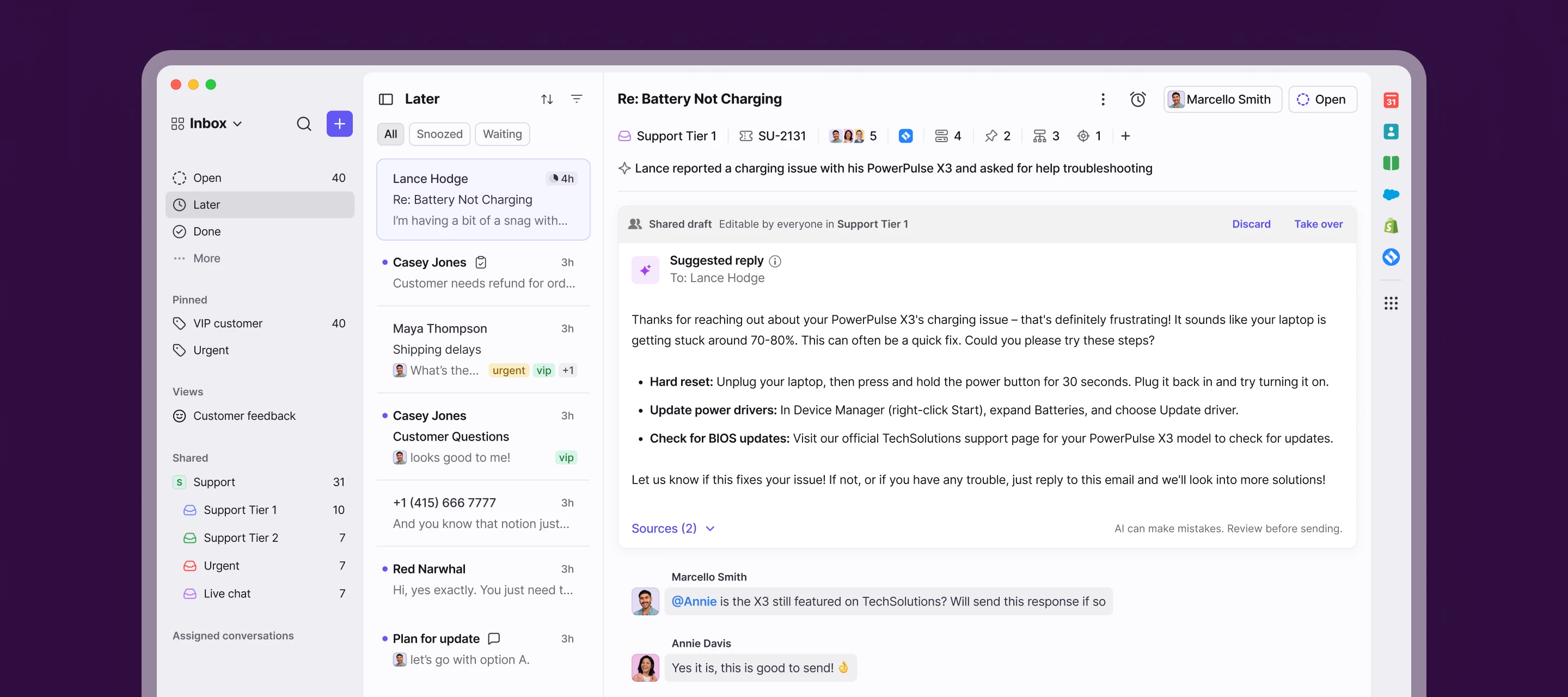
Boost productivity and focus with a new reimagined inbox
Related products:StarterProfessionalEnterprise
  • July 15, 2025
  • 75 replies
  • 3371 views
Boost productivity and focus with a new reimagined inbox
Show first post

75 replies

jdekruijf
Forum|alt.badge.img+3
  • Conversationalist
  • July 25, 2025

Hello,

I won't go too much in depth regarding the new update since almost all of the points are already mentioned in this thread.

I’m wondering how the Front team is using all of this feedback and whether or not certain things will be changed or not. I’ve seen comments that feedback is being collected but have you already made some decisions or what is your stance regarding all this feedback? During the webinar you said that improvements and changes would be shipped on a daily basis. I haven't seen them so far within Front or here in the Product updates section to be honest. Maybe they are subtle and I just didn't see it? If that's the case please let me know.

I would just love to hear from you guys what you think and what's coming in the (near) future. Please keep us up to date as the changes that have been made are pretty significant as you can see by all the feedback. 


meganbeatty
Forum|alt.badge.img+3
  • Fronteer
  • July 29, 2025

Hi ​@jdekruijf - thanks for asking and happy to clarify. 

First, prior to launching the redesign, we heavily tested the new design internally and with a large group of beta customers. There were many iterations of the redesign shipped during the beta, such that we feel confident with what we launched. However, since the launch, we’ve continued collecting and aggregating all of the feedback we get internally. We always prioritize bugs that are identified first. From there, we look at the themes of feedback to determine how it impacts customer’s workflows. A few examples of things we have changed in response to feedback include: 

  • Feedback we've addressed and shipped:
    • Greater visibility of tags in the message preview and message header
    • New chat indicator in message preview for prioritizing chats
    • Attachment indicator in the message preview has been brought back
    • Flattened message menu (Resend/Fwd more prominent) has been brought back
  • [Coming soon] In progress:
    • New filters for finding items in Later/Done
    • Improvements to bulk actions page

We also understand that there is a large bucket of feedback that is preferential and may take some time to adjust to - things like color updates generally fall into this bucket. Right now, we don’t have plans to address this type of feedback as we’ve seen that it typically takes users a few weeks to adjust, but we’ll continue monitoring and collecting all of this feedback. 

Hope this helps - thanks! 


domclegg
  • Conversationalist
  • July 30, 2025

Just signed up here to say the new UI is unpleasant since all the colours have been watered down. 

We will be using the original UI as long as possible to delay this update. My team hates it.  Just add more contrast please!  I don’t want to leave Front because its visually hard work navigating the interface.  


Javier - Developer Relations
Forum|alt.badge.img+9

Hi everyone - thanks all for sharing your feedback here in the community! While we haven’t been able to respond to every post, we’ve been reading everything you’ve posted and discussing internally. Based on your feedback, we’re excited to share some changes we’ve recently made to the redesign, as well as some changes that are currently in progress. Megan mentioned some of these recently, but we wanted to share a few more, and will continue to do so as more changes roll out.


🚀 Recently shipped:

  • Chat: Introduced a new chat indicator for prioritizing chats
  • Attachments: Brought back the attachment icon in the message preview
  • Message menu: Flattened the 3 dot message menu making Resend/Fwd one-click actions
  • Unread vs read indicator: Updated the bolding and color values for "unread" in the left-hand navigation pane and message previews.


🚧 In progress:

  • Inbox filters: We're introducing a new inbox filter for finding conversations in private/shared inboxes. This will allow you to filter your Open/ Done/ Later sections to single inbox space. 
  • Bulk actions: We're making improvements to bulk actions (most used actions first will be available with one click, less used actions behind the more menu)
  • Application objects: We're exploring exposing a limited number of objects in the conversation header
  • Click to compose: We're exploring ideas to make composing an email 1 click vs 2. 
  • Mobile: We are redesigning our mobile app to match the look and feel of the desktop inbox UI / navigation
  • Adding metadata in conversation header: We're making improvements to the "+" menu to help users quickly search for/apply any object across tags, custom fields, tasks, etc. without needing extra clicks. 


👀 Monitoring (not comprehensive):

  • Inbox color impact on scannability 
  • Subject line length in conversation header
  • How counters, timestamps, and SLA timers are used

GA3
Forum|alt.badge.img
  • Conversationalist
  • August 3, 2025

Hello,

While the new UI may offer a more modern look, it has significantly impacted our productivity. (While the claim is the opposite: Boost your productivity!! A huge failure from Front).

My team and I have made a genuine effort to adapt, but it’s become clear that the new interface is not workable for our day-to-day needs.

It's difficult to justify paying premium rates for a product that complicates even simple actions compared to before.

Given that the transition to the new UI is made mandatory, we're now actively exploring alternatives—specifically, migrating to Missive.

Good luck to those of you who will have to work in the new Front.


bpr
Forum|alt.badge.img+2
  • Conversationalist
  • August 4, 2025

We’re just a small team (3 people) but had to move away from Front when this update came out. I’ve been using Front for five years in various organisations, but we just don’t have time to wrap our heads around this when we’re in the middle of some massive projects, so we’ve reverted to Outlook. The super-short “keep using the legacy UI” period just meant we had to make a rushed decision whether we persevere or move. Would have been better to have 6 months before the old UI goes. The whole “you’ll get used to it” approach comes off a bit elitist.


GA3
Forum|alt.badge.img
  • Conversationalist
  • August 5, 2025

Why can’t we see the number of emails in a thread anymore?

This is very useful, who would even think of hiding this?

We need the badge back, both in the conversations list and in the message pane!


s_murphy
  • Conversationalist
  • August 6, 2025

How can i go back to the older version. Our entire office up in arms over the awful update. 


Kwinters
  • Conversationalist
  • August 6, 2025

I am here to echo what others are saying. This new UI is not user friendly at all. It’s disappointing to see Front team members on here just telling us to “get used to it” instead of actually taking the feedback seriously. If the majority of your customers say it’s bad, it probably is. The old interface was much better and the option to revert back to it should at least still be there. Forcing changes that increase workload in fast paced environments is the best way to lose customers. We are definitely looking at other platform options. 


micahtcs
Forum|alt.badge.img+1
  • Conversationalist
  • August 6, 2025

Bring back the old version. This new version is awful and so hard to use. Difficult on the eyes. Forcing this change over and not allowing the old version is terrible. 


micahtcs
Forum|alt.badge.img+1
  • Conversationalist
  • August 6, 2025

Really want to know from Front. Are you going to listen to your users and bring back the old UI? If you are sticking with this new version just let us know. So we can plan our move away from Front. 


allenk
Forum|alt.badge.img+4
  • Conversationalist
  • August 6, 2025

It appears that the ability to use the old UI was removed this week. This seems really fast, especially with all of the issues with the new UI. I know I submitted feedback directly, and never received a response on it. Our team has been struggling with this as well and causing disruptions in our workflow. I have been such a champion for Front in our org and other orgs, but this is making hard to really champion right now.


JFucile
  • Conversationalist
  • August 7, 2025

In no way has this update “boosted productivity.” It’s absolute trash. New features/tools are worthless if you can’t even navigate your inbox with ease. It took 3 team members 38 minutes today to find an archived discussion thread.

How much to pivot back to the old format?


  • Conversationalist
  • August 7, 2025

This update has been poorly thought out - the ability to send a new email should not require two clicks. It should be one - our core purposes on using Front is handling emails.

It is extremely difficult to distinguish between read emails and unread emails which should not be the case - especially for users who are handling so many emails in a day it is painful.

The ability to use the older interface should not be taken away until basic issues are resolved.


hannah_tamplain

While I appreciate many of the updates, I have to agree there’s a stepdown in accessibility with the lessened contrast in the email previews. Everything is very flat and can be difficult for users who are dyslexic or attention issues. I would highly recommend the Front team consult with a company like Accessibe who provides web accessibility tools.


meganbeatty
Forum|alt.badge.img+3
  • Fronteer
  • August 8, 2025

Hi everyone - thanks for continuing to share your feedback with us - we appreciate your passion for Front and the examples you’ve shared about your own workflows. We wanted to share a few more updates on changes we’ve made or are shipping soon in response to feedback we’ve heard: 
 

 🚀 Feedback we've addressed/shipped:

  • Tag visibility: We now show more tags in the conversation list and the conversation header. (Shipped at GA)

  • Chat indicator: We've introduced a new chat indicator in P2 for prioritizing chats. (Shipped at GA)

  • Attachment icon: We've brought back the attachment indicator in the conversation list. (Shipped last week)

  • Message menu: We've flattened the 3 dot message menu making Resend/Fwd one-click actions. (Shipped last week)

  • Unread vs read: We've updated the bolding and color values for "unread" in the conversation list. (Shipped last week)

  • [NEW]Bulk actions:  We’ve reordered actions so the most used ones (like Assign) appear up front, with others behind the “more” menu. (Shipped last week) 

  • [NEW]Inbox filters: New filters in P2 to help find conversations across private and shared inboxes (Shipped last week)

  • [NEW]Assignee visibility: We’ve restored blue text and added last names to help quickly identify assignees in the conversation preview. (Shipped today)

 🚧 In progress:

  • [NEW] Conversations tab: The conversation list now has a tab just for your external conversations (i.e. a filtered view without Tasks or Discussions). (ETA: Next week)

  • [NEW] Subject line visibility in Conversation header: We’re extending the subject line to display up to 2 lines of text. (ETA: Next week)

  • [NEW] Email counter in conversation preview: We’ll now show the email message count starting at 5+ instead of 20+ (ETA: Next week)

  • [NEW] App objects in conversation header: We'll show 2 objects inline (similar to our tag UI) followed by a count if there is more than one object. (ETA: 2 weeks)

  • [NEW] Same tabs across Open/Later/Done: These sections will have the same tabs to easily find tasks, discussions, or conversations across any section. (ETA: 2 weeks)

  • [NEW] Bulk actions metadata: We're bringing back the ability to see the inbox and tags of bulk selected items (ETA: 2 weeks)

  • [NEW] Click-to-compose: We’re exploring a 1-click path to composing emails. (ETA: Q3)

  • [NEW]Mobile redesign: We're updating the mobile app to reflect the new inbox UI and navigation (ETA: Q3)

  • [NEW]Adding metadata in conversation header: We're making improvements to the "+" menu to help users quickly search/apply any tag, task, custom field, etc. without needing extra clicks. (ETA: Q3)


smalone
  • Conversationalist
  • August 8, 2025

Hi everyone - thanks for continuing to share your feedback with us - we appreciate your passion for Front and the examples you’ve shared about your own workflows. We wanted to share a few more updates on changes we’ve made or are shipping soon in response to feedback we’ve heard: 


I appreciate that Front is making efforts to address the overwhelming amount of user feedback. However, making all of these updates to the new version so quickly seems to be like a complicated approach destined to cause more problems. 

Wouldn’t the simplest solution be to revert back to the old version and enhance it from there? 

It seems almost all customers are in favor of the old version. While I am “used” to the new version, I’ve yet to see any clearly defined benefits. Workflows are much slower and it is visually exhausting on the eyes.


carrie.renick
  • Conversationalist
  • August 11, 2025

Not a huge fan of the new inbox to be honest. I feel like everything is harder to see due to reduced contrast and everything more “squarish.” The biggest disadvantage and annoyance is that I feel like regular tasks take more clicks. Clicks = time & effort, the prior inbox was more effortless. It takes 2 clicks (and looking in the dropdown) to get to the calendar now, wheres before it took 1 click. Same thing with mass assigning emails. The search function is not intuitive and I feel like I have to “look” for it everytime. Give me the old version!!! 


  • Conversationalist
  • August 12, 2025

please get back the older version


asmirnov
  • Conversationalist
  • August 12, 2025

Would it be possible to add an option to switch between the legacy version and the current one (not just on a trial basis)? To be honest, I haven’t found the new experience to be a positive one.


KAK3000
  • Conversationalist
  • August 15, 2025

Why would incoming mail names look different/be truncated since the new UI?  How can we fix this?


domclegg
  • Conversationalist
  • August 18, 2025

I can’t get over how awful this new UI is.  It’s a sea of grey with far too much subtlety between zones. I actually used to enjoy going through my emails in the old UI, not anymore Please bring back the old version.


EoLs
Forum|alt.badge.img
  • Conversationalist
  • August 28, 2025

Horrible update, valuing aesthetics over efficiency and user-friendliness is a common
and annoying trend. One gets the clear sense that the developers do not user
Frontapp on a day-to-day basis, contrary to their customers…

Many horrible choices:

1) No contrast on unread messages make it much harder to see the unread
messages

2) Overall the UX is flat and uniform, making it harder to quickly locate
things

3) Many very common features now take an extra step/click to use (such as
adding a tag)

4) No dark sidebar theme

5) No message count on threads??

Revert it or fix this half-baked update!


Forum|alt.badge.img
  • Conversationalist
  • October 20, 2025

Some feedback on the new UI:

  1. Too many clicks to find Assigned to Me & Archived. There should be an Archived tab. Seemingly the way to see this is to go to Done and add an Assigned To Me filter, which is a lot of clicks, especially when having to add/remove the Assigned to Me filter depending on what I’m looking for. Workaround is that I created a Private View to do this instead, but it used to be a core feature.
  2. Shared With Me feature removed - now this is Subscribed, which is fine, except for the same issue above; there is no Archived filter and I don’t know of a way to see Archived. Sometimes my tickets get reassigned when I’m OOO in Front and I want to see which of those were reassigned, determine if I need to take them back. I’m not sure how I can do this today without using the mobile app’s Shared With Me.
  3. Too many clicks to add a tag. I started using Ctrl + T instead which has been a fine replacement but it doesn’t seem necessary to have this action consolidated into a drop down menu with other features. We use tags on every email.
  4. Would love to have a toggle dark mode on/off in the menu that pops up when I click my profile picture. I use Dark Mode but when I take screenshots for documentation, I prefer light mode, and I switch between the two often.

helena
Forum|alt.badge.img+6
  • Community Manager
  • November 10, 2025

Hey everyone, since there has been lots of feedback around this topic, our team wanted to create a dedicated space for you all to share your thoughts around continued inbox design improvements. We’ve created a beta group in our community where we’ll share designs before they’re launched so that you can shape the features you want. We want to hear from you and to create the Front that is most valuable to you. 


➡️ Join the beta group here

We’ve already started sharing designs here so jump in with your input!