
Community Manager
April 2, 2024
Feature Update

Upcoming user experience enhancements for Front Chat, WhatsApp, SMS and more
Related products:StarterProfessionalEnterprise
  • April 2, 2024
  • 15 replies
  • 961 views
Upcoming user experience enhancements for Front Chat, WhatsApp, SMS and more

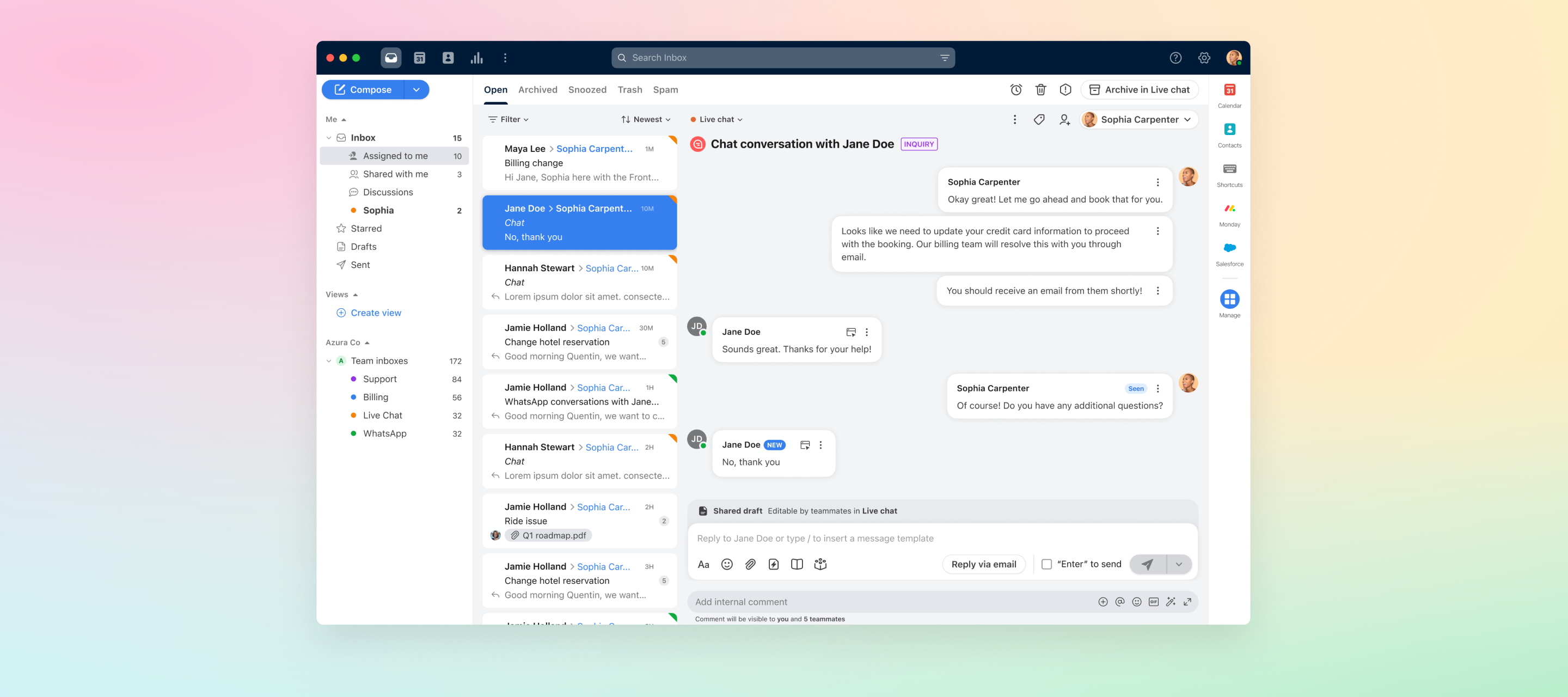
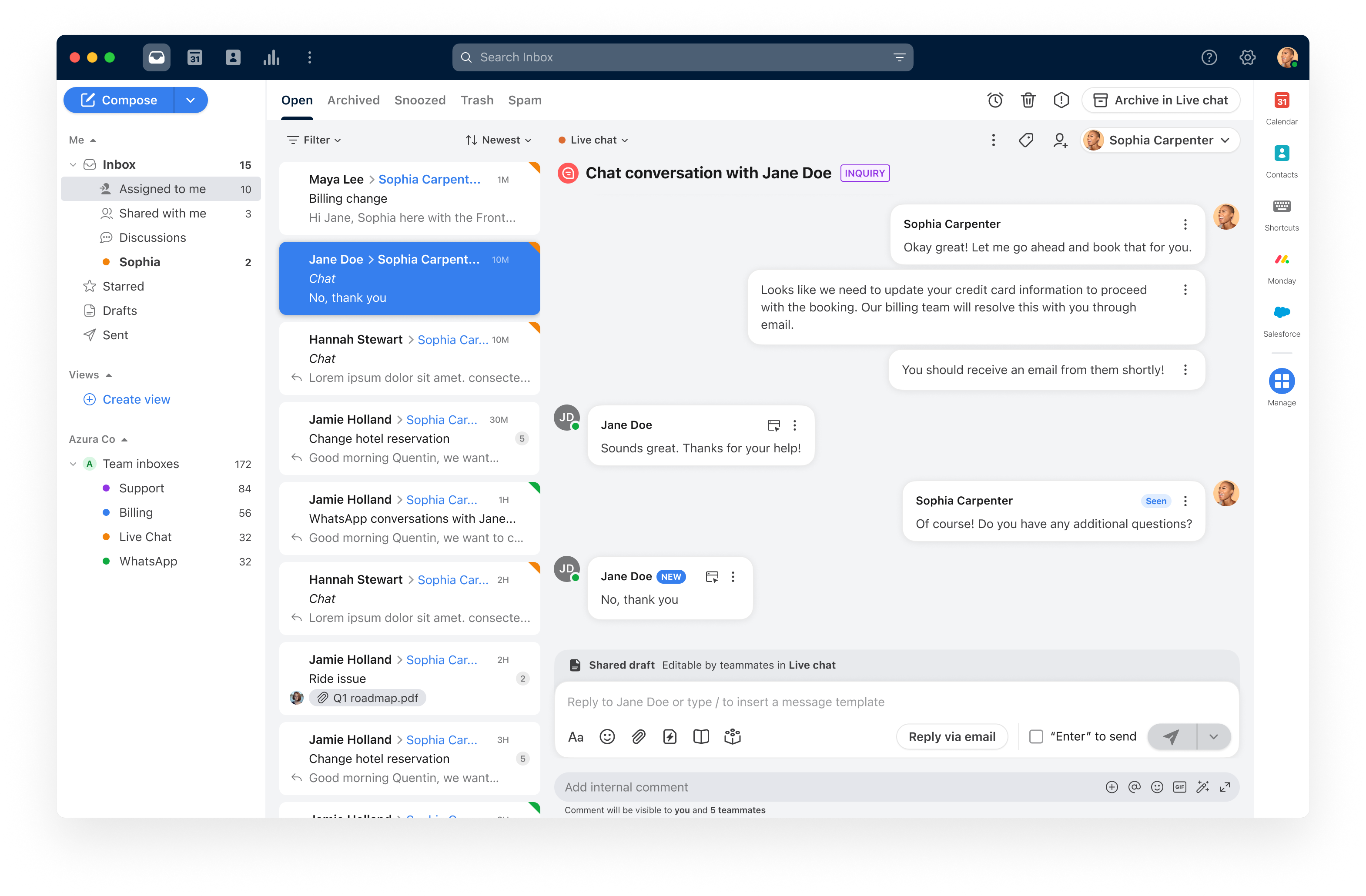
We're excited to announce upcoming UI and UX improvements for chat-like channels to give them the look and feel of more real-time messaging. These updates will better differentiate between inbound messages from customers, outbound messages from agents, and internal-only comments so your team can respond quickly and accurately.
 

Over the next few weeks, we’ll slowly roll these updates out to customers using the following channels: Front Chat, WhatsApp, SMS, Instagram, Facebook, Telegram, Slack, Google Business Messages, and other third-party messaging channels. We estimate that all customers on these channels will see the changes by mid-May.
 

Have any questions or feedback about these changes? Please submit it here with the subject line "UI/UX for chat-like channels feedback."


    This topic has been closed for replies.

    15 replies

    Vchin
    Conversationalist
    April 3, 2024

    Good day, 

    I am unable to view the pictures that was sent by my client in this new UI.
    Please assist. 
    Below is the attachment:


    Darren C
    Conversationalist
    April 3, 2024

    I am also unable to view images. Please revert this until this is fixed.

    Javier - Developer Relations
    Community Manager
    April 3, 2024

    Our engineering teams pushed a fix. If you refresh your app or browser, you should hopefully see that this issue no longer occurs.

    Javier - Front Developer Relations
    rpamplona
    Conversationalist
    April 3, 2024

    There’s no option to “Send later”. Please let me know how I can get that back. 

    Javier - Developer Relations
    Community Manager
    April 3, 2024

    @rpamplona Our teams are working on getting that option back. Thanks for your patience

    Javier - Front Developer Relations
    rpamplona
    Conversationalist
    April 3, 2024

    Also:

    (1) when I compose a message, I have to do this extra toggle to search for the name of the recipient. Before, when I click compose, I can immediately type a name and it will show the suggested contacts right away. It would save time if that is fixed, too.

    (2) Same issue with composing a message. I need to click the uppermost right portion of the compose box to be able to type my message. Before, I could just click anywhere.

    Thanks

    Javier - Developer Relations
    Community Manager
    April 3, 2024

    Fixes are now live. Thanks for reporting the issues! Let us know if there is anything else that was not caught.

    Javier - Front Developer Relations
    danpg
    Conversationalist
    April 4, 2024

    Whenever I click on a SMS message in Front it pops up with a new compose window. This is so frustrating. I have to close the window to read the message. It doesn’t mean because I click on a message to read it that I want to reply. Please provide a fix for this urgently.

    Javier - Developer Relations
    Community Manager
    April 4, 2024

    Hi @danpg, our team is investigating the SMS pop-up window issue.

    If there are any other issues, please submit your concerns here with the subject line "UI/UX for chat-like channels feedback”.


    Thanks!

    Javier - Front Developer Relations
    Javier - Developer Relations
    Community Manager
    April 4, 2024

    All fixes are now live. Hopefully that reverts behavior to the expected norm while introducing the benefits of the new UI for chat-like channels.


    If there are any other noted issues or concerns, please submit your concerns here with the subject line "UI/UX for chat-like channels feedback”.


    Thanks for the feedback and we appreciate your patience with the unexpected issues!

    Javier - Front Developer Relations