
Solved

Change in forward button

  • May 12, 2025
  • 4 replies
  • 93 views

joe_eral

Hi All, 


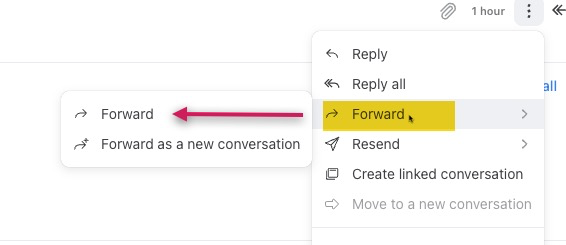
Not sure if this was part of the recent changes, or if I clicked something accidentally to get the submenus. Any help would be appreciated. 


Best answer by Isaiah

Hi Joe 👋 Isaiah here from the Front Support team! 

Thanks for reaching out about this. The team has been rolling out a few UI changes in the inbox to improve the overall experience, and one of those changes affects how forwarding button works.

Now, when you hover over Forward, you’re given two options:

  • Forward: Continues the thread as usual

  • Forward as a new conversation: Starts a brand-new thread, separate from the original. This is great if you want to share the content without keeping it tied to the initial conversation. Replies to this will stay in the new thread (if threading is enabled).

You can view the forwarded content by clicking the three-dot menu at the bottom of the composer to expand the message history.

To speed things up, you can also use the keyboard shortcut:

Command + J, J → Forward a conversation

This article goes through all shortcuts 👉 Front keyboard shortcuts

4 replies

joe_eral
  • Author
  • Conversationalist
  • May 14, 2025

@helena Can you help me out with this one? 

Thank you,

Joe


Isaiah
Forum|alt.badge.img+2
  • Fronteer
  • Answer
  • May 19, 2025

Hi Joe 👋 Isaiah here from the Front Support team! 

Thanks for reaching out about this. The team has been rolling out a few UI changes in the inbox to improve the overall experience, and one of those changes affects how forwarding button works.

Now, when you hover over Forward, you’re given two options:

  • Forward: Continues the thread as usual

  • Forward as a new conversation: Starts a brand-new thread, separate from the original. This is great if you want to share the content without keeping it tied to the initial conversation. Replies to this will stay in the new thread (if threading is enabled).

You can view the forwarded content by clicking the three-dot menu at the bottom of the composer to expand the message history.

To speed things up, you can also use the keyboard shortcut:

Command + J, J → Forward a conversation

This article goes through all shortcuts 👉 Front keyboard shortcuts


joe_eral
  • Author
  • Conversationalist
  • May 19, 2025

Hi Isiah -


Thank you for reaching out. While I appreciate the new changes you are making, is there a way to set it back to the way it was via settings on an individual basis? 

Thank you for including the shortcuts. 


Joe


Isaiah
Forum|alt.badge.img+2
  • Fronteer
  • May 19, 2025

Hi Joe,

Unfortunately, we’re unable to revert these changes at this time. Please let me know if I can answer any other questions!
