

Early access: task due dates

  • March 30, 2026
  • 21 replies
  • 191 views

conniechen
Forum|alt.badge.img+5

Thanks for your feedback on our new task features! Due dates are now live and ready for testing.
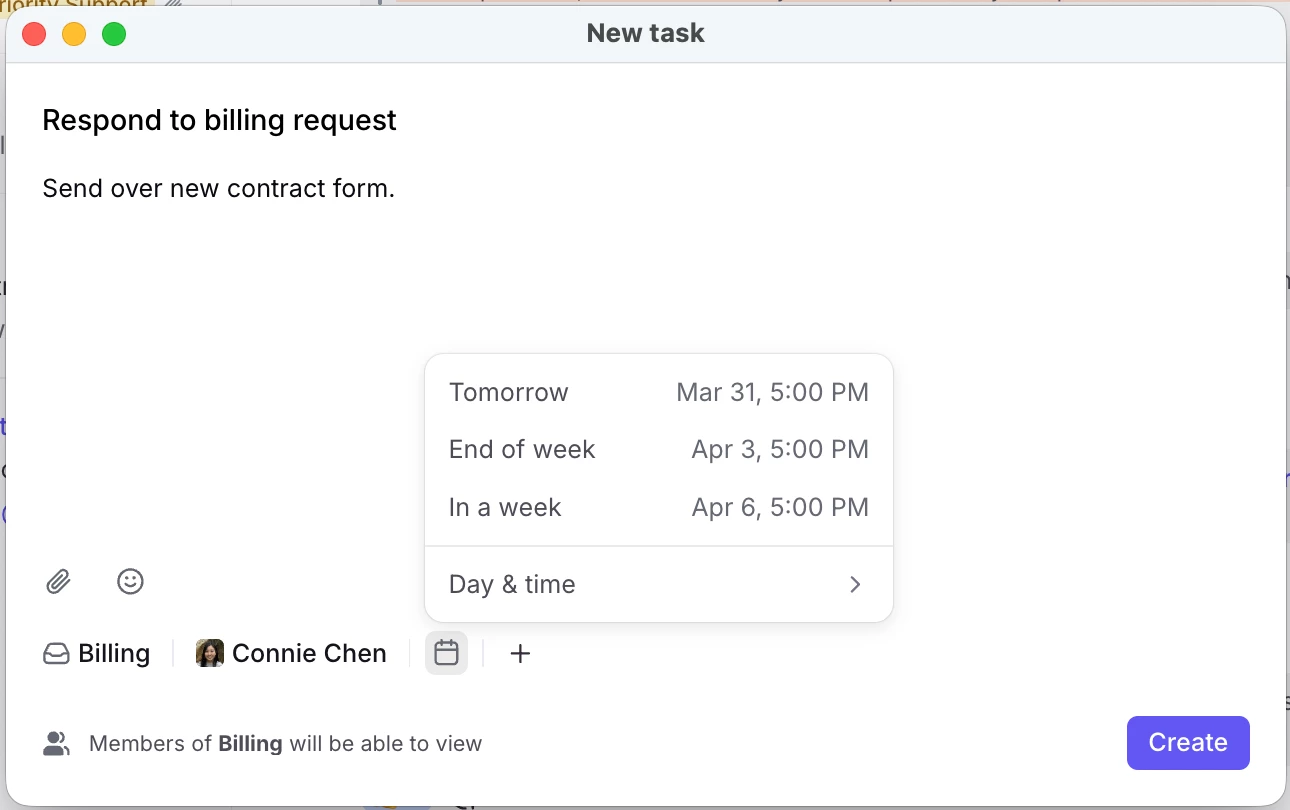
How to get started

  • Already have access to the new task features? The due date field should appear automatically. If it doesn’t, try a quick refresh. Reach out if you still have trouble.
  • Need access? Comment below and I’ll enable the features for your account.
  • Company-wide access: Admins can now request to enable these features for their entire organization. Just let me know in the comments.

Once you’ve had a chance to explore, please post your thoughts here. Thanks!

 

21 replies

Wes
Forum|alt.badge.img
  • Conversationalist
  • March 30, 2026

Hey Connie! Could I get access to this feature please?


david_vien
Forum|alt.badge.img+5
  • Conversationalist
  • March 30, 2026

Hey Connie - can we please turn this on too please?


allenk
Forum|alt.badge.img+4
  • Conversationalist
  • March 30, 2026

@conniechen Can we get access to this as well?


elizabeth47
Forum|alt.badge.img
  • Conversationalist
  • March 30, 2026

I’m not seeing this, can I have access as well!  Thanks!


murielle_bellec
Forum|alt.badge.img+2

Hey Connie - can we please turn this on too please?


oana
Forum|alt.badge.img+2
  • Conversationalist
  • March 31, 2026

Hi Connie, 

Can we please enable these new task features for all our organization so all our users can benefit from this update?

Thanks


nate_devree
  • Conversationalist
  • March 31, 2026

Hi Connie,

I would like this enabled for my entire organization please.

Thanks!


rmace
Forum|alt.badge.img+4
  • Conversationalist
  • March 31, 2026

I love the addition of Due Dates! 

One thing I’m not sure about though, when I set a due date the task remains in my Open section, but shows the due date. I would expect the task to drop off my Open section and just remain in the Tasks section until the due date. 

My use case for due dates would basically be similar to a Snooze. I can set a date and not see the task in my Open (active work area) until it’s due. I can continue to Snooze them, but I’d love to be able to set the date and have it only show in my Open section when it’s due. 


megan.lis
  • Conversationalist
  • March 31, 2026

Hi Connie, can I get access? Very excited about this feature!


conniechen
Forum|alt.badge.img+5
  • Author
  • Fronteer
  • March 31, 2026

@rmace thanks for the feedback! I see where you are coming from. 

The benefit of the current implementation is that you still have the full flexibility and optionality to decide what you want to set the snooze too, separate from the due date. The use case I’m thinking of is, if I own a task that is a dependency for another conversation, it may be due on Friday at noon but I want to get working on it Thursday afternoon. Snoozing will then move the task to Later, as you know.

Currently Open also operates like an All section to ensure nothing slips through the cracks, and tasks and discussions live there or can be accessed through the Tasks and Discussions sections.

Really curious to hear what others think about this idea!


rmace
Forum|alt.badge.img+4
  • Conversationalist
  • March 31, 2026

@rmace thanks for the feedback! I see where you are coming from. 

The benefit of the current implementation is that you still have the full flexibility and optionality to decide what you want to set the snooze too, separate from the due date. The use case I’m thinking of is, if I own a task that is a dependency for another conversation, it may be due on Friday at noon but I want to get working on it Thursday afternoon. Snoozing will then move the task to Later, as you know.

Currently Open also operates like an All section to ensure nothing slips through the cracks, and tasks and discussions live there or can be accessed through the Tasks and Discussions sections.

Really curious to hear what others think about this idea!

Yeah, I can totally see how that would be handy too. I suppose it comes down to personal preference and how you want to use it. I am coming from Todoist and you could set a view to filter to only tasks due “today” and then you could view upcoming tasks separately. You could also create custom views to see tasks due in the next X days or whatever you wanted. 


oliver_banham
  • Conversationalist
  • March 31, 2026

Hey Connie!

Just for the development of this feature, it would be great if they could be re-occurring tasks (as I have a number of processes I have to repeat on a monthly basis…..I’d imagine many people do!


Just an idea & feedback!

Thanks for all you’re doing, 

Oli


nate_devree
  • Conversationalist
  • April 1, 2026

Hey again Connie!

We have just started using tasks now that due dates have been added, so I apologize if this is something that is already available.  It would be really nice if there was an option to have tasks be private or limit the participants.  I believe it works that if you link a conversation to a task, that all participants of the linked conversation have access to the task.  They can then edit the due date, change assignments, etc.  It would nice if the person who creates the task and links the conversation would be able to have control of limiting participants.

One other edit that would be helpful is the ability to link multiple conversations to a single task.  I believe that you can have multiple tasks linked to one conversation, but not the other way around.  We have some use cases where there are multiple conversations (that we don’t want to merge as it involves different customers), but there is 1 main task that needs to be accomplished involving all of those conversations.

Again, apologize if this is just something I’m missing!

Thanks!


conniechen
Forum|alt.badge.img+5
  • Author
  • Fronteer
  • April 2, 2026

Hi ​@nate_devree and thanks for the thoughtful feedback. The primary use case we are trying to solve for with tasks is providing full visibility and access across the team for the tasks that need to be done. Could you say more about what the need/benefit is for limiting the ability to edit? What is the need for private tasks that only the creator/assignee can see?

You should be able to link multiple conversations to a task, though the linkages must be in one layer. This behavior works between conversations, tasks, and discussions. If you still can’t get it to work, you may be experiencing a bug, so let me know.


smeuse
Forum|alt.badge.img
  • Conversationalist
  • April 2, 2026

We’ve also recently started using the tasks feature in Front, particularly after due dates were enabled. One enhancement that would be helpful is the ability to manually mark a task as complete, rather than relying on archiving. I assume tags and rules may be intended to support this functionality, but clarification would be helpful.

We also ran a test to better understand how task status is determined based on due date and time. While the task did show as overdue at one point, the indication was not very prominent. Additionally, there was no alert or notification—though I assume rules/snoozing may be the intended method for managing and surfacing overdue tasks.

We also noticed that the same task is now showing as “due date met,” even though no action was taken. This creates some confusion around how Front is evaluating task completion or determining that a due date has been met without user interaction.

Clarification on how task statuses are calculated, as well as guidance on best practices (e.g., use of tags, rules, or alerts), would be greatly appreciated. Improved visibility for overdue tasks would also be beneficial.


conniechen
Forum|alt.badge.img+5
  • Author
  • Fronteer
  • April 2, 2026

@smeuse Thanks for the feedback, I would love to dig in.

  • Can you give me some context on how you are using tasks? For example, are they linked to customer conversations or assigned out to your teammates?
  • What would you expect the experience to be if you were to manually mark a task as complete?
    • What benefit does this provide over the current way (archiving the task)?
  • Regarding overdue tasks, what kind of alert or notification were you expecting?

Tasks will only show as “due date met” if it was archived or resolved at some point. I would check the activity line in the task to see when that happened.


nate_devree
  • Conversationalist
  • April 2, 2026

Hi ​@nate_devree and thanks for the thoughtful feedback. The primary use case we are trying to solve for with tasks is providing full visibility and access across the team for the tasks that need to be done. Could you say more about what the need/benefit is for limiting the ability to edit? What is the need for private tasks that only the creator/assignee can see?

You should be able to link multiple conversations to a task, though the linkages must be in one layer. This behavior works between conversations, tasks, and discussions. If you still can’t get it to work, you may be experiencing a bug, so let me know.

For the visibility, an example would be one our team members emailing in to a shared inbox and has multiple requests.  One of the requests is an HR task that we would create a task from that gets assigned to an HR representative, but that task may involve HIPAA, so it should be private.  I know that the work around would be to forward as a new conversation for HR to then build a task from, but we wanted to try and fully utilize the most efficient path.

I think my inability to link multiple conversations might be because I already linked an original conversation, so it won’t let me link another?

Thanks Connie!


smeuse
Forum|alt.badge.img
  • Conversationalist
  • April 2, 2026

@smeuse Thanks for the feedback, I would love to dig in.

  • Can you give me some context on how you are using tasks? For example, are they linked to customer conversations or assigned out to your teammates?
  • What would you expect the experience to be if you were to manually mark a task as complete?
    • What benefit does this provide over the current way (archiving the task)?
  • Regarding overdue tasks, what kind of alert or notification were you expecting?

Tasks will only show as “due date met” if it was archived or resolved at some point. I would check the activity line in the task to see when that happened.

Thanks for digging into this—happy to provide more context.

We are primarily using tasks in conjunction with customer conversations and internal follow-ups. In many cases, tasks are assigned to teammates to ensure accountability on items that require action (e.g., follow-ups, issue resolution, documentation, etc.).

From a workflow perspective, what we’re really looking for is a clear visual indication that a task has been completed.

Right now, archiving doesn’t necessarily communicate that the task itself was completed—it simply removes it from view. Given how easy it is to accidentally archive something, there’s no clear distinction between a task that was intentionally completed versus one that was archived unintentionally.

A visible “completed” state (even if followed by archiving) would provide much better clarity and accountability.

At the moment, those lines feel blurred, which makes it harder to rely on tasks as a true tracking and accountability tool.

Regarding overdue tasks, the current indicator is fairly subtle—it appears as the assigned date turning red at the top of the task. In practice, this was easy to miss. We were expecting something more prominent, such as a clearer visual indicator or a configurable alert/notification to help surface overdue items in a more actionable way.

On the “due date met” status—thank you for the clarification. We did confirm that the task was archived; however, that action occurred after the scheduled due date/time had already passed. From a user perspective, it would seem more intuitive for that task to reflect as “completed late” rather than “due date met,” since the timing expectation was not actually met.

Additionally, are there plans for analytics or reporting tied to tasks (e.g., on-time completion vs. overdue, task volume, ownership, etc.)? That would be extremely valuable for managing accountability and performance across the team.

Overall, we’re aiming to use tasks as a lightweight accountability and workflow management tool within Front, so clarity around status, visibility, and completion tracking is key for adoption on our end.


Gage
Forum|alt.badge.img+4
  • Conversationalist
  • April 6, 2026

@conniechen, Could I please get access to this feature? Thanks


conniechen
Forum|alt.badge.img+5
  • Author
  • Fronteer
  • April 7, 2026

@smeuse Thanks for the detailed response, this is incredibly helpful feedback!

A visible “completed” state (even if followed by archiving) would provide much better clarity and accountability.

Another way to accomplish this today is using custom ticket statuses (if the shared inbox has ticket statuses enabled), and creating your own statuses like “Completed” or “In progress”. This would ensure that whoever is changing the status of the ticket is doing so intentionally. Are you using ticket statuses today? If not, are you expecting something more like a default set of task statuses?

Regarding overdue tasks, the current indicator is fairly subtle—it appears as the assigned date turning red at the top of the task. In practice, this was easy to miss. We were expecting something more prominent, such as a clearer visual indicator or a configurable alert/notification to help surface overdue items in a more actionable way.

Super helpful feedback, I’ll take this back to the team for consideration along with what you said about “completed late”.

Additionally, are there plans for analytics or reporting tied to tasks (e.g., on-time completion vs. overdue, task volume, ownership, etc.)? That would be extremely valuable for managing accountability and performance across the team.

We have basic analytics available at this time. See help center article here.


smeuse
Forum|alt.badge.img
  • Conversationalist
  • April 7, 2026

@smeuse Thanks for the detailed response, this is incredibly helpful feedback!

A visible “completed” state (even if followed by archiving) would provide much better clarity and accountability.

Another way to accomplish this today is using custom ticket statuses (if the shared inbox has ticket statuses enabled), and creating your own statuses like “Completed” or “In progress”. This would ensure that whoever is changing the status of the ticket is doing so intentionally. Are you using ticket statuses today? If not, are you expecting something more like a default set of task statuses?

Regarding overdue tasks, the current indicator is fairly subtle—it appears as the assigned date turning red at the top of the task. In practice, this was easy to miss. We were expecting something more prominent, such as a clearer visual indicator or a configurable alert/notification to help surface overdue items in a more actionable way.

Super helpful feedback, I’ll take this back to the team for consideration along with what you said about “completed late”.

Additionally, are there plans for analytics or reporting tied to tasks (e.g., on-time completion vs. overdue, task volume, ownership, etc.)? That would be extremely valuable for managing accountability and performance across the team.

We have basic analytics available at this time. See help center article here.

@conniechen 

I don’t think using ticket statuses would work well in our scenario. Our main shared inboxes aren’t structured in a way where a full ticketing workflow makes sense, and introducing statuses at the conversation level would likely add unnecessary complexity for the team.

What we’re really looking for is something more lightweight and specific to the task itself—essentially a clear, intentional way to mark a task as completed, independent of the overall conversation status.

The key gap for us is that archiving doesn’t clearly indicate completion. Since it’s easy to archive something accidentally, it doesn’t give us confidence that the task was actually completed versus simply removed from view. A visible “completed” state on the task would solve that and create a clearer audit trail of what was done and when.

So yes, this would be more in line with a default task-level status (e.g., Pending, Completed, Overdue, Completed Late), rather than relying on ticket statuses at the inbox level.

Appreciate you taking the feedback back to the team—especially around overdue visibility and the “completed late” distinction. Both would be really valuable for how we’re trying to use tasks for accountability.

On the analytics side, I’ll take a look at the current reporting. Longer term, anything that ties task completion timing and ownership together would be a big win for us.