
Do you use tasks? Give feedback on template and due date improvements

  • January 15, 2026
  • 25 replies
  • 164 views

conniechen
Forum|alt.badge.img+5

We’re making some improvements to tasks!

(If you haven’t yet contributed to the roadmap discussion, see this post)


What is a task? 

A task in Front represents a discrete piece of work that needs to be done. They’re especially helpful in the context of resolving a customer inquiry because you can assign tasks out to different people while linking them all back to the main conversation. Learn more.


What we’re working on

  • Option to set a due date for tasks
  • Task templates (so you don’t have to start from scratch every time)
  • Ability to create tasks from rules and macros

» Check out the prototype here. « 

Note: You can start the prototype by creating a task from the “+” menu in the top left.
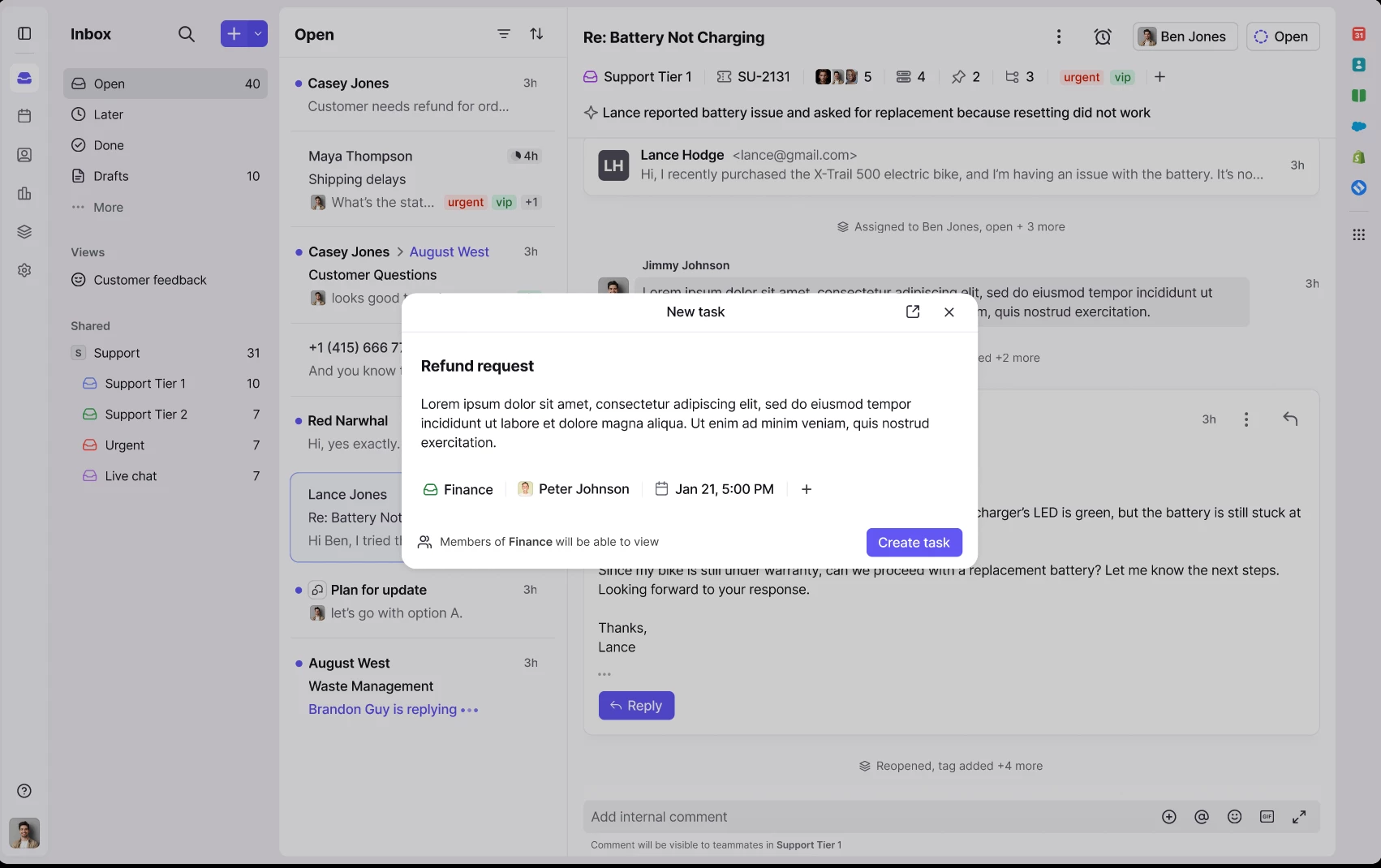
Screenshot of task creation window

Feedback I’m looking for

Thinking about how you’re using tasks today:

  • Are you using any workarounds to track due dates or repetitive tasks?
  • What is the primary reason you’re not using tasks more?

Thinking ahead:

  • Looking at the prototype, which of these updates would you use first?
  • In what scenarios do you imagine creating tasks from rules?


Thanks!

25 replies

brandon_lockhart
Forum|alt.badge.img+4

Other than items listed in the post. Our blockers to making use of tasks have been:

  1. No analytics
  2. Lack of preference settings like:
    1. ​​​Do not subscribe yourself to linked tasks you assign to others. 
    2. Do not notify all conversation subscribers when a linked task is resolved.

sarah_potter
  • Conversationalist
  • January 15, 2026

I would love to leverage tasks more. It’s something that would work well in our workflow between teams. Sometimes sharing a ticket in multiple inboxes isn’t enough and there are subtasks to that work item that need to be completed by different individuals simultaneously.

Templates for tasks would be highly used within my organization.

The primary reason we don’t use tasks as much as we’d like to is because they aren’t picked up in analytics. 
Second to that, I would love to be able to create them from rules or macros.
Deadlines aren’t really a make or break item for our use case.


jfreitas
Forum|alt.badge.img
  • Conversationalist
  • January 15, 2026

The concept of templates for tasks is fantastic! We use them all day-- it’s extremely important in our workflow. Looking forward to this release!


gareth_butcher
Forum|alt.badge.img+4
  • Conversationalist
  • January 15, 2026

We’re working towards a model where Sales + Operations own the main customer conversation end-to-end, and other departments support via tasks. From what we’ve seen so far, tasks have huge potential for this — a couple of small improvements would really help us roll it out with confidence. One suggestion would be a clear “Waiting on tasks” view (or similar) so owners can instantly see what’s outstanding, and importantly, when a task is completed it should resurface back into the owner’s view even if it was previously snoozed/hidden.

The other two suggestions that would make a big difference for adoption are task templates (so repeatable tasks don’t need to be rebuilt from scratch every time), and a way for the assisting team to send/attach their external email chains to the task so supplier/customer comms stay linked to the work item. Rules aren’t essential for us yet, but could be handy later if they can trigger templates/macros from tags.


abarder
Forum|alt.badge.img+2
  • Conversationalist
  • January 15, 2026

We’ve been anticipating SLAs applying to tasks. Is it safe to assume that due dates would replace this? If so, does the creation of task templates include designating time until due? (Eg. when using template x, due will always be set to “5 hours from task creation”)

Separately, does “Ability to create tasks from rules and macros” include auto-assignment of tasks made manually?


conniechen
Forum|alt.badge.img+5
  • Author
  • Fronteer
  • January 16, 2026

@abarder Resolution time goals already work on tasks today (not reply time goals as there is not really a concept of replying to a task). You can also already do task auto-assignment using the rule trigger “New task is created”. Let me know if you’re unable to find these in product.

We are planning on having due dates effectively override inbox-level resolution time goals. For example, if I create a task and set the due date as 1 week from now, the timer on the task will be based on that 1 week due date, and not the existing SLA. If the due date is removed, then that task has no due date or SLA.

The due date will be a component of the task template, so you don’t need to set it every time if you are using the same template.

Excited to hear if this aligns with what you would expect!


conniechen
Forum|alt.badge.img+5
  • Author
  • Fronteer
  • January 16, 2026

@gareth_butcher Lots of interesting feedback, thanks! Can you help clarify a few pieces?

  • Waiting on tasks view: When you say “owner”, are you referring to the creator of the task, or the assignee of the customer conversation, or are these the same?
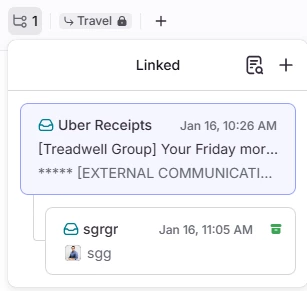
    • The way we accomplish this today is through the linking section at the top of the conversation panel, where the owner can see all the linked tasks and identify which ones are already done. Is there something missing here that’s making it ineffective?
  • Task resurfacing to owner once completed: Today tasks bump the original conversation they were linked to so the owner is aware that this sub-piece has been completed. What benefit does bumping the actual task itself provide?

gareth_butcher
Forum|alt.badge.img+4
  • Conversationalist
  • January 16, 2026

@gareth_butcher Lots of interesting feedback, thanks! Can you help clarify a few pieces?

  • Waiting on tasks view: When you say “owner”, are you referring to the creator of the task, or the assignee of the customer conversation, or are these the same?
    • The way we accomplish this today is through the linking section at the top of the conversation panel, where the owner can see all the linked tasks and identify which ones are already done. Is there something missing here that’s making it ineffective?
  • Task resurfacing to owner once completed: Today tasks bump the original conversation they were linked to so the owner is aware that this sub-piece has been completed. What benefit does bumping the actual task itself provide?

owner is typically both, but mainly the assignee of the customer conversation. Sorry I haven’t played with this for a while so my comments may be outdated. the fact that it bumps the conversation is good but we have the issue where we add a task for order entry, which pushes a team to enter info into our erp system and then move to the original conversation to respond to the customer with an acknowledgement, and they typically don't get notified that there has been a response to the original email, this might be a use for a task rule.

Would be nice to see this view, show clearly that the link is a task with a graphic of some sort that turns into a check mark when complete


ry_rael
Forum|alt.badge.img
  • Conversationalist
  • January 16, 2026

Many of the others have captured my thoughts on tasks regarding analytics, scheduling tasks etc. but one of the other reasons I haven’t used them as much as I’d like is due to the incompatibility with the mobile experience. 


harry
Forum|alt.badge.img+6
  • Helper
  • January 16, 2026

We are using tasks more now and find it very useful for turning off the SLA clock instead of snoozing an email. Having templates would be very handy for some of us, as we use tasks to assign call-backs on phones. Adding rule functionality could also be very useful with tasks. Currently, we use a timing rule to monitor replies not received, which could be folded into a task with a template instead. My mouse is going to be running out of buttons. At least you chose a forward slash, as Grammarly is using the back slash.


rmace
Forum|alt.badge.img+4
  • Conversationalist
  • January 16, 2026

I have recently started using tasks more and I’m really liking them. I love the plan to add due dates, templates and rule/macro functionality. I could definitely see myself using all three of those features. 

I currently, though less and less frequently, use Todoits. It’s a great tool, but something extra to pay for. It also means my tasks aren’t Front and center (pun intended lol). I could definitely see myself migrating to Front tasks over using another application.

The team aspect of Tasks is really handy. I can share a task easily on Front. With Todoist everyone needs to have an account, you have to pay for a business plan, etc. Nothing wrong with that, but I’d prefer to contain everything in one place, and it allows our organization to manage access more easily. We use API to automate part of our departure procedures so Front access it blocked automatically. 

I honestly think having due dates, templates and rule/macro support would be enough for me to drop Todoist. I currently snooze tasks as a means of adding a due date, but it’s extra steps and not as easy to manage.

One thing I would love to see is a toggle on the calendar to show tasks with due dates. That would definitely help with daily planning. That is something I tried to do with Todoist, and it technically worked, but it was a bit clunky and slow to sync. So I never really got into the habit of using it and turned it off eventually. 

I also think it would be handy to have tasks within a workspace. So team tasks, if you will. That would be extra handy for recurring things or tasks that may need to be passed from one person to another as people are in and out of the office.

My org currently uses a lot of SharePoint lists for team tasks. We have to build them out manually and then our IT team builds a Power App that can be used as a Front sidebar app to manage the lists. It works well, but is a lot of work to build out. If we could have tasks in Front workspaces with rules/macro support, assigning, snoozing, due dates, recurrence, etc that would basically eliminate the need for SharePoint lists and building apps. 


conniechen
Forum|alt.badge.img+5
  • Author
  • Fronteer
  • January 16, 2026

@ry_rael I assume you’re talking about the inability to create tasks on the mobile experience? Can you say more about how you imagine using tasks on mobile? What do you do instead today? Thanks!


ry_rael
Forum|alt.badge.img
  • Conversationalist
  • January 16, 2026

@ry_rael I assume you’re talking about the inability to create tasks on the mobile experience? Can you say more about how you imagine using tasks on mobile? What do you do instead today? Thanks!

@conniechen Yes, the inability to create tasks and when I am viewing them from the mobile experience they are looped in with discussions at the moment. There are many to-do items that pop up throughout the day and it would be nice to quickly create a task vs. a discussion or email to myself. 


cait_a
  • Conversationalist
  • January 17, 2026

The concept of templates for tasks is fantastic! We use them all day-- it’s extremely important in our workflow. Looking forward to this release!

we use tasks often for our tracking purposes, but we really need to be able to track them in analytics (I’ve met with Front team members about this) 

Looking forward to new task innovations for my team!


grit_evy
Forum|alt.badge.img+4
  • Conversationalist
  • January 19, 2026

We’re not currently using tasks in our workflow, but I’m very interested in the continued evolution of this feature. With the right enhancements, this could be a strong candidate for piloting with other departments and potentially replacing Slack for certain use cases.

Initial feedback:

  • Add Google Meet as a meeting option

  • Support recurring tasks

The proposed features, due dates, task templates, and the ability to create tasks from rules and macros are a solid starting point.

I also agree with the other feedback that has been provided for additional enhancements that would significantly improve adoption and usability:

  • Analytics 

  • Task scheduling

  • Mobile visibility and functionality

  • Ability to assign tasks to teams or workspaces, not just individuals

  • Calendar integration to surface tasks alongside meetings and deadlines


caitlin.crouse
Forum|alt.badge.img
  • Conversationalist
  • January 19, 2026

I think tasks were introduced while I was on maternity leave, so I didn’t know they existed until this thread. 😅

I took a tour and think these could be useful. For now, their utility will be at the management level or for individual inboxes. I personally snooze a lot of emails and leave myself comments for different tasks and having the tasks in my inbox will help me with my own organization.

What will prevent us from implementing this in team workspaces:

  • Analytics
  • Mobile visibility (for managers to monitor after hours)
  • Something very clearly marking it as done vs just archiving (or even marking as resolved when ticketed). Having something to check off on it so there’s a firm acknowledgement that it was completed would be nice because sometimes team members get into a groove and accidentally archive. 
  • Due dates with times. We have time-bound SLAs, not just due dates. Having a task with an optional due time would be really helpful for scheduling follow ups and ensuring tasks due sooner are prioritized. 

dcavanaugh
Forum|alt.badge.img
  • Conversationalist
  • January 19, 2026

@abarder Resolution time goals already work on tasks today (not reply time goals as there is not really a concept of replying to a task).

We use tasks in a few ways currently as we interact with other teams. One example would be sending a task to another team with just a question that needs answered. We use the thread in the task to discuss the question so we can then relay information to our customers. 


In other cases, we send a task to another department requesting they reach out to individuals for varying requests. The initial request is to reach out, but ensuring we hear back from that individual and passing the information along takes additional time and follow up. The problem with a single due date in these cases is that there’s both an expectation of how quickly that department creates the outreach to the individual as well as how quickly the individual responds with the requested information. Having a reply time goal and a due date for these cases would better communicate urgency. 


conniechen
Forum|alt.badge.img+5
  • Author
  • Fronteer
  • January 21, 2026

@dcavanaugh thanks for sharing your use case. I have some follow up questions to make sure I understand what’s happening.

In your first paragraph, when you send that task to another team, is it in service of addressing a customer request, and is it linked to the main conversation?

In your second paragraph, this is how i’m interpreting the sequence of actions (please correct me if I’m wrong):

  1. A assigns a task to B, which may be a request to reach out to C
  2. Once B completes that task, they resolve it
  3. B still needs to let A know what happened and what’s next (close the loop) once C responds

In this case, the due date solves 1 and 2, but there is a gap at 3 that a reply time goal could solve.

Is the ideal behavior that B “replies” to the task to confirm next steps with A, or that they reply to the main conversation?


conniechen
Forum|alt.badge.img+5
  • Author
  • Fronteer
  • January 21, 2026

@gareth_butcher about what you said here “they typically don't get notified that there has been a response to the original email, this might be a use for a task rule.”

Is the task assignee not a part of the original email? Is there a reason why you wouldn’t create a new task for any follow up items? Alternatively, I hear you on the rules. Are you envisioning something like “when there’s a reply to the main conversation, notify the linked task assignee”?


dcavanaugh
Forum|alt.badge.img
  • Conversationalist
  • January 21, 2026


In your first paragraph, when you send that task to another team, is it in service of addressing a customer request, and is it linked to the main conversation?

@conniechen  - We are typically asking another team for guidance or input related to a customer request and we use the “Linked Task” function.

In your second paragraph, this is how i’m interpreting the sequence of actions (please correct me if I’m wrong):

  1. A assigns a task to B, which may be a request to reach out to C
  2. Once B completes that task, they resolve it
  3. B still needs to let A know what happened and what’s next (close the loop) once C responds

In this case, the due date solves 1 and 2, but there is a gap at 3 that a reply time goal could solve.

Is the ideal behavior that B “replies” to the task to confirm next steps with A, or that they reply to the main conversation?

Correct! There’s the initial “task” of B reaching out to C but the larger request is that we get that response from C. In this case, C is a contractor and sometimes does not respond in the timeframe desired, so if B closes the task after the first outreach to C, it becomes A’s responsibility to follow up through snoozing the initial conversation with the customer. Ideally, the task communicates the urgency for B to contact C, but also remains active and communicates a timeline for C’s response that B can follow up on, thus closing the loop.


Jess
  • Conversationalist
  • January 26, 2026

What workarounds are you using / why aren't you using tasks more?

The friction to create a task slows me down. Both name and description are required fields, and neither auto-populates with anything from the conversation. For quick tasks, I just need to jot down what needs to happen—having to fill out multiple fields every time adds unnecessary steps.

The other issue is workflow confusion when resolving tasks. When I resolve a task, the original email pops back to the top of my inbox and I have to resolve that separately. It's disorienting—I think I'm done, but then there's another step, and it's not always clear what still needs attention vs. what I just completed.

Which updates would you use first?

Task templates would immediately reduce the friction I mentioned above. If I could have a template that pre-fills common task types, I'd actually use tasks more consistently.


conniechen
Forum|alt.badge.img+5
  • Author
  • Fronteer
  • January 26, 2026

@Jess thanks for the feedback, super clear. What would be your ideal behavior for the original conversation? The reason the linked conversation bumps back up is so you as the task owner can remember to follow up in the original thread. Is this not typical of your internal processes?


rmace
Forum|alt.badge.img+4
  • Conversationalist
  • January 26, 2026

One thing I think would be handy is the ability to choose if tasks without a due date would show in the Open section or not. I tend to build up a list of tasks that I need to work on, but they aren’t all current action items.

Right now with tasks as they currently are I have to snooze tasks and re-snooze them if I’m still not to the point of working on them. Once due dates are added I think it would be super helpful to have a toggle that would allow me to choose if tasks without a due date show in my Open section or not. 

My preference would be to only show tasks with a due date as that fits how I would use tasks. I could definitely see others wanting them all to show so I think it would have to be a toggle in user settings. 


conniechen
Forum|alt.badge.img+5
  • Author
  • Fronteer
  • January 28, 2026

@rmace that’s a neat idea! To generalize, it sounds like you need a way to differentiate between tasks that are ready to be worked on and tasks that are generally “for later”. Makes sense


rmace
Forum|alt.badge.img+4
  • Conversationalist
  • January 28, 2026

@rmace that’s a neat idea! To generalize, it sounds like you need a way to differentiate between tasks that are ready to be worked on and tasks that are generally “for later”. Makes sense

Yes, that's exactly it. I use Todoist in that way now. I've been migrating over to Front tasks and that's the one thing I've been missing so far.