Question

Unable to Configure MCP With Claude

  • May 27, 2026
  • 42 replies
  • 615 views

Show first post

42 replies

Javier - Developer Relations
Forum|alt.badge.img+9

@mw_bills We don’t recommend using mcp-remote, but I can confirm that this issue is reproducible via Claude Code when configuring it in the general pattern below. I have created a ticket for the team.

MCP_CLIENT_SECRET=<secret> claude mcp add --transport http --client-id <client id> --client-secret <server name of choice> https://mcp.frontapp.com/mcp


Javier - Developer Relations
Forum|alt.badge.img+9

@mw_bills Could you try connecting a new server following these new instructions for Claude Code? This works for me.
https://dev.frontapp.com/docs/mcp-server#example-for-claude-code


Javier - Developer Relations
Forum|alt.badge.img+9

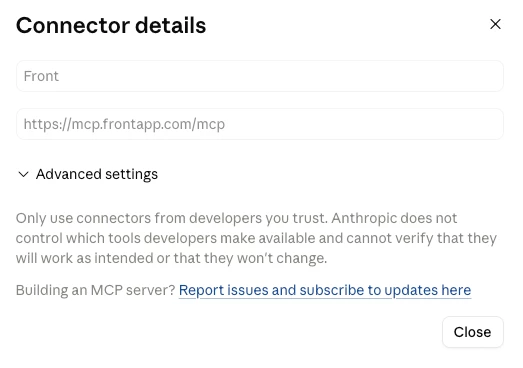
For anyone having issues with Claude Desktop or Web, could you try setting this up through Claude’s custom connector UI instead of editing the config files directly?
https://dev.frontapp.com/docs/mcp-server#example-for-claude-web-and-desktop

Let me know if that works!


mw_bills
  • Rookie
  • June 3, 2026

I tried connecting using the json provided in my mcp.json file but claude code doesnt recognize it … it never shows up in this list ( i tried restarting the CC CLI etc)


julius
  • Rookie
  • June 3, 2026

@Javier - Developer Relations im also having trouble connecting to claude code. I tried everything as instructed above but to no avail.

What might be the issue is that i dont see the MCP toggle in my Front app. Any help?


Javier - Developer Relations
Forum|alt.badge.img+9

@mw_bills Have you been able to try the command line instructions instead of configuring the JSON file? I’ve found that configuring the JSON file is unreliable and depends too much on your local machine’s setup to get right.


julius
  • Rookie
  • June 3, 2026

@mw_bills Have you been able to try the command line instructions instead of configuring the JSON file? I’ve found that configuring the JSON file is unreliable and depends too much on your local machine’s setup to get right.

@Javier - Developer Relations I tried everything however I dont see the mcp toggle in Front. Claude claims that is the issue. Is this something with my plan?


Javier - Developer Relations
Forum|alt.badge.img+9

@julius I don’t think you submitted the form to get access, but I added you about ten minutes ago. You should have received an email from me. Can you try refreshing the app?


ward
Forum|alt.badge.img
  • Conversationalist
  • June 4, 2026

Hi ​@Javier - Developer Relations — I've submitted the beta access form and am running into the same 403 issue described in this thread. The error occurs at the OAuth consent screen (before a token is issued), so it appears to be an authorization issue on the Front side rather than a scope or token problem.

Setup details:
- Connected via Claude's custom connector UI (not JSON config)
- MCP Server toggle is visible and enabled in my Front developer app
- Configured at the org level in Claude; individually getting the 403 on auth
- App was created this morning, so it shouldn't be a stale token issue

Happy to share my App ID and client_id by reply or DM if that helps you confirm whether my app is provisioned. Thanks!

Will


Javier - Developer Relations
Forum|alt.badge.img+9

Hey ​@ward,

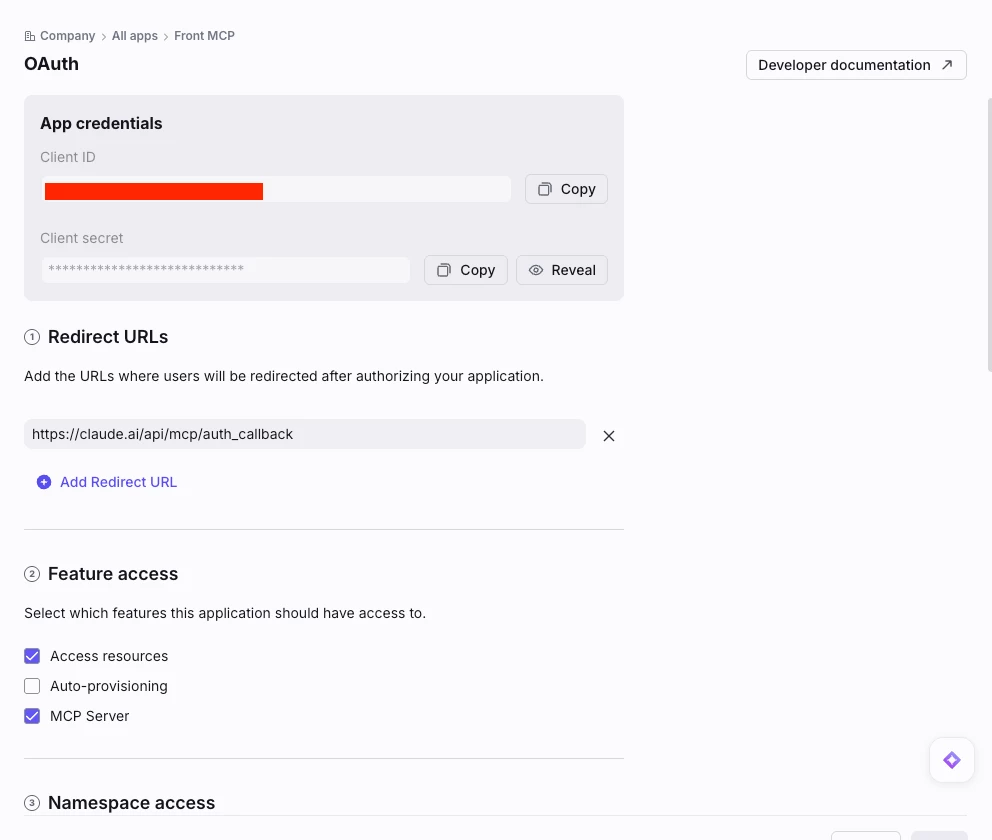
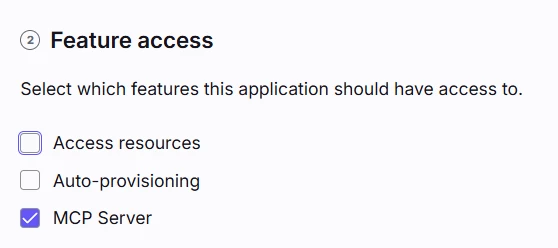
We had enabled the server already for you since your company was part of the initial beta. One thing I’ve learned recently is that the 403s can occur if you have multiple feature access checkmarks enabled in the OAuth feature within your Front developer app. Can you double-check that you only have the MCP Server feature enabled? We’re working to improve this, but it’s currently a possible cause of a 403.


If this doesn’t solve your issue, send me a private message with your details and I can have the team take a closer look. If you can copy the full URL where you see the 403 from your browser, that would help as well.


Javier - Developer Relations
Forum|alt.badge.img+9

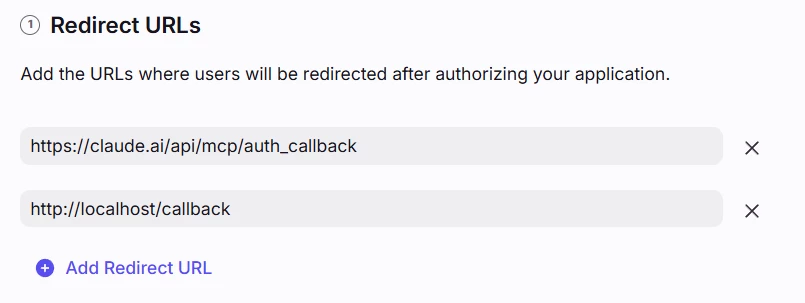
Update for visibility: The 403 that ​@ward reported was fixed by changing the redirect URL being used in the Front developer app’s OAuth feature.

The redirect URL that works for Claude Desktop/Web is https://claude.ai/api/mcp/auth_callback

The redirect URL that works for Claude Code is http://localhost/callback


paulineplm
  • Rookie
  • June 5, 2026

We do not have the MCP server under feature access. Could you help? 


rolandschuetz

Hi Front team,

I am running into what looks like the same MCP OAuth setup issue, but I can now narrow it down quite precisely.

I have tested this across several runs and threads. First, I tried to configure Front MCP exactly according to the current Front setup guide, using `https://mcp.frontapp.com/mcp` directly and avoiding `mcp-remote`. That did not work. After that, I went through multiple debugging iterations with several Codex agents, trying different redirect URLs, scopes, config shapes, and local bridge approaches. We eventually ended up stuck at the following Codex analysis: the Front authorization step succeeds, but the token exchange fails because Codex does not appear to send valid client credentials to Front’s token endpoint.


I asked Codex to write a detailed analyses based on our conversations, hope that help you narrow down the issue:
 

Requested details:

1. AI agent/client

- OpenAI Codex CLI / Codex Desktop
- Codex CLI version: `codex-cli 0.135.0`

2. OS

- macOS

3. Setup guide compliance

I am currently following the newest setup guide as closely as possible:

- MCP URL: `https://mcp.frontapp.com/mcp`
- No `mcp-remote` in the current test
- Front OAuth app has MCP Server enabled
- Redirect URL includes the actual Codex callback:
  `http://localhost:25899/callback/xF30yljzBJGv`
- Codex is configured with:
  `mcp_oauth_callback_port = 25899`
  `mcp_oauth_callback_url = "http://localhost:25899/callback"`

4. Error

If I run:

```bash
codex mcp login front --scopes read,write
```

Front rejects the request before token exchange:

```text
OAuth provider returned `invalid_scope`: The requested scope is not supported: read, write.
```

This matches the live OAuth metadata from:

```text
https://app.frontapp.com/.well-known/oauth-authorization-server
```

which currently returns only:

```json
"scopes_supported": ["feature:mcp"]
```

So I then run:

```bash
codex mcp login front --scopes feature:mcp
```

Thanks for looking into it,
Roland

This gets further. Front shows the authorization screen, I click Authorize, and Front redirects successfully to:

```text
http://localhost:25899/callback/xF30yljzBJGv?code=...&state=...
```

So the redirect URL and authorization step are working.

However, Codex then fails during the token exchange:

```text
Error: failed to handle OAuth callback

Caused by:
    OAuth token exchange failed: Server returned error response:
    invalid_client: Invalid client credentials.
```

This strongly suggests that the remaining failure is not the redirect URL, not user authorization, and not the scope. It is the token request from Codex to Front.

5. Codex MCP config, anonymized

```toml
mcp_oauth_callback_port = 25899
mcp_oauth_callback_url = "http://localhost:25899/callback"

[mcp_servers.front]
url = "https://mcp.frontapp.com/mcp"
```

The server was added with:

```bash
codex mcp add front \
  --url https://mcp.frontapp.com/mcp \
  --oauth-client-id <front-client-id>
```

The Codex CLI currently exposes `--oauth-client-id`, but I do not see a documented equivalent for passing the OAuth `client_secret` for MCP login.

I also tested adding an OAuth block manually:

```toml
[mcp_servers.front.oauth]
client_id = "<front-client-id>"
client_secret = "<front-client-secret>"
scopes = ["feature:mcp"]
```

But the token exchange still failed with:

```text
invalid_client: Invalid client credentials
```

From the live Front OAuth metadata, the token endpoint supports:

```json
"token_endpoint_auth_methods_supported": [
  "client_secret_post",
  "client_secret_basic"
]
```

So my current hypothesis is:

- Front MCP requires a confidential OAuth client.
- Codex MCP login successfully performs PKCE authorization.
- Codex then exchanges the authorization code without sending the client secret, or sends it in a form Front does not accept.
- Front therefore rejects the token request with `invalid_client`.

Could you confirm the supported Codex CLI configuration for Front MCP, specifically how Codex should pass the OAuth `client_secret` to Front’s token endpoint?

If Codex CLI is not currently supported because it cannot provide confidential client credentials for MCP OAuth, it would be helpful to document that explicitly. At the moment, authorization succeeds, but the token exchange fails after callback, which makes the issue look like a local redirect or scope problem even though it appears to be a client authentication problem.

One additional observation: the Front developer UI currently seems to auto-enable “Access resources” when Resource permissions are configured. I initially thought this might be related to the issue, but the current failure happens after successful authorization and redirect, during token exchange, so I do not think Resource permissions are the primary blocker here.


rolandschuetz

Update: I upgraded Codex CLI from 0.135.0 to 0.139.0 and retried the direct Remote MCP OAuth flow.


Command:
codex mcp login front --scopes feature:mcp


The authorization URL now includes:
scope=feature:mcp
resource=https://mcp.frontapp.com/mcp
redirect_uri=http://localhost:25899/callback/...

The browser authorization succeeds and redirects back to localhost with a code, but the CLI still fails during the token exchange:

OAuth token exchange failed: Server returned error response: invalid_client: Invalid client credentials.

This suggests the remaining issue is not the redirect URL, scope, resource parameter, or Codex CLI version. It appears to be the token exchange step, likely because Front’s OAuth app is treated as a confidential client requiring valid client credentials, while Codex CLI’s Remote MCP OAuth flow does not appear to support providing the Front client secret for this MCP server configuration.


Javier - Developer Relations
Forum|alt.badge.img+9

@rolandschuetz We have not had a chance to test with Codex yet, but I agree with your suspicion that the OAuth secret is not being passed. Reviewing docs and articles online, you seem to have tried the steps that are commonly suggested. We’re taking note of this to investigate further and find time to test a Codex configuration! If you discover something that works before hearing back, please do let us know!


andrewkwitko

Hi Front team — following the setup guide, my OAuth app authorizes (Front login + consent succeed) but then fails immediately after with an authorization error. This looks like the same server-side beta-enablement gate others have hit, where the app needs MCP Server access switched on manually.

Could you please enable MCP Server access for my app?

I've also submitted the beta request form. Thanks for your help!


Javier - Developer Relations
Forum|alt.badge.img+9

@andrewkwitko We just enabled MCP server access for your company. Thanks for submitting the form.