

jackson
Enthusiast
May 30, 2024
Solved

How can I configure Front to view each individual customer without using customer mailboxes?

  • May 30, 2024
  • 1 reply
  • 158 views

We would like to avoid using customer mailboxes as Front suggests, but still want to view each customer’s messages on a per customer basis in our sidebar by default. How would we go about achieving this?
Best answer by PhoebeatFront

Hey Jackson! 

You can do this using a combination of tags, rules, and views. 

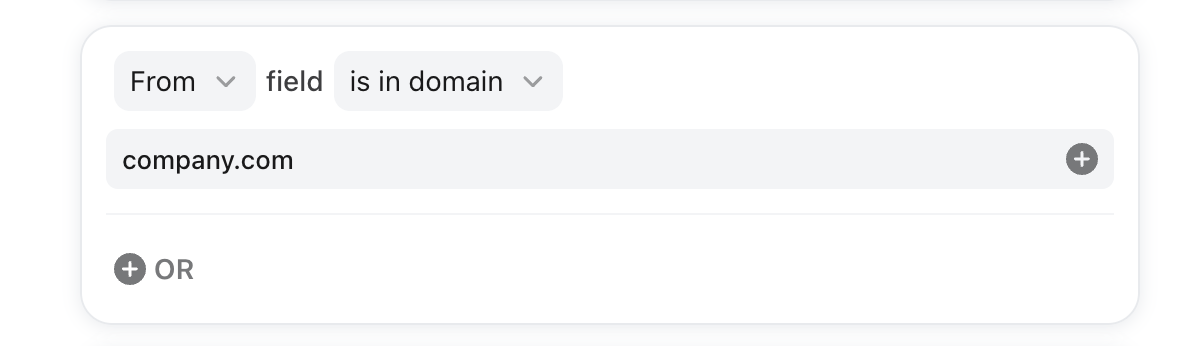
Tags: Create a tag for each customer, and use a rule to tag all conversations with that customer. You can do this based on their domain: 


We recommend using a Rule Set to make this easier. You can even upload a CSV with the rule conditions and tags for each customer. 

Once the tags are added by the rule, you can use Views for each customer, which can be pinned to any teammate’s sidebar. 

1 reply

PhoebeatFront
Fronteer
May 31, 2024

Hey Jackson! 

You can do this using a combination of tags, rules, and views. 

Tags: Create a tag for each customer, and use a rule to tag all conversations with that customer. You can do this based on their domain: 


We recommend using a Rule Set to make this easier. You can even upload a CSV with the rule conditions and tags for each customer. 

Once the tags are added by the rule, you can use Views for each customer, which can be pinned to any teammate’s sidebar. 

-Phoebe, Senior Customer Support Specialist @ Front