
Option to expand tag and app object visibility has been released!

  • December 3, 2025
  • 21 replies
  • 246 views

conniechen
Forum|alt.badge.img+5

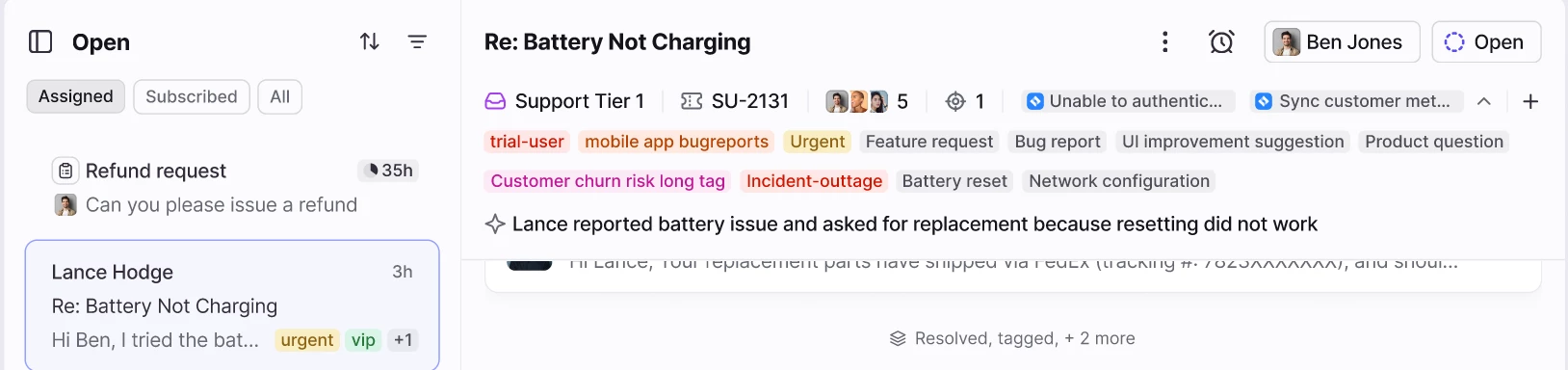
We just released the ability to view more tags and app objects in the header of a conversation. You should be able to see this feature now on any conversation that has more than 2 tags or app objects if you have the toggle enabled.


Let me know if you have any questions or feedback. Thanks!

21 replies

Stevie
Forum|alt.badge.img
  • Conversationalist
  • December 3, 2025

Hi Connie,

Thank you for addressing this issue. 

Unfortunately, it is still only showing the first two tags for us. Is there something in the settings we need update? 


Thanks
Steve


anthonyv
Forum|alt.badge.img+1
  • Conversationalist
  • December 3, 2025

@conniechen working like a charm. Great improvement!

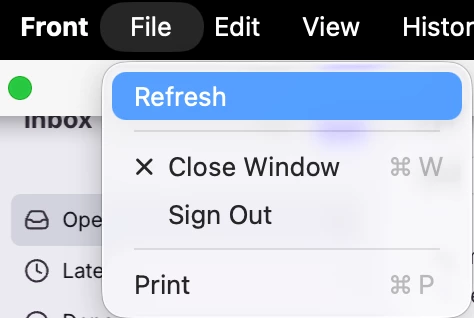
@Stevie maybe try refreshing your App to see if it activates it for you.


Stevie
Forum|alt.badge.img
  • Conversationalist
  • December 3, 2025

@anthonyv we generally use Front on Chrome browser. I’ve closed the browser and re-opened, but doesn’t work. 

I do have the app on my windows laptop. I have opened and refreshed as you showed but it doesn’t work…..


I will attempt to restart my laptop and hopefully that will work! 🤞


Stevie
Forum|alt.badge.img
  • Conversationalist
  • December 3, 2025

Hello Connie and Anthony,

The switch off/on strategy did not work. The desktop browser and the app only displaying a maximum of two tags only. 


Thanks
Steve


gareth_butcher
Forum|alt.badge.img+4
  • Conversationalist
  • December 3, 2025

@Stevie Try the little arrow on the right side of the tag section

Hello Connie and Anthony,

The switch off/on strategy did not work. The desktop browser and the app only displaying a maximum of two tags only. 


Thanks
Steve


anthonyv
Forum|alt.badge.img+1
  • Conversationalist
  • December 3, 2025

@conniechen since the latest beta release the shortcut for Tags (CMD+T) is no longer working for me. I have tried on both Mac Desktop app and the WebApp in Safari. 
If I toggle the “Enable Inbox Improvements” to OFF, then the shortcut will work again, but will fail with the toggle on.


Margaret
Forum|alt.badge.img+1
  • Conversationalist
  • December 3, 2025

Hello Connie and Anthony,

The switch off/on strategy did not work. The desktop browser and the app only displaying a maximum of two tags only. 


Thanks
Steve

It’s OK ​@Stevie doesn’t have access to the change but I do. Have let him know! We are in different time zones - at least that’s my excuse 😄


rmace
Forum|alt.badge.img+4
  • Conversationalist
  • December 3, 2025

Thanks Connie and Team! 

This looks great on my end. Took me a second to notice the drop down arrow, but once I found that it is super handy. I like that it stays expanded once you click the drop arrow even when navigating away or to different convos. 

I personally don’t use tags to the extent that it was ever an issue, but I know some of the teams in my organization do use a lot more tags so this will be a very welcomed update. 


Liz
Forum|alt.badge.img+4
  • Conversationalist
  • December 3, 2025

It worked for me. Looks great! Agreed that I would not have natively known where to find that option had I not been told on this thread (about the little dropdown arrow). 


Kim P
Forum|alt.badge.img+1
  • Conversationalist
  • December 3, 2025

Hello, I’m excite for this new options. 


I am noticing that I can no longer use the T shortcut to add tags. Other shortcuts seem to still be working. 


Margaret
Forum|alt.badge.img+1
  • Conversationalist
  • December 3, 2025

@conniechen Can see it and it’s a game changer - thank you. Do you have a date for the roll out?


jdekruijf
Forum|alt.badge.img+3
  • Conversationalist
  • December 3, 2025

EDIT:
I just noticed that ​@Kim P said this as well. 

Really nice!


1 issue I encountered in the chrome and firefox browser is that I can't add tags with the “T” shortcut now. Does anyone else also experience that? If I go back to the view where the tags are capped it does work when I press "T”


judy
Forum|alt.badge.img+2
  • Conversationalist
  • December 3, 2025

This is great! This addresses the one of the biggest issue my team have been experiencing since the switch over in August! Yes! When will thing be released?


allenk
Forum|alt.badge.img+4
  • Conversationalist
  • December 3, 2025

@conniechen I’m having the same issue where if I “toggle” this on using the dropdown arrow. CMD+T doesn’t work to bring up the tag window. If I “toggle” it back off using the dropdown arrow then the shortcut works again.

My assumption is that the shortcut should work whether you are displaying all tags or not?


conniechen
Forum|alt.badge.img+5
  • Author
  • Fronteer
  • December 3, 2025

@allenk ​@jdekruijf ​@Kim P ​@anthonyv thanks for all the reports on the shortcut not working. It should indeed still work in the new version. We’re working on fixing this issue and it should be resolved soon. In the meantime, feel free to turn off the toggle if it’s disrupting your work.


conniechen
Forum|alt.badge.img+5
  • Author
  • Fronteer
  • December 3, 2025

@judy ​@Margaret this will be released mid-December to all users


dmitry.minkovsky

Hi everyone, I’m Dmitry, a software engineer here at Front. I’m happy to report that the tag keyboard shortcut should be working now in the new expanded mode. Please reload Front to get this fix. Thanks so much for all your feedback!


conniechen
Forum|alt.badge.img+5
  • Author
  • Fronteer
  • December 3, 2025

@Liz ​@rmace definitely agree it’s subtle by design! We’ll have an education tooltip that will show when this is released to all users, which should help your team learn about it.


rmace
Forum|alt.badge.img+4
  • Conversationalist
  • December 3, 2025

@Liz ​@rmace definitely agree it’s subtle by design! We’ll have an education tooltip that will show when this is released to all users, which should help your team learn about it.

Thanks for the update. That sounds like a good plan! 


dmitry.minkovsky

Hi everyone, I’m Dmitry, a software engineer here at Front. I’m happy to report that the tag keyboard shortcut should be working now in the new expanded mode. Please reload Front to get this fix. Thanks so much for all your feedback!

Actually, we found a case where the shortcut still isn’t working. We’ll fix this and update here. 


kia_slade
Forum|alt.badge.img+2
  • Conversationalist
  • December 4, 2025

Its working on my end. I missed the down arrow after i closed the app and reloaded it. My team is looking forward to this feature being released to them.