
Improved conversation list filters

  • November 12, 2025
  • 19 replies
  • 491 views

conniechen
Forum|alt.badge.img+5

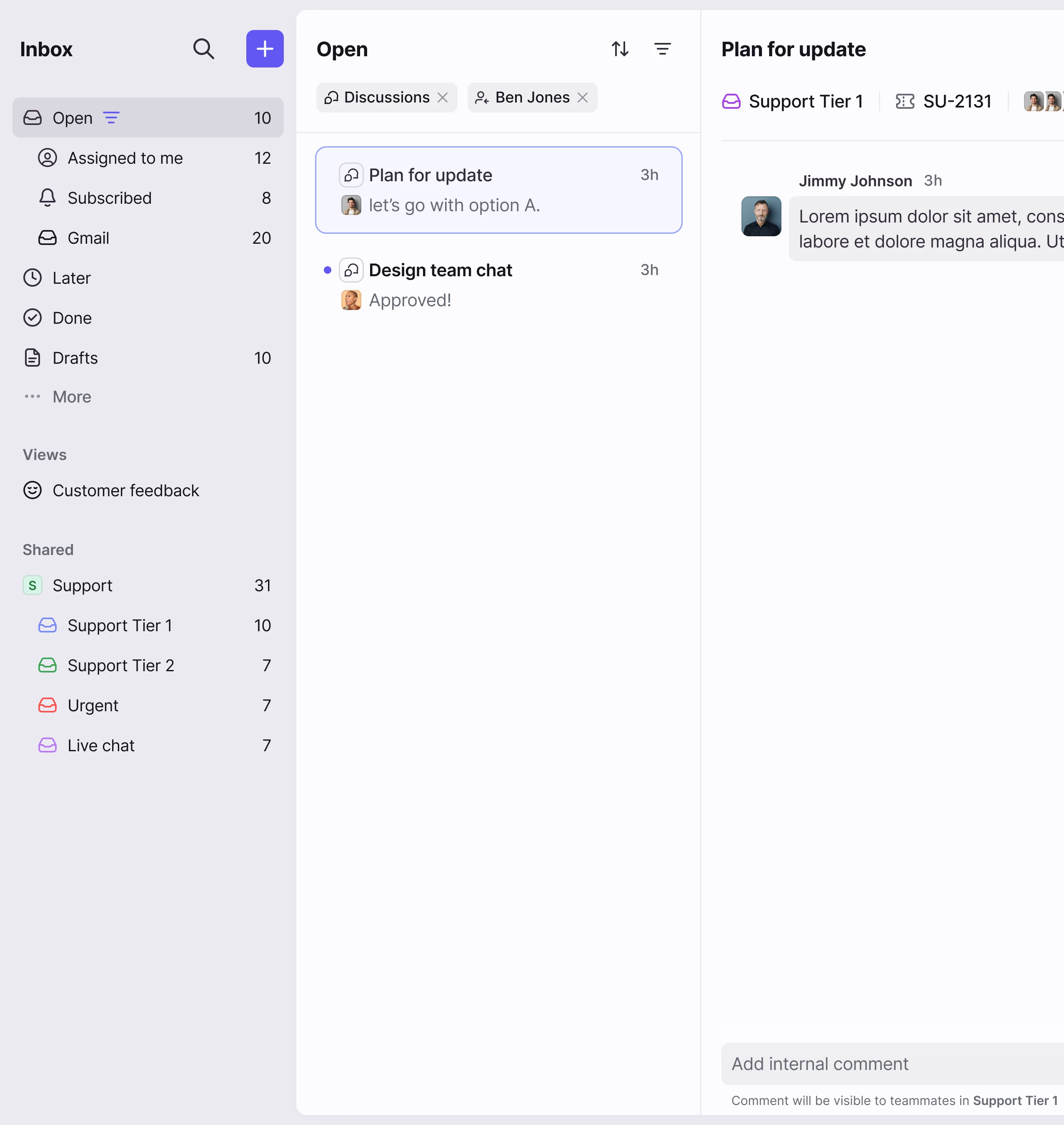
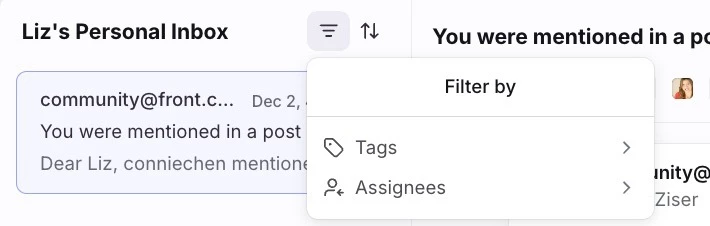
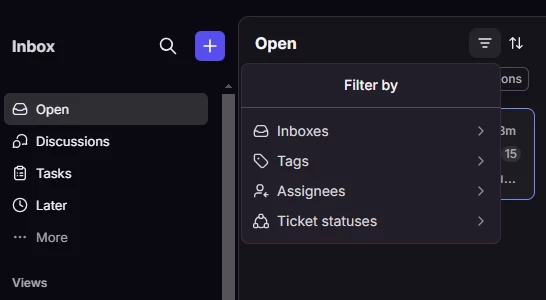
The next improvement we’re making simplifies the process of applying or removing filters on your conversation list by utilizing hover interactions and pills. We’re also adding in conversation type filters, so you’re still able to split out tasks and discussions as needed. 

Take a look at the experience below.
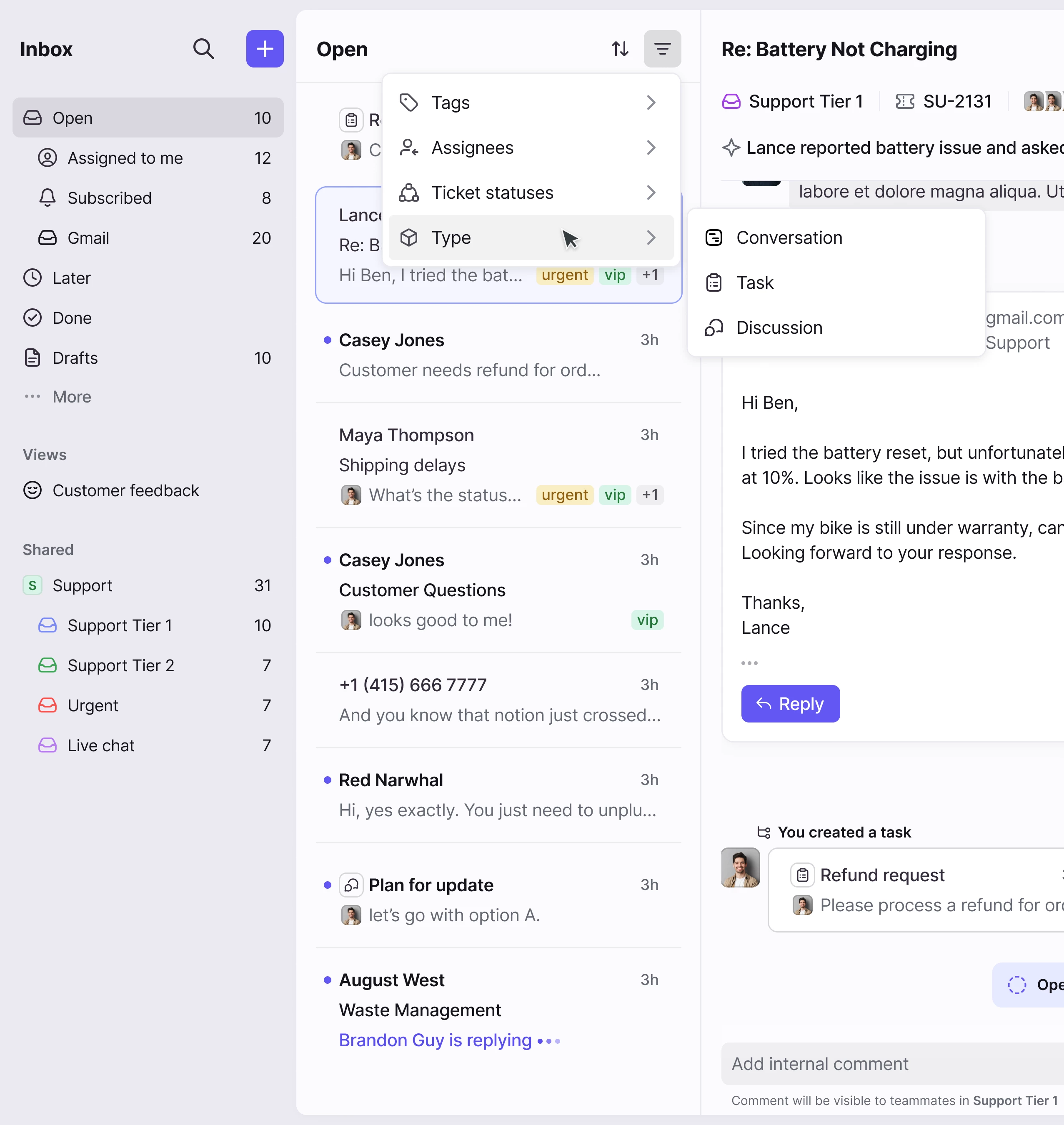
 

➡ Here’s a prototype for you to try out ⬅ 


Note that this prototype is not exhaustive; you’ll only be able to apply filters for Discussions and Ben Jones. You can always press ‘r’ on your keyboard to restart the prototype.


Some questions as you explore the new filtering experience:

  • How often are you using conversation list filters?
  • When you are filtering, what are you typically looking for? What’s your typical workflow?

Let me know your thoughts and feedback below!

 

19 replies

grit_evy
Forum|alt.badge.img+4
  • Conversationalist
  • November 13, 2025

How often are you using conversation list filters?
We use filters constantly. They’re an essential part of our daily workflow. Since our customer service team has access to all 50+ shared inboxes across workspaces, filters help us quickly zero in on the conversations that actually need our attention - which are the @ mentions.

When you are filtering, what are you typically looking for?
We primarily filter to see @mentions. Because all other incoming messages are managed directly within the shared workspace inboxes (where our rules for tagging, archiving, and routing trigger correctly), the only conversations we need to track in the Subscribed section are the ones where a team member was specifically @mentioned.

What’s your typical workflow?We created a tag for each user and set up a rule so that when someone is @mentioned, the rule automatically applies their tag to the conversation. Team members then filter the Open section by their specific tag to view only the messages that require their attention. This process worked well for quite some time, but within the last couple of weeks it’s started to fail, unrelated conversations are now appearing even when the tag filter is applied to the Open or Subscribed section, making it harder to track true @mentions.


brandon_lockhart
Forum|alt.badge.img+4

Conversation filters are typically only used by management looking for something specific or by teams testing new workflow ideas, however, even though we don’t use them frequently, it is important to have them. This new flow looks great. 


Carrie
  • Conversationalist
  • November 13, 2025

Similar to Brandon, we are very light filter users.


conniechen
Forum|alt.badge.img+5
  • Author
  • Fronteer
  • November 13, 2025

Thanks for the feedback!

@grit_evy Thanks for the insights into your team’s workflow. Have you contacted support about the issue you’re running into? That does seem like a bug!


anthonyv
Forum|alt.badge.img+1
  • Conversationalist
  • November 13, 2025

We regularly use filters, predominantly to filter with tags.
This allows us to handle all enquirer types that relate to the same tag in bulk/sequence - which creates efficiency for our workflows as different types of tasks require using different systems and tools.

I think adding the pills makes a lot of sense so it is easy to see what tags are applied and clear them as needed. Good improvement


rmace
Forum|alt.badge.img+4
  • Conversationalist
  • November 14, 2025

Love this! Our use case is primarily management users. We receive direct messages, get tagged and have emails assigned. It's sometimes difficult to find things like discussions vs emails. 


grit_evy
Forum|alt.badge.img+4
  • Conversationalist
  • November 14, 2025

Hello ​@conniechen 

Response from the Front support team "The workflow you’ve built (using global shared tags to try and track @mentions) isn’t something the system was originally designed to support. Because of that, some latency or temporary mismatches in counters are expected. In most cases, and based on your reports, things do eventually reconcile, but the process is not perfectly reliable."


gareth_butcher
Forum|alt.badge.img+4
  • Conversationalist
  • November 19, 2025

This new filtering experience looks really promising — love the direction, especially how quickly we can toggle filters in and out. We use filters constantly to help the team stay focused, so refinements here make a big difference.

I shared this elsewhere but, one workflow we rely on heavily is using stars as a short-term task list. Our team checks their inbox at set times, clears what they can (archive/snooze/respond), and then stars anything they need to complete before the next inbox check. After that, they work almost entirely from Assigned to Me → Starred, which keeps focus tight and avoids inbox distraction.

With the new filtering UI, two improvements would make this workflow even stronger:

  • A one-click “Starred Only” filter
  • An option to auto-unstar when snoozing or archiving

These two additions would fit naturally into the new filtering model and would really help teams like ours maintain a clean, accurate, distraction-free workflow through the day.


Orianne
Forum|alt.badge.img+4
  • Conversationalist
  • November 25, 2025

On my side, I also agree that filters are important — they make it much easier to narrow things down.
But I think we’re still missing one key piece: seeing the actual number of conversations after a filter is applied.

Right now, we can only see how many filters we’re using, not how many conversations those filters return.

To get that number, we have to manually select all conversations.

Being able to see the conversation count right away would:

  • Save time (no need to select everything manually)

  • Help us understand workload at a glance and what is left.

  • Make filters more actionable and meaningful

We actually stopped using the ticketing because of that.


Liz
Forum|alt.badge.img+4
  • Conversationalist
  • November 25, 2025

Will Conversation Status be added to this filter? That’s something that was lost with the previous redesign, and has been incredibly cumbersome since.


Caroline
Forum|alt.badge.img
  • Conversationalist
  • November 28, 2025

How often are you using conversation list filters?

We use filters every day!


When you are filtering, what are you typically looking for? What’s your typical workflow?

We usually filter conversations to see those handled by a specific teammate on a specific date, or to find messages that are still open based on certain tags.


conniechen
Forum|alt.badge.img+5
  • Author
  • Fronteer
  • December 2, 2025

@Liz Can you clarify what you’re referring to? I’m assuming you are talking about the Open/Archived/Snoozed/Trash/Spam tabs? If so, these are now Open/Later/Done and we won’t be moving back to the tabs in the personal workspace.


Liz
Forum|alt.badge.img+4
  • Conversationalist
  • December 2, 2025

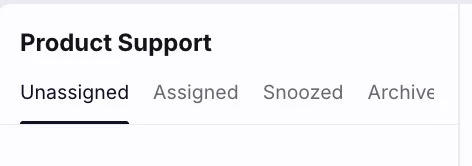
@conniechen I’m referring to the attached. While I understand clicking into our folders defaults to those that are “open”, it would be incredibly helpful to sort conversations by Conversation Status in order to quickly find “Archived” and “Snoozed” conversations in the same folder. This used to be easy to do, but now has an incredibly cumbersome workaround (largely requiring a burdensome “Search”).


rmace
Forum|alt.badge.img+4
  • Conversationalist
  • December 8, 2025

I’m not seeing the Type filter option. 


saba.hojjat
  • Conversationalist
  • December 9, 2025

I agree with Liz—it would be incredibly helpful to be able to search snoozed or archived conversations. The mobile app still has the older search functionality, which, while imperfect, often forces us to use our phones just to locate threads that are no longer in our open inbox.

If it’s possible to add filters by conversation status (open, snoozed, archived), it would make the search function significantly more powerful and efficient.


Saba


conniechen
Forum|alt.badge.img+5
  • Author
  • Fronteer
  • December 9, 2025

@saba.hojjat thanks for the feedback. It sounds like you’re specifically referring to search being scoped to conversation status, and not the Open/Later/Done folders specifically?


Liz
Forum|alt.badge.img+4
  • Conversationalist
  • December 9, 2025

@conniechen Not to bury Saba’s response, but echoing my feedback in response to your follow-up question:

The Open/Later/Done folders include conversations from all folders, which makes them incredibly inefficient (almost unusable) for teams like mine who have many folders.

The search feature is also inefficient for simple queries like “Snoozed conversations in this folder,” especially since you have to click into the specific folder first before searching, as not everything appears in the “All Inboxes” dropdown of the search modal.

It would be far more efficient to bring back the ability to click into a folder and, at the top, access Snoozed/Archived buttons relevant to that folder. It requires far fewer steps and is significantly easier to use.


conniechen
Forum|alt.badge.img+5
  • Author
  • Fronteer
  • December 9, 2025

@Liz when you say “folder”, are you referring to personal inboxes you’ve connected?


Liz
Forum|alt.badge.img+4
  • Conversationalist
  • December 9, 2025

@conniechen I believe this applies to anything except Shared Inboxes (but please correct me if I’m wrong). For example, this appears at the top of a Shared Inbox: 


It does not appear across any other inboxes under the top-left “Open” section. I understand that’s because those views default to “Open” conversations, but there should be an easy way to access these same options for those folders as well, without needing cumbersome ‘search’ workarounds (no offense intended 🤓 I love the expanded search features! But not for simple views like this that should otherwise take a single-click).