

Updated mobile app is now available for early access

  • June 11, 2026
  • 25 replies
  • 647 views

conniechen
Forum|alt.badge.img+5


Update: The new mobile app is now available to all users without the need for a separate test app as instructed in this post. Please see the newest post below for instructions.


We are actively working on updating the Front mobile app to better match the styling and information architecture of the current web and desktop apps. As part of this update, we’ve also refreshed the look and feel so it is sleeker, more native-feeling, and meets modern mobile standards and patterns.
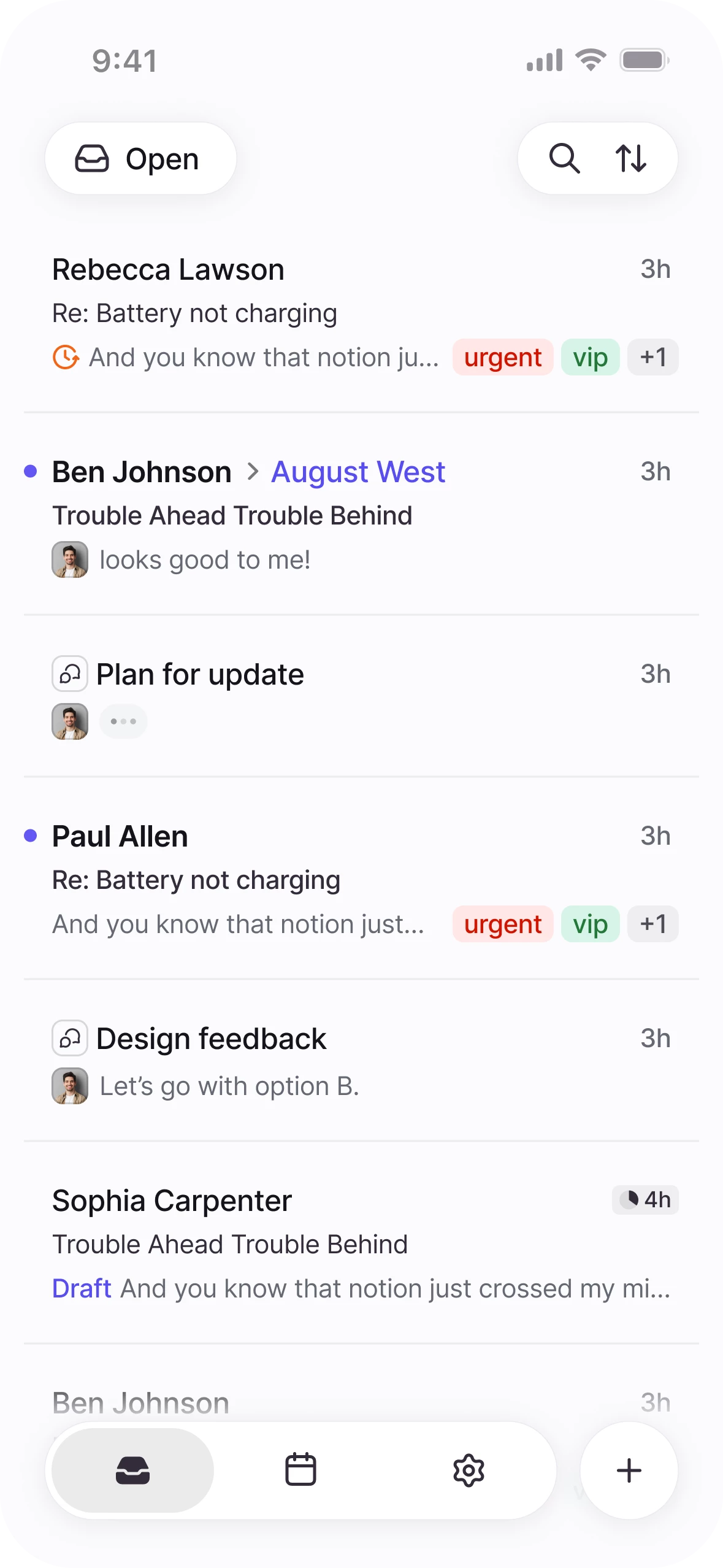
 

To get early access, please follow the instructions below:

  1. Let me know you’re interested in the thread below, so I can give you access on my side
  2. Download the relevant test app
    1. For iOS
      1. Visit https://testflight.apple.com/join/3T0IaOUV
      2. Follow the steps on the page to install version 5.81.0
    2. For Android
      1. Visit https://play.google.com/store/apps/details?id=com.frontapp.mobile
      2. Scroll down the page and then click Join in the Join the beta section for version 5.81.0.
  3. Open the Front mobile app sidebar and turn on the toggle “Enable new design”

We plan on releasing the app to all users behind the toggle in the coming weeks.

Feel free to leave feedback here once you get a chance to try it out. Thanks!


This topic has been closed for replies.

25 replies

antoine-sudan
  • Conversationalist
  • June 11, 2026

I have the testflight version but no toggle in the Front mobile app sidebar to turn on the toggle “Enable new design”. Do you know why?


rmace
Forum|alt.badge.img+4
  • Conversationalist
  • June 11, 2026

I'm definitely interested in testing this out!


lucas_hilgemann
Forum|alt.badge.img

 Yes.  Want in. Please.  


🖐🏽


Forum|alt.badge.img+5
  • Conversationalist
  • June 11, 2026


conniechen
Forum|alt.badge.img+5
  • Author
  • Fronteer
  • June 11, 2026

I have the testflight version but no toggle in the Front mobile app sidebar to turn on the toggle “Enable new design”. Do you know why?

@antoine-sudan I have to add you to the access list on my side first. It should be working now!


dtos
Forum|alt.badge.img+1
  • Conversationalist
  • June 11, 2026

I’m definitely in!


anthonyv
Forum|alt.badge.img+1
  • Conversationalist
  • June 12, 2026

@conniechen can you please ad me to the access list as well


Orianne
Forum|alt.badge.img+4
  • Conversationalist
  • June 12, 2026

I would like to be able to test too, please?


allenk
Forum|alt.badge.img+4
  • Conversationalist
  • June 13, 2026

@conniechen I would like access as well. Thanks!


conniechen
Forum|alt.badge.img+5
  • Author
  • Fronteer
  • June 15, 2026

Everyone who has commented thus far has been given access. Please follow the instructions in the post to access the new changes. 

Looking forward to your feedback!


dtos
Forum|alt.badge.img+1
  • Conversationalist
  • June 15, 2026

Everyone who has commented thus far has been given access. Please follow the instructions in the post to access the new changes. 

Looking forward to your feedback!

When you tap into a tag on mobile, how do you toggle between Open/Archived/Snoozed messages in that tag?


danielle_brod
Forum|alt.badge.img
  • Conversationalist
  • June 17, 2026

Interested - please add me ​@conniechen and thanks!


conniechen
Forum|alt.badge.img+5
  • Author
  • Fronteer
  • June 17, 2026

@dtos We’re working on getting that added back in!


rmace
Forum|alt.badge.img+4
  • Conversationalist
  • June 18, 2026

So far the new app experience has been great. I noticed the issue dtos pointed out and I’m glad to hear that is being worked on. I also noticed there isn’t an option to add a Task yet. I use that feature a lot so I’d love to see that. I expect it’s coming and just not ready though. 

Another feature I’d love to see is a dark mode. :D 

Some nice to haves would also be the ability to reorganize the inbox menu and for the workspaces to default to collapsed, but retain the last toggle. In other words, I’d like them all to be collapsed to start, but if I expand one I would want it to remain expanded until I collapse it again. The reason for that is the massive number of workspaces I’m in as a company admin. I need to remain in them, but I don’t need to necessarily see every inbox all the time.  


nicholas
  • Conversationalist
  • June 25, 2026

Interested in trying out the new app


indy
  • Conversationalist
  • June 25, 2026

Im interested


conniechen
Forum|alt.badge.img+5
  • Author
  • Fronteer
  • June 25, 2026

Thanks for the feedback ​@rmace! Yes, we had to deprioritize adding tasks in at this time, along with dark mode. 


andoodle
  • Conversationalist
  • June 25, 2026

Would love to get access!


sarge
  • Conversationalist
  • June 25, 2026

@conniechen would love to test this as well. Thanks!


Emma
  • Helper
  • June 26, 2026

Yes please, I would love to have access to the updated app


sarge
  • Conversationalist
  • June 26, 2026

@conniechen Is there any chance you'd consider replacing the Settings icon in the bottom navigation with Search?

Search is something many users access throughout the day, while Settings tends to be something you only visit occasionally. Moving Search to the bottom navigation would make it much faster to reach, especially on larger iPhones where the bottom of the screen is much more comfortable to access with one hand.

It also feels more in line with Apple's current iOS design language. Many first-party and third-party apps have moved high-frequency actions like Search into the bottom navigation, which makes the experience feel more consistent with the rest of the operating system.

Settings could simply move back into the slide-out menu, where it's still easy to find when needed but doesn't occupy one of the most valuable spots in the primary navigation.

I've included a few examples of other apps that have adopted this pattern for reference.

Slack:


Instagram:


Apple Mail:


conniechen
Forum|alt.badge.img+5
  • Author
  • Fronteer
  • June 26, 2026

Hi ​@sarge, thanks for trying out the new design, and for the thoughtful feedback. Your feedback makes sense. I’ll log it for our team to talk through in the coming weeks.


Kim P
Forum|alt.badge.img+1
  • Conversationalist
  • June 27, 2026

I would like to test this!


conniechen
Forum|alt.badge.img+5
  • Author
  • Fronteer
  • June 29, 2026

@Kim P The new design is now available without going through the test app, through version 5.81.1. Let me know if you’re not seeing the toggle in the app after updating.