

Solved

Allow clipboard access in sidebar plugin

  • August 19, 2025
  • 3 replies
  • 84 views

sdriver

Hello - at the moment when attempting to use an inbuilt copy paste button in my sidebar plugin i get the following error.

Unhandled Runtime Error

NotAllowedError: Failed to execute 'writeText' on 'Clipboard': The Clipboard API has been blocked because of a permissions policy applied to the current document. See https://goo.gl/EuHzyv for more details.

After investigating the front sidebar plugin iFrame it looks as if clipboard-write is not allowed. Are there either, plans to change this or a suggested workaround? If no plans to change at the moment i can submit as a suggestion. Thank you for your help.
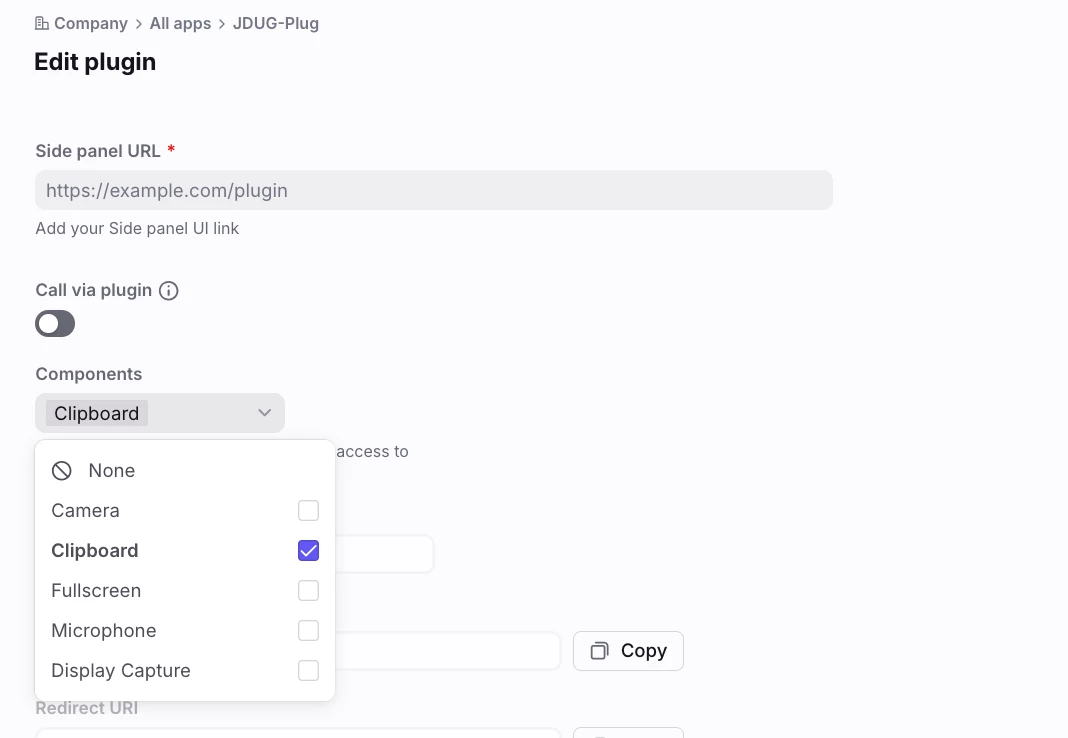
 

Best answer by Andy

If you want to allow clipboard permissions for a plugin, you'll need to enable it under the plugin settings:


To get to this screen:
  • Settings > Company > Integrations: Developers
  • Under All apps select the plugin that you want to have clipboard access
  • Click the Features tab
  • Click Edit sidebar plugin
 

3 replies

Andy
Forum|alt.badge.img+8
  • Fronteer
  • Answer
  • August 20, 2025
If you want to allow clipboard permissions for a plugin, you'll need to enable it under the plugin settings:


To get to this screen:
  • Settings > Company > Integrations: Developers
  • Under All apps select the plugin that you want to have clipboard access
  • Click the Features tab
  • Click Edit sidebar plugin
 

sdriver
  • Author
  • Conversationalist
  • August 25, 2025

Will this work in the front app as well? or just in the web client? Thank you!


Andy
Forum|alt.badge.img+8
  • Fronteer
  • August 26, 2025

This setting should be applied to your plug-in both versions of the app. 👍