

conniechen
Fronteer
November 25, 2025

Exploring an @mentions folder

  • November 25, 2025
  • 15 replies
  • 558 views

We want to better understand your needs around the mentions folder. And if you don’t find value in a mentions folder, that’s helpful to know too.

Before you take a look at the mock below, please answer these questions. I want your unbiased thoughts!

  1. How do you use @mentions today, as both the mentioner and the mentionee? Can you give a brief example?
  2. When you're deciding what to focus on in your inbox, what role does being mentioned play in your prioritization?
  3. Imagine you open the mentions section for the first time. What pieces of information would you need to see immediately to understand what it is and what you need to do next?
  4. If this mentions section worked perfectly, what would it help you accomplish? Alternatively, what problems would it solve for you today?
  5. Let's say you are mentioned in a single conversation five different times over the course of an hour. What would you need to see in a mentions section to efficiently deal with those five mentions?

Feel free to mention anything else as well.


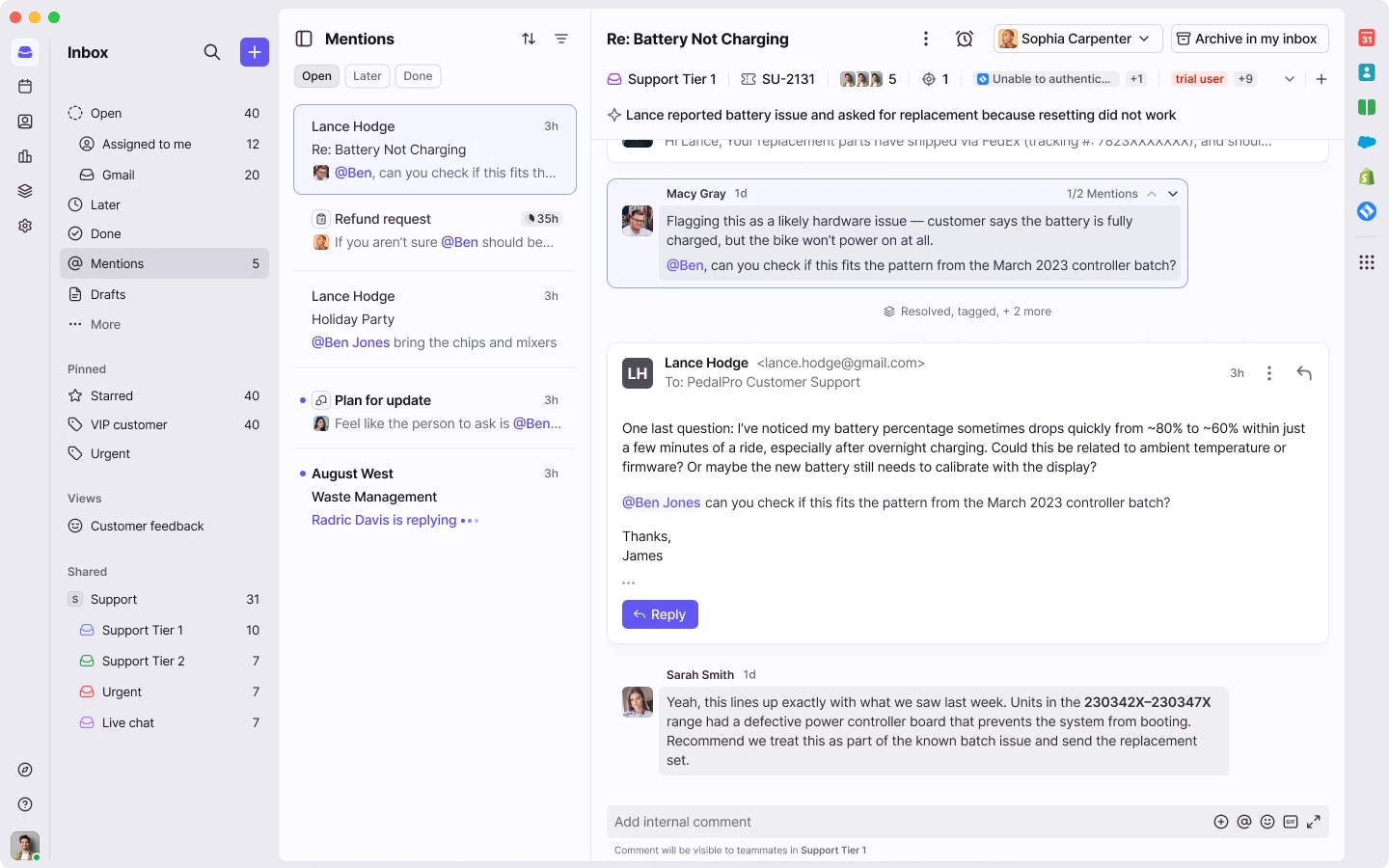
Now here’s the mock - what do you think of this treatment of multiple mentions in the same conversation?
 

Thanks, looking forward to your feedback!

    15 replies

    rmace
    Conversationalist
    November 25, 2025

    How do you use @mentions today, as both the mentioner and the mentionee? Can you give a brief example?

    We use them mostly within our workspaces to communicate with direct team members. Our internal support team also asks users to tag us so we gain access to view conversations within other workspaces we're not normally a member of. 

    When you're deciding what to focus on in your inbox, what role does being mentioned play in your prioritization?

    I don't use mentions specifically. I use my inbox and snooze to manage things. I may choose to snooze a message I was mentioned in for follow up, but I don't use the mention itself for anything. For items that will take longer I use a tag to keep those on my radar. 

    Imagine you open the mentions section for the first time. What pieces of information would you need to see immediately to understand what it is and what you need to do next?

    I think seeing the last mention in the conversation, and a clear indication of what inbox the message is in would be helpful. 

    If this mentions section worked perfectly, what would it help you accomplish? Alternatively, what problems would it solve for you today?

    I would personally only use a mentions section to look up past mentions when I can't find a conversation, but recall that I was mentioned in it. 

    Let's say you are mentioned in a single conversation five different times over the course of an hour. What would you need to see in a mentions section to efficiently deal with those five mentions?

    Personally, the last mention would be the main thing I'd need. 


    Regarding the mock up, I'm not sure I understand the purpose or intended use case. Seeing the mentions stacked isn't as helpful as seeing them in the flow of the conversation, IMO. Maybe I'm missing the point though. Lol

    conniechen
    Fronteer
    November 25, 2025

    Regarding the mock up, I'm not sure I understand the purpose or intended use case. Seeing the mentions stacked isn't as helpful as seeing them in the flow of the conversation, IMO. Maybe I'm missing the point though. Lol

    Ah, let me provide a bit more context. In this mockup, we’re just showing a case where you happen to be mentioned in a comment and an email. This is just a regular conversation thread! I’m more interested in your thoughts on the blue box around the comment mention.

    Product @ Front
    rmace
    Conversationalist
    November 26, 2025

    Regarding the mock up, I'm not sure I understand the purpose or intended use case. Seeing the mentions stacked isn't as helpful as seeing them in the flow of the conversation, IMO. Maybe I'm missing the point though. Lol

    Ah, let me provide a bit more context. In this mockup, we’re just showing a case where you happen to be mentioned in a comment and an email. This is just a regular conversation thread! I’m more interested in your thoughts on the blue box around the comment mention.

    I was confused by the 1/2 mentions in the upper right of the blue box. Is it aggregating mentions? If I'm not mistaken doesn't an at mention in an email just add you as a recipient now? I'm not seeing the connection between the mention in the email vs the internal comment mention. 

    conniechen
    Fronteer
    November 26, 2025

    @rmace Yes, it is aggregating mentions. The 1 of 2 is meant to show you that you are mentioned twice in this conversation, once in a comment and once in an email. One of the use cases for mentions in emails is to draw your attention to an action or something you need to do, so this aggregation experience would encompass both comment and email mentions.

    Product @ Front
    rmace
    Conversationalist
    November 26, 2025

    @rmace Yes, it is aggregating mentions. The 1 of 2 is meant to show you that you are mentioned twice in this conversation, once in a comment and once in an email. One of the use cases for mentions in emails is to draw your attention to an action or something you need to do, so this aggregation experience would encompass both comment and email mentions.

    I can definitely see where that would be helpful to some. We don't currently use mentions in that way so I'm not sure how we'd possibly be able to incorporate it. Always nice to have new ways to explore though!

    anthonyv
    Conversationalist
    November 26, 2025

    @conniechen 
    I personally do not think the segregation of @mentions into a separate folder is an ideal design.

    In my view the “Open” inbox should contain all items that require attention, and to remove @mentions out is to suggest that they are of lower importance. Often with @mentions there is a team member that is liaising with a customer that is seeking input or guidance from another team member. So to me they are of equal importance to attend to as personally received or assigned conversations.

    It would also remove the utility of the “hide sidebar” feature, as you would not see the @mentions come in at all unless you expand the sidebar and look for them.

    To your other questions see below response:
     

    1. @mentions are used for cross collaboration across team members in solving messages from customers. This can be for action required by another team member to progress the enquiry, seeking input/guidance, reviewing draft emails, and FYIs
    2. To me they are of equal weight/importance as other messages (per my comment above). If my inbox is under control I will just leave on the Open tab and attend to enquires as they come in. At times when I am behind, I might filter my view by @mentions and attend to these in bulk (as they are often of a similar theme)
    3. When you open the @mention section for the first time, normally there are 2 things you are looking for: the comment; the context. This is a scenario where I think AI summaries are actually useful because the context is not clear without reading the chain. Appreciate that this can get messy when messages and comments pile up and it can be difficult to identify where you need to come into the conversation. 
    4. I think the current @mentions is a reasonably strong feature, so do not believe it requires major overhaul. I think the weakness in @mentions is that people tend to stay subscribed longer than they need, and end up drowning in excessive conversations. Perhaps modifying the Archive button to give the option of “Archive and “Unsubscribe” or “Archive and stay Subscribed” would encourage users to take the most appropriate course of action at the time they are Archiving (similar to how you have Send, Send and Snooze, Send and Archive). 
    5. Ideally I want to come in at the first “unread” @mention, so I can work my way down from there (rather then the last @mention). This way you can get the context from above, and then understand the development moving down. Ideally this is dynamic and if a conversation is re-opened in your Subscribed by new Activity (once it has been archived/snoozed) then it takes you to the newest @mention for the reopen.

    In terms of general feedback about the “outlined” box and the counter, I think these are both good improvements.
     

    Kirsten
    Conversationalist
    November 26, 2025

    I like the idea of having a Mentions folder. If I archive a thread I am mentioned in, I have trouble finding it again. If they are in a folder, I can look at “done” and better find what I need.

    When I am mentioned in a thread, I prioritize this, as it is used by my team when they need my eyes on something, they are asking how to proceed, or needing me to step in as an escalation.

    grit_evy
    Conversationalist
    November 26, 2025

    We operate in a high-volume, fast-paced environment, and @mentions are one of the most critical ways we communicate internally. Right now, the only options available are either relying on an unstable workaround or requiring users to manually apply filters in the Subscribed section every time they need to check for @mentions. Neither approach is feasible, the workaround is inconsistent, and filters reset after app refreshes or device changes. This creates unnecessary friction and significantly increases the risk of missing time-sensitive communication.

    A dedicated Mentions section would eliminate these issues entirely by giving our team a consistent, reliable way to see and respond to @mentions in real time.


    How do you use @mentions today, as both the mentioner and the mentionee? Can you give a brief example?

    @mentions are our real-time communication channel for internal support, escalations, and quick updates. A quick simple example If someone needs technical help, they’ll @mention my team directly in a thread, and we do the same when we need another team to take action or when an issue is resolved.

    Because we work out of Shared Workspaces, where our rules for tagging, archiving, and routing function correctly, the Subscribed section ends up filled with duplicate conversations from all 50+ shared inboxes. The only conversations we actually need to see there are @mentions.

    To make @mentions visible, we created a workaround using user-specific tags and a rule that applies the tag whenever someone is mentioned. Team members then filter their Open or Subscribed view by their tag. This worked for a while, but it has become unreliable: tags don’t always apply, unrelated messages show up in filtered views, and filters reset when the app refreshes or when switching devices.

    When you're deciding what to focus on in your inbox, what role does being mentioned play in your prioritization?

    @mentions are the highest priority in the Subscribed section. Everything else there is already visible and managed within our shared inboxes, so an @mention is the only indicator that someone specifically needs our attention. Missing one directly impacts our ability to respond quickly or escalate an issue.

    Imagine you open the mentions section for the first time. What pieces of information would you need to see immediately to understand what it is and what you need to do next?

    • A list of conversations where I’ve been @mentioned.

    • A detail pane showing the thread with the mention highlighted.

    • An Open / Archived tab 

    • Ability to archive that’s independent of the original inbox’s status, similar to how the Open Subscribed section works today.

    • The ability to respond directly and archive the mention once completed.

    This layout would match other Front folders and make the section immediately intuitive.

    If this mentions section worked perfectly, what would it help you accomplish? Alternatively, what problems would it solve for you today?

    A dedicated Mentions section would eliminate all of the inefficiencies caused by our current workaround. It would:

    • Allow us to instantly see @mentions without applying filters or scrolling through hundreds of unrelated conversations.

    • Reduce the risk of missed communication, especially during high-volume periods.

    • Remove our reliance on tag-based rules, which are inconsistent and sometimes fail.

    • Provide a clean, reliable space to respond to and complete mention-related tasks.

    • Eliminate the noise created by duplicate conversations in Subscribed

    Our workflows today rely heavily on speed and clarity. A functioning Mentions section would restore both.

    Let's say you are mentioned in a single conversation five different times over the course of an hour. What would you need to see in a mentions section to efficiently deal with those five mentions?

    Ideally, I would see the conversation only once in the Mentions section. If I archive it after the first mention and get tagged again later, the conversation should reopen automatically and appear again with a new indicator showing additional mentions.

    what do you think of this treatment of multiple mentions in the same conversation?

    I really like the mock that displays a “1 out of X mentions” format — that’s a clean, simple, and intuitive way to show multiple mentions within the same conversation without cluttering the list.

    ericfrisch
    Conversationalist
    November 26, 2025
    1. How do you use @mentions today, as both the mentioner and the mentionee? Can you give a brief example?
      On our team, mentions are primarily used for internal collaboration prior to the response to a customer. Being able to keep all of the conversation within the thread ensures that we can get input from all of the necessary voices while keeping all of the context together. At this time, our team does not use the standalone discussion feature - mentions are always within the context of a customer-facing email thread.
       
    2. When you're deciding what to focus on in your inbox, what role does being mentioned play in your prioritization?
      I treat mentions in the same way I do any other message in my inbox. I appreciate seeing all of the conversations I’m involved in (whether internal or external) in one location. From there, I can triage everything and respond/archive/snooze accordingly. 
       
    3. Imagine you open the mentions section for the first time. What pieces of information would you need to see immediately to understand what it is and what you need to do next?
      Personally, I don’t see much use for a dedicated mentions area. I like having everything together.
       
    4. If this mentions section worked perfectly, what would it help you accomplish? Alternatively, what problems would it solve for you today?
      See #3
       
    5. Let's say you are mentioned in a single conversation five different times over the course of an hour. What would you need to see in a mentions section to efficiently deal with those five mentions?
      Knowing that I’ve been mentioned in the conversation is enough for me. Just like any other conversation in Front, I know that there may have been multiple messages exchanged since the last time I viewed the conversation.
    alexis.gwynn
    Conversationalist
    November 26, 2025

    Thanks for the opportunity to share feedback—here’s how my team and I use mentions day to day, and what would make the experience even more useful:

    1. How we use @mentions (as mentioner + mentionee):
    We’re a small team of 3, so staying async is essential. Mentions help us:

    • Hand off context when someone’s away (e.g., lunch or OOO)

    • Flag when a specific teammate needs to take action, review something, or just stay in the loop

    • Collaborate on drafts—@mentioning a manager for final approval or a teammate for a second set of eyes before sending a client response
      They keep us from needing to jump on calls or huddles just to get aligned.

    2. How mentions influence prioritization:
    Mentions cut through the noise—they usually signal something needs input, review, or signoff. They're not always urgent, but they are always directional.

    3. If I opened the mentions tab for the first time, I’d want to see:

    • Who mentioned me, when, and in what context

    • A preview of the message that includes my name

    • Whether it’s something I need to act on or just be aware of

    • Whether I’ve already seen it

    4. If this worked perfectly, it would:

    • Let me triage what needs my eyes vs. what doesn’t

    • Keep async workflows moving without Slack follow-ups or Zoom check-ins

    • Give me clarity on what’s new or still waiting on me

    5. If I’m mentioned 5x in the same thread:
    Ideally, I’d see a single grouped view, with a brief summary or timeline of each mention (hover or expandable). That helps me avoid rereading the entire thread and lets me focus on what changed since my last check-in.

    On the mock:
    Love the direction. Grouping is great, and I’d love to see:

    • Actionable vs. FYI mentions visually differentiated

    • A way to mark as “handled” without needing to respond

    • Filters for unread or unresolved mentions