

Increasing tag and app object visibility in the message header

  • November 12, 2025
  • 21 replies
  • 488 views

conniechen
Forum|alt.badge.img+5

One of the big pieces of feedback we heard was the need to see more tags and app objects in the message header. We’re exploring ways to give you easy access to that information when you need it, while retaining a clean and polished experience when you don’t. 


➡ Try out the prototype here! ⬅
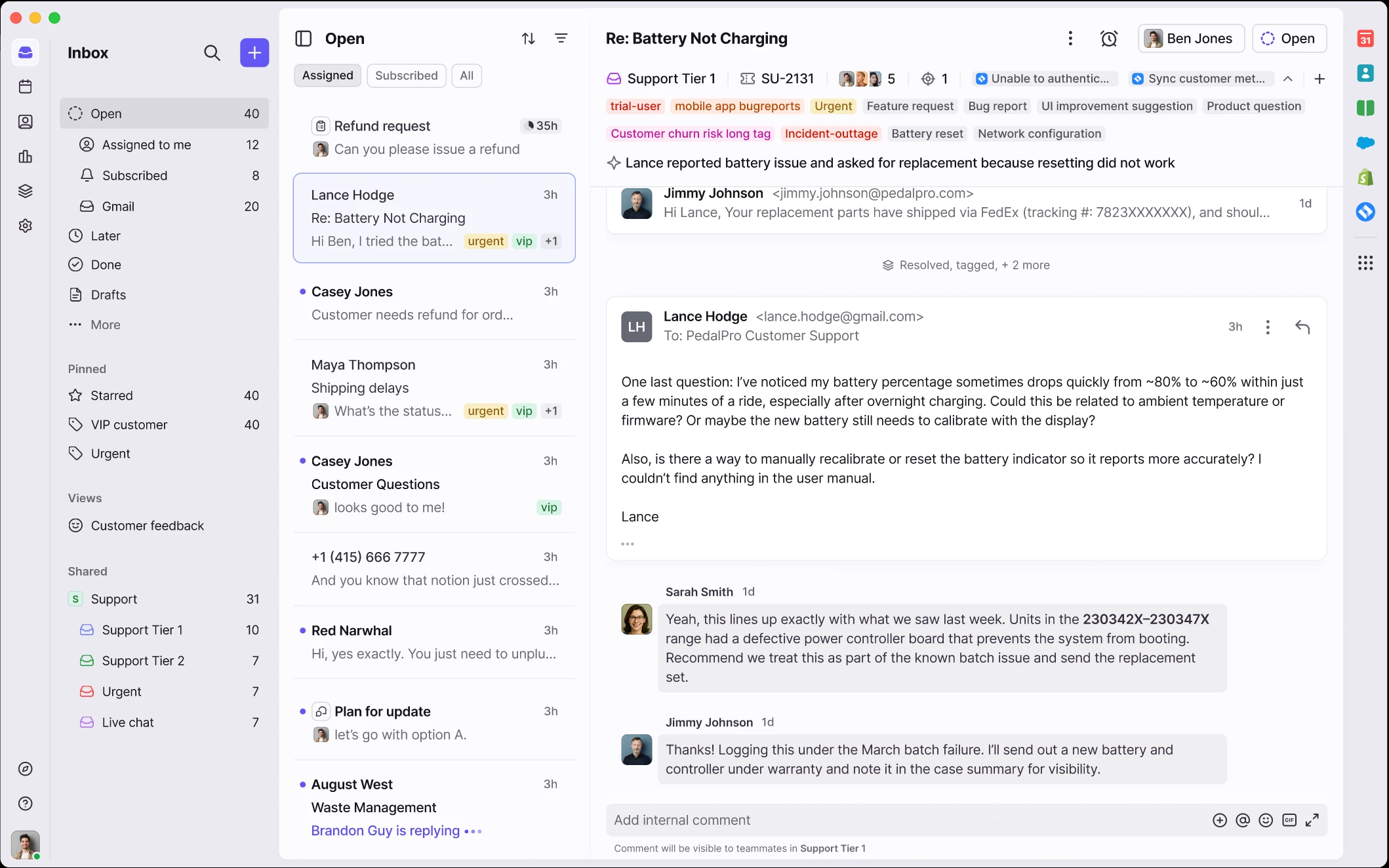


As you’re exploring the prototype, I’m curious to know:

  • How do you currently use the data from tags to make decisions or identify trends?
  • Do you have different types of tags (e.g. issue type, product area, customer health)? If so, how do you organize and manage these to be most useful for you or your team?

Thanks, and looking forward to your reactions and feedback!

21 replies

alexis.gwynn
  • Conversationalist
  • November 13, 2025

So excited for this one! This will definitely help my team with visibility on the total issue as well as identify old tags we need to remove or delete that are no longer being used. 


kia_slade
Forum|alt.badge.img+2
  • Conversationalist
  • November 13, 2025

This is the one my team has said over and over they want back. the visibility lets them remove tags that shouldn't be there anymore as well as see important things since we have no control over the order of the tags. 


christina_bishop

We have two specific categories of tags that are required on all conversations.  One is for the sales region/territory, so we can monitor workload for each of the teams and we use that to make decisions on hiring or moving people to different regions.  The second is a disposition tag, so we can see what the workload is (i.e. was it a PO, an RFQ, or some other traditional CS task), with this we look for opportunities to improve the resolution of repeat requests (what is my password, what is my tracking number).


grit_evy
Forum|alt.badge.img+4
  • Conversationalist
  • November 13, 2025

How do you currently use the data from tags to make decisions or identify trends?
We heavily rely on tags to categorize conversations and extract meaningful metrics and KPIs. For example, we track new business (quotes vs. sold), current customers (scheduling vs. information requests), and other key segments that help us monitor trends and performance. Tags also play a big role in automation, we use them to trigger rules that automatically tag or archive conversations. Additionally, our customer team uses tags as visual flags to identify priority levels, while our leadership team reviews tag data to spot coaching opportunities and internal performance trends.

Do you have different types of tags? How do you organize and manage them?
Yes, we have both company-wide and workspace-specific tags.

  • Company-wide tags are standardized across all workspaces and are mainly used for internal purposes such as IT, coaching, and certain workarounds (like our workaround for @mentions).

  • Workspace-level tags are used for metrics, KPIs, and automation. Each workspace follows a prefix naming convention to keep tags organized and easily identifiable within their respective areas.


anthonyv
Forum|alt.badge.img+1
  • Conversationalist
  • November 13, 2025

We also use tags extensively. Both customer/enquiry related tags, as well as internal tags to assist staff know which branch and databases the customer relates to. This would help us immensely as the current reduction in tag visibility has not assisted us at all.

Agree the need to balance both practical needs as well as reducing clutter and noise, so I am okay with the collapsable option as a middle ground.  Ideally for each user it would dynamically retain their setting over time (so if they expand then all subsequent conversations clicked into default expand, and if they collapse it reverts all subsequent conversations that they click into to be collapsed)


anthonyv
Forum|alt.badge.img+1
  • Conversationalist
  • November 13, 2025

Another suggestion on managing the visibility of tags, could be to include an option for each Tag to make them “always visible” or “priority”. Some tags are critical and others are nice to have, but want can happen currently is that the order of the tags (and which ones display and which are hidden) is somewhat random or based on when the tag was first added.
This could be improved by allowing the Admins/Users to identify those tags which are most important, so that they always appear first in the collapsed display view


conniechen
Forum|alt.badge.img+5
  • Author
  • Fronteer
  • November 14, 2025

@anthonyv The behavior you described is exactly how we imagine this feature working. If the user chooses to expand the tags, that preference will be retained across other conversations. 

Regarding tag visibility, we do have the option to “show in conversation list” on each tag, which will prioritize those tags in your conversation list and within the conversation header. Have you used this setting before?


anthonyv
Forum|alt.badge.img+1
  • Conversationalist
  • November 14, 2025

@conniechen thanks. Yes we use this already - we must just be hitting the current limit in the conversation view which means not all of them display. Glad to know that the preference will be retained across conversations - sounds like a winner


Kim P
Forum|alt.badge.img+1
  • Conversationalist
  • November 14, 2025

This is great to hear. What is the timeline for this feature to go live?

We use tags extensively and it has been a productivity hit to have to click to see the tags. It’s also lead to the team missing things while scrolling through the inbox. 

  • How do you currently use the data from tags to make decisions or identify trends? » We have a more collaborative work approach and many times tasks may require more than one person. Because of that we don’t use the assign feature within Front. Instead each team member has a tag (some more than one) and we have action tags. Some tags are manually applied while others are added by rules. We also use task for lifecycle and process management. 
  • Do you have different types of tags (e.g. issue type, product area, customer health)? If so, how do you organize and manage these to be most useful for you or your team?» Yes. We have a library of tasks. We have an internal communication guide that explains the use. Depending on role/tasks team members set up pinned tasks and views. 

conniechen
Forum|alt.badge.img+5
  • Author
  • Fronteer
  • November 14, 2025

@Kim P we’ll start to roll these features out in the next month. Expect to see the option to opt-in in the coming weeks. Thanks for the feedback!


robinshih
  • Conversationalist
  • November 14, 2025

We rely heavily on tags as well, but where we would see the most value is in improving the visibility of objects when appending them to conversations. Our Front setup pulls data from our internal database via API and displays those details on the relevant conversations. We automatically apply these objects based on email context, and in the current version, the expanded list is extremely tedious to scroll through. Enhancing the header layout would be a significant improvement for our workflow.


Margaret
Forum|alt.badge.img+1
  • Conversationalist
  • November 17, 2025

This is the number one issue raised by our team. Tags are added as we go thru our work flow. The team have started deleting and re-creating Tags just so they can get them in an order where they can see the two most recent ones. This is time consuming and very inefficient.


Margaret
Forum|alt.badge.img+1
  • Conversationalist
  • November 18, 2025

We use the Tags at every stage in the process and have tags for:-


  1. If it’s urgent
  2. The year the rental relates to e.g. 2025, 2026, 2027
  3. The month the rental relates to e.g Jan, Feb, Mar
  4. Discount code if applicable
  5. The part of the world the customer is from e.g UK, EU, RoW
  6. The member of staff taking the lead
  7. If it’s an out of hours pick up
  8. If it’s confirmed
  9. If it’s a complaint


At the beginning of the process 1, 2 and 3 are important but as you progress the later ones become the focus. Hope this helps.


kia_slade
Forum|alt.badge.img+2
  • Conversationalist
  • November 18, 2025
  • How do you currently use the data from tags to make decisions or identify trends?
    • Each dept uses tags according to what they need so in some use cases its to determine revenue and others its to determine urgency
  • Do you have different types of tags (e.g. issue type, product area, customer health)? If so, how do you organize and manage these to be most useful for you or your team?
    • I work in 2 separate workspaces who use tags differently. In the logistics one its used to determine where it is in shipment, its urgency and deliverables. In Customer support we have big tags and subtags so things can be tracks from clients, to system errors, payment issues, privacy policy inquires, to needing review by someone senior after the triage person does their part. There is nothing in the inboxes that doesn't have at least 1 tag. Our rules tag every single email that is inbound before someone even sees it then additional ones are added by the person who gets assigned the email if its a round robin or who takes it from the inbox. 

Stevie
Forum|alt.badge.img
  • Conversationalist
  • November 18, 2025

The removal of being able to see all tags is a pain and seems a bit pointless as there’s more than enough space to show all tags. Why say +2 and force me to drill down further when previously I could see and reference all tags easily. 


sarah_wilder
  • Conversationalist
  • November 24, 2025

Another suggestion on managing the visibility of tags, could be to include an option for each Tag to make them “always visible” or “priority”. Some tags are critical and others are nice to have, but want can happen currently is that the order of the tags (and which ones display and which are hidden) is somewhat random or based on when the tag was first added.
This could be improved by allowing the Admins/Users to identify those tags which are most important, so that they always appear first in the collapsed display view

YES this would be a HUGELY helpful feature for us. There are tags that we need for tracking purposes but are not important for the day-to-day, and other much higher priority tags that my team needs to see for prioritizing their tasks day-to-day.


conniechen
Forum|alt.badge.img+5
  • Author
  • Fronteer
  • November 25, 2025

@sarah_wilder and ​@Margaret It sounds like both of you are pointing out the same problem with tags today, that there’s not an easy way to manage in what order tags are displayed. It also seems like the “Show in conversation list” setting is not meeting your needs either. Is that an accurate assumption?


Stevie
Forum|alt.badge.img
  • Conversationalist
  • November 25, 2025


@sarah_wilder and ​@Margaret It sounds like both of you are pointing out the same problem with tags today, that there’s not an easy way to manage in what order tags are displayed. It also seems like the “Show in conversation list” setting is not meeting your needs either. Is that an accurate assumption?


Hi Connie,

Is there any way just to show all tags as per my comment above? 

Thanks
Steve


conniechen
Forum|alt.badge.img+5
  • Author
  • Fronteer
  • November 25, 2025

@Stevie Yes, with this release we will also be addressing your feedback!


kia_slade
Forum|alt.badge.img+2
  • Conversationalist
  • November 25, 2025

I’ve gotten the 5th “oops, i didn't see the tag that mean i wasn't supposed to do the thing i did” message this month because of the lack of tag visibility. There’s a tag that supersedes others but because tag are alphabetical in some cases this tag is the 4th or 5th one seen. The other tags are just as important so removing them so the most important one is visible isn't a viable solution.  Show in conversation list doesn't show enough tags either. 


conniechen
Forum|alt.badge.img+5
  • Author
  • Fronteer
  • November 25, 2025

@kia_slade Hear you on that. We’ll be releasing this feature to beta in a couple days. I’d love for you and your team to try it out and see if it addresses your needs adequately.