

App Request Nodes Are Now in the Macro Flow Builder!
We're thrilled to announce a major improvement to how you build macros with Connectors: app request nodes are now available in your flow builder. No more hunting through dynamic variable menus or trying to figure out where to nest your app requests inside action nodes. You can now drop an app request directly into your macro flow by clicking the plus (+) sign and selecting "Send app request"—just like any other node. This makes building Connector-powered workflows far more visual and intuitive.
View the docs for step-by-step instructions!
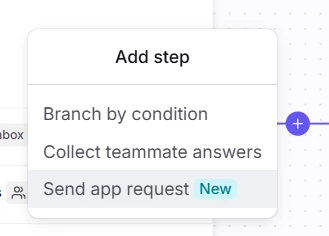
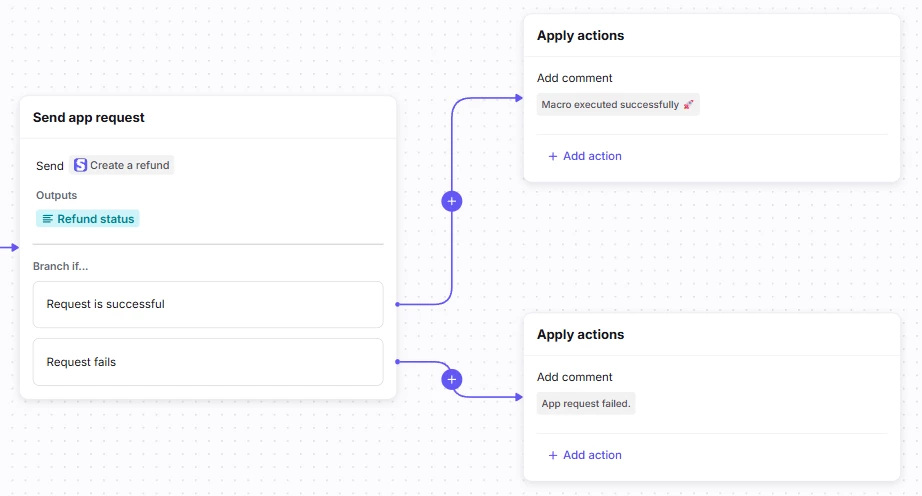
Each app request node comes with built-in success and failure paths, so you can immediately see how your workflow branches based on the request outcome. Want to chain multiple requests together? Send a success message to your teammates? Branch based on output values? You can now build these flows exactly how you envision them, with complete flexibility. Plus, your app request outputs automatically become dynamic variables that you can use anywhere downstream in your macro—no manual setup required.
This update removes the old restrictions on where nodes could live in your macros, giving you the freedom to design workflows that match your actual business processes. Whether you're building a simple refund flow or a complex multi-step integration that collects teammate input, calls multiple APIs, and branches on response data, the flow builder now gives you the visual clarity and flexibility to make it happen. Head to your macros and start building—your Connectors just got superpowers!