

Feature

Stay connected and visible by tagging contacts with @mentions in emails
  • November 5, 2025
  • 5 replies
  • 252 views
helena
Forum|alt.badge.img+6

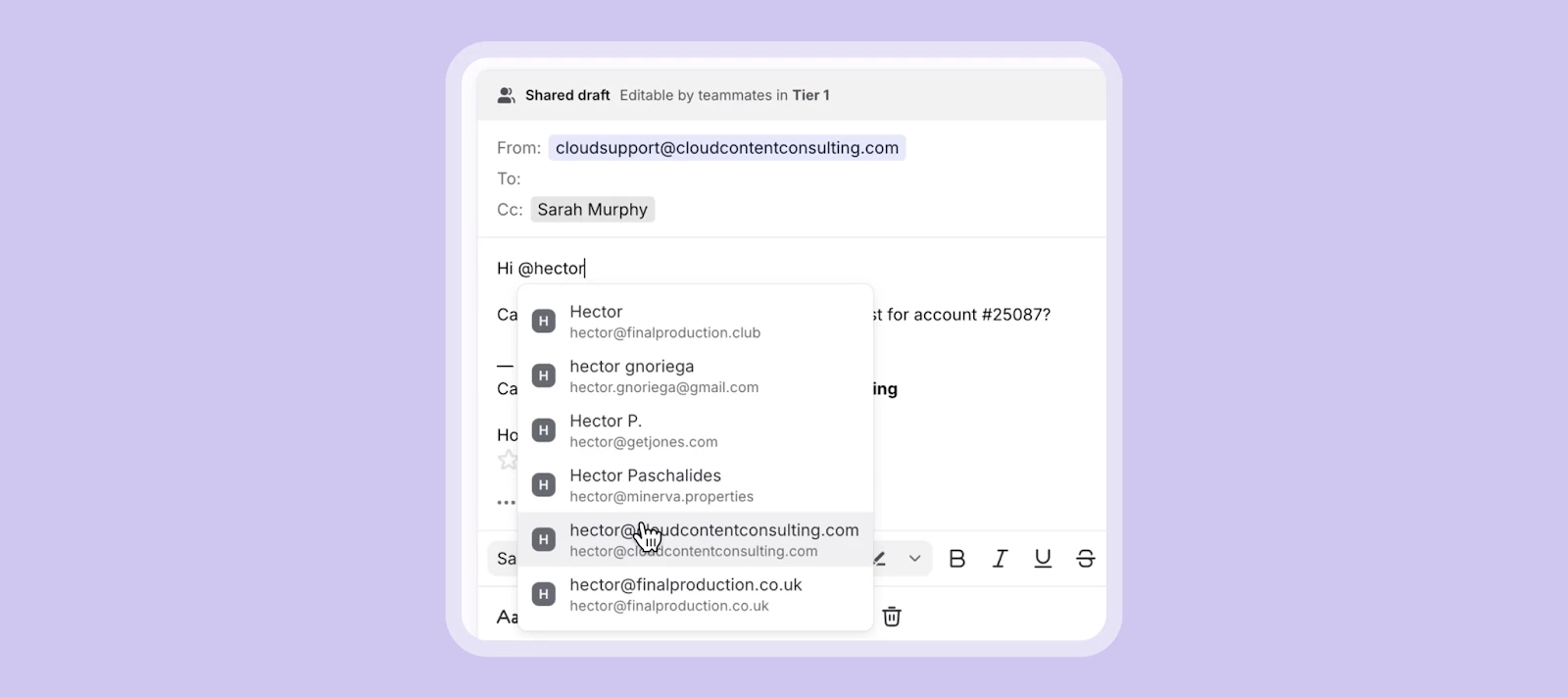
You can now @mention contacts in the email body to boost visibility and ensure the right people are included automatically. Simply type “@” and a contact’s name and select from the list of contacts that appear. They will also be added directly to the sender field so you can ensure the right contacts receive the right message. See a 30-second demo:


This was a popular request! Share your feedback with us by replying to this post.


5 replies

soulsby
Forum|alt.badge.img+1
  • Conversationalist
  • November 26, 2025

Love this! This was one of the only features I missed when shifting from Outlook.

One feature that would be nice is to limit this to contacts at a certain domain, ie. your own workplace. I would generally only ever mention/add people within my company, so would prefer to disallow this for other contacts to avoid the risk of a random contact accidentally being looped into an internal email.


helena
Forum|alt.badge.img+6
  • Author
  • Community Manager
  • November 26, 2025

Hi ​@soulsby! Glad to hear you’re excited about this feature. In response to your concern about accidentally adding in external people, this prevention has already been built into the feature in a few ways:

  1. You have to first type the @ symbol to trigger the mention, so in most cases it would be a deliberate decision.
  2. However, if you do accidentally type @ to trigger the feature, you still then have to select a contact’s name from a dropdown menu in order to confirm the person you want to mention, so it will be another intentional action.
  3. After you select the person’s name, their name becomes blue and bolded in the email so it will be another visual indicator.

We agree that we wouldn’t want to enable easily adding people into threads, so we’ve taken steps to prevent it! 


soulsby
Forum|alt.badge.img+1
  • Conversationalist
  • November 26, 2025

Thanks Helena. I’m aware of all those features, but I still see it as quite a risk that the wrong person can accidentally be tagged. Eg. I am trying to mention @claudia.smith but there is another random contact called @cladia.slade. I type the name, press tab to accept the contact and send the email, not realizing that I have tagged the wrong contact. Given that we run a contact centre and interact with 100s of thousands of contacts per year, finding the correct internal contact becomes tricky as often the first suggestion is a random customer rather than a colleague. If you could limit the feature to only email addresses at a certain domain, it would be very helpful in our case.


helena
Forum|alt.badge.img+6
  • Author
  • Community Manager
  • November 27, 2025

@soulsby Understood! I’ll pass this feedback over to our product team so they’re aware, and if you have the time would be great to get it submitted from you into our Ideas board as well, as that’s how our product team formally tracks feedback from users.


conniechen
Forum|alt.badge.img+5
  • Fronteer
  • December 3, 2025

@soulsby Thanks for the feedback, Cam! That’s a fair point, and thanks for illustrating with an example. I’ll make a note of this in our backlog.