

Early access: Build branching rules with AI
Hey everyone 👋
We're opening up early access to something I've been really excited about: Build with AI for branching rules.
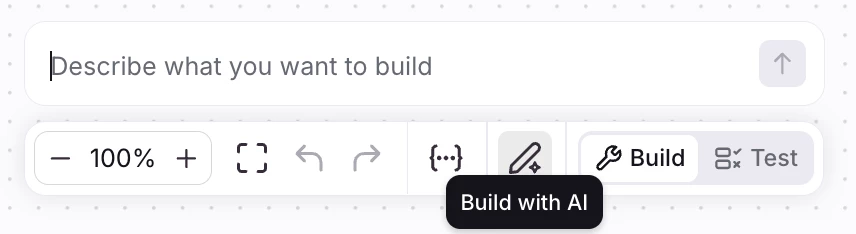
You'll now see an "Build with AI" button right inside the editor. Click it, describe what you want in plain English, and the rule gets built (or refined) for you. Similar to our other features, changes show up inline in the builder with a diff view, so you can see exactly what changed before you save. Undo/redo work the way you'd expect and nothing goes live until you hit save.
A few example prompts we've been testing:
- "When an inbound email with subject containing 'invoice', move it to the Billing inbox"!-->
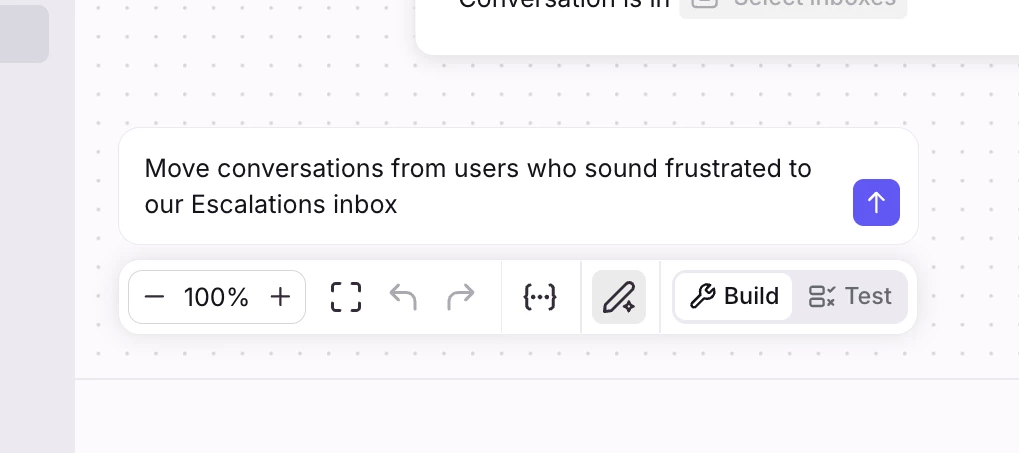
- "Move conversations from users who sound frustrated to our Escalations inbox" (this one uses an AI node under the hood)
It also works great for refining rules you already have like "also notify the on-call teammate", etc.
Want in?
We're hand-picking a small group of companies to get early access before we roll this out more broadly. If you'd like your team to be in that group, fill out this form by April 20th.
How we'd love to hear from you:
Once you're in, we'd really appreciate your feedback in one (or both!) of these ways:
- Reply in this thread: drop the prompts you tried, what worked, what didn't, screenshots of weird outputs, feature request anything. The more, the better.
- Book a call with our team: if you'd rather walk us through your use cases live, we'll be scheduling 30-min sessions with early users to dig in deeper. We'll share a booking link once you're given access.
This is genuinely one of the first real tests of our new "Build Mode" direction for Admin Copilot, so your feedback is going to directly shape where we take it next.
📍 To stay in the loop about all AI admin features, join our AI Admin beta group.