

Answer

Analytics API Issue ("Reply Time" Difference)

  • November 10, 2023
  • 3 replies
  • 93 views

abdur_siddiqui
Forum|alt.badge.img+1

Hi guys,


I am trying to fetch the average reply time between the dates Oct 29, 2023 and Nov 4, 2023 via API. I am using this Analytics API Endpoint “"https://api2.frontapp.com/analytics/reports"” to fetch the data point i.e. 4 h and 56 m (can be seen in the below attached image as well).
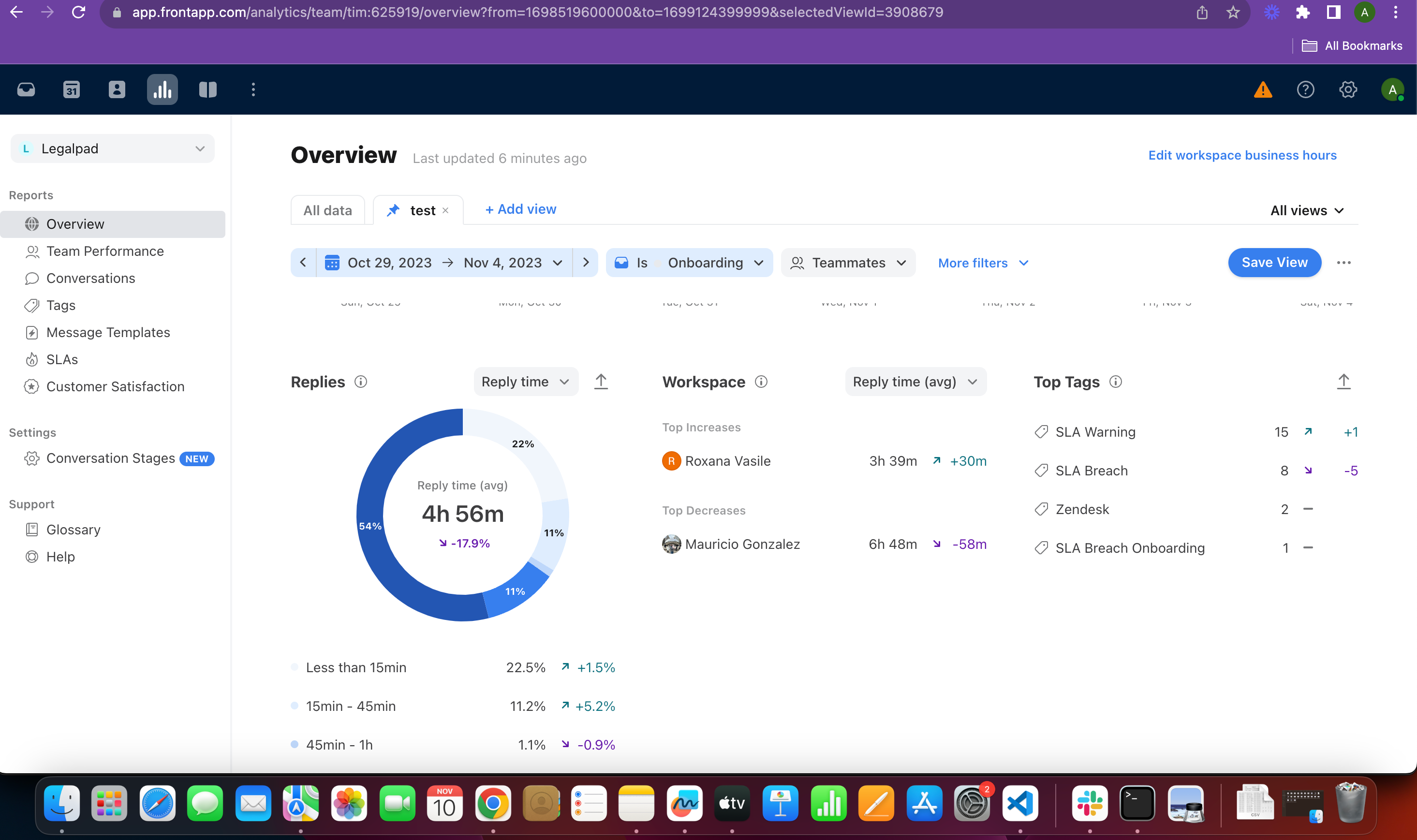
 

I am using below python code to fetch data:


import requests

import time


url = "https://api2.frontapp.com/analytics/reports"


payload = {

"filters": { "inbox_ids": ["<inbox ID>"]},

"start": 1698519600000 / 1000,

"end": 1699124399999 / 1000,

"metrics": ["avg_response_time"] # 29 Oct to 4 Nov 2023 | 18963.617021276597 Seconds | 5 hrs 16 mins | On front => 4 hrs 56 mins

}

headers = {

"accept": "application/json",

"content-type": "application/json",

"authorization": "Bearer <Token>"

}


response = requests.post(url, json=payload, headers=headers)

print("Process Initiating")

time.sleep(5)

print("avg_response_time")

print(response.json())


Upon response of above code I am getting “18963.617021276597” seconds metric (avg_response_time) value in JSON format.


“18963.617021276597” seconds = 5h 16 mins, which is different than 4 h and 56 m which was my target. So anyone can help me what I am doing wrong here. Also suggest if there is a better way of doing this.


Thanks.

Best answer by Support Engineering

Hi Abdur, thanks for your patience while we investigated here. It’s possible that this is an issue with timezones. If no timezone is specified we automatically set the time to be the start of the first day specified to the end of the last day specified, in other words etc/UTC. Can you please try fetching the analytics again only this time specifiying the correct timezone, which looks to be Asia/Karachi?

3 replies

Javier - Developer Relations
Forum|alt.badge.img+9

Hi @abdur_siddiqui 

I’ve moved this question to our Developer Q&A forum, where our Support Engineers will be able to help you


jason
Forum|alt.badge.img+8
  • Fronteer
  • November 14, 2023

Hi @abdur_siddiqui , It’s possible this is a Front bug - I’m looking into it, and will get back to you as we learn more


Forum|alt.badge.img+5

Hi Abdur, thanks for your patience while we investigated here. It’s possible that this is an issue with timezones. If no timezone is specified we automatically set the time to be the start of the first day specified to the end of the last day specified, in other words etc/UTC. Can you please try fetching the analytics again only this time specifiying the correct timezone, which looks to be Asia/Karachi?