Hi! I am in Logistics and am thinking of using the snooze button for appointment requests that have not gotten a reply in 24 hours - if the snooze times out and there has not been a reply, i would like to use AI to resend original email with “2nd request” added to the email. Have any of you used this function within Front before?
Solved
Snooze button for AI use

Best answer by PhoebeatFront
Hey
We don’t currently have a feature that allows AI to automatically send emails. We do have a feature called Copilot that suggests drafts, but these still need to be approved by a human.
For what you’re describing, I’d recommend setting up a rule/message template workflow.
For example, you could set up a generic message template that says you are following up.
Then, you could create a rule like this:
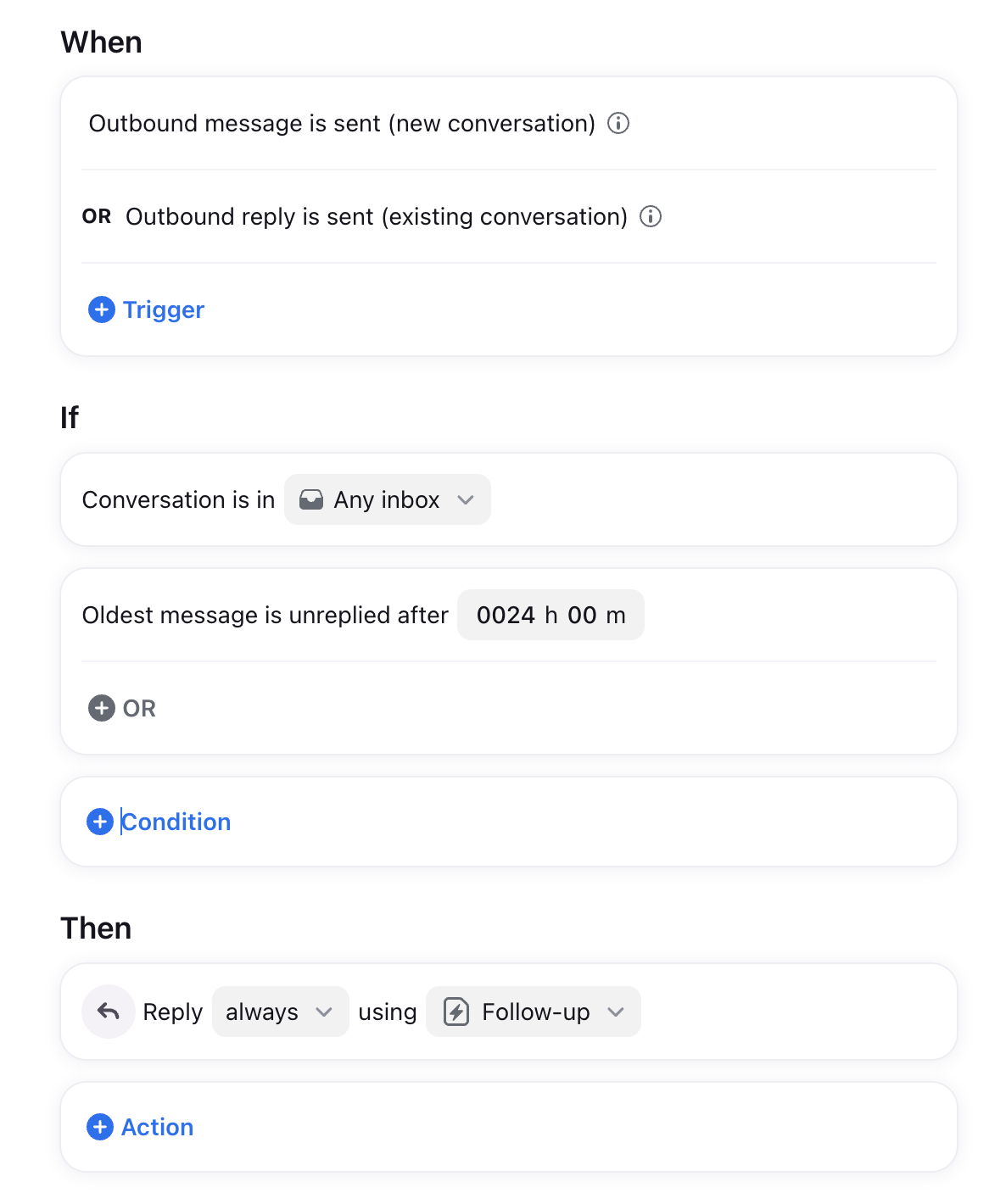
I highly recommend checking out our article here on rules, which would allow you to get fancier with it. You can also reach out to our Support team for help with configuring your specififc rule!


Login to the community
No account yet? Create an account
Use your Front credentials
Log in with Frontor
Enter your E-mail address. We'll send you an e-mail with instructions to reset your password.